
Kickserv Review
Kickserv is an affordable, easy-to-use field service management platform for small home-service businesses, covering scheduling, estimates, invoicing, payments and CRM, with standout QuickBooks integration and a free plan.
On this page
The verdict
Kickserv reviews rate it a strong, affordable all-rounder for small home-service businesses, with a 4.4 out of 5 from nearly 400 reviews. It covers scheduling, estimates, invoicing, payments and customer management in one easy, low-cost platform, and its standout is deep two-way QuickBooks integration (Online and Desktop) that syncs invoices and payments without double entry. Starting at 60 dollars a month for five users, with a free plan and a 30-day trial, it is genuinely budget-friendly. The honest catch is an aging mobile app that draws bug and crash complaints, especially on Android, plus limited offline use and reporting that is not always intuitive. For a small trade business that wants value and QuickBooks sync, Kickserv is a proven choice.
Kickserv at a glance
| Vendor | Kickserv (by EverCommerce) | Category | Field service management |
|---|---|---|---|
| Best for | budget-conscious small home-service businesses (1 to 20 users) | Starting price | Free to $199/mo |
| Free trial | Yes | Free plan | Yes |
| User rating | 4.4/5 (387 reviews) | Our score | 8.2/10 |
| Deployment | Cloud, iOS, Android | Founded | 2006 |
| Headquarters | Denver, CO | Users | Small home-service businesses |
See Kickserv in action
A quick look at the interface, so you know what you are getting before the trial.
What Kickserv does
The areas we lean on most in daily use, and how Kickserv handles each.
Scheduling & calendar
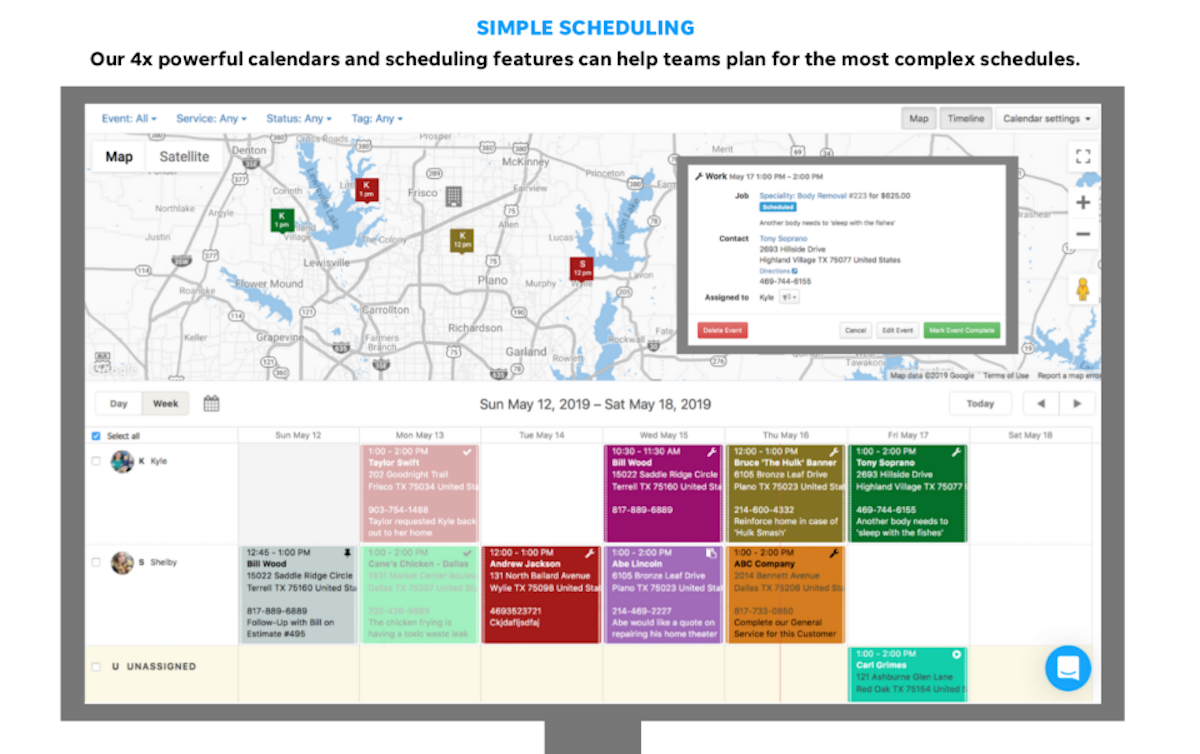
A drag-and-drop calendar with day, week and map views organises jobs and coordinates a small team.
Estimates & quotes
Build professional estimates, send them for online approval and convert won work straight into a job.
Invoicing & payments
Invoice from a completed job and take payment online through Stripe, with ACH and Tap to Pay.
Customer account center
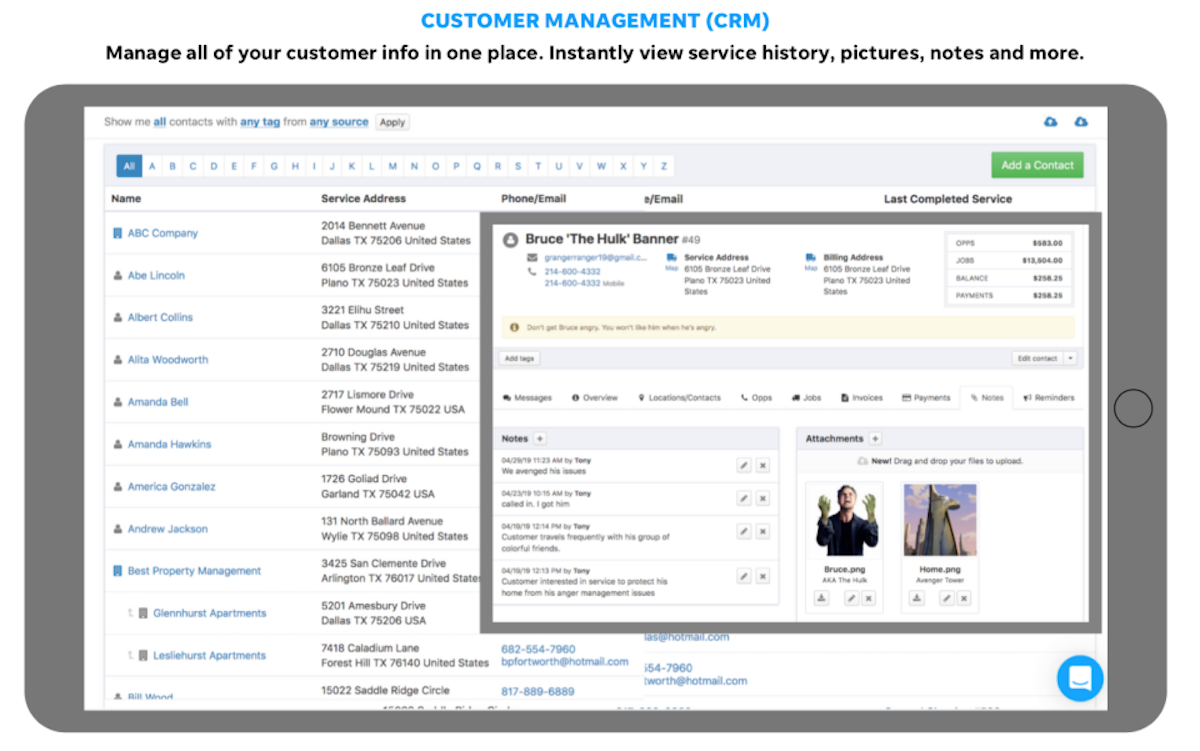
A client portal lets customers view service history, approve estimates and pay invoices online.
QuickBooks & Xero sync
Deep two-way integration with QuickBooks Online, QuickBooks Desktop and Xero keeps the books in sync without double entry.
Dispatch & GPS
Higher tiers add dispatch mapping and GPS check-ins so the office can see where crews are in the field.
Automated reminders
Automated email and text reminders cut no-shows and keep customers informed about upcoming work.
Time, expenses & reporting
Built-in time tracking, expense tracking and over 20 business reports support day-to-day operations.
How Kickserv works day to day
Kickserv is one of the most affordable all-round field service management tools for small home-service businesses, and it has quietly been doing the job for a long time. The product traces back to 2006 (originally ServiceSidekick, rebranded Kickserv in 2011), is based in Denver, and is now part of EverCommerce after a 2023 acquisition. Across Kickserv reviews the picture is consistent: a genuinely easy, low-cost platform that covers scheduling, estimates, invoicing and customer management well, held back by an aging mobile app and occasional instability.
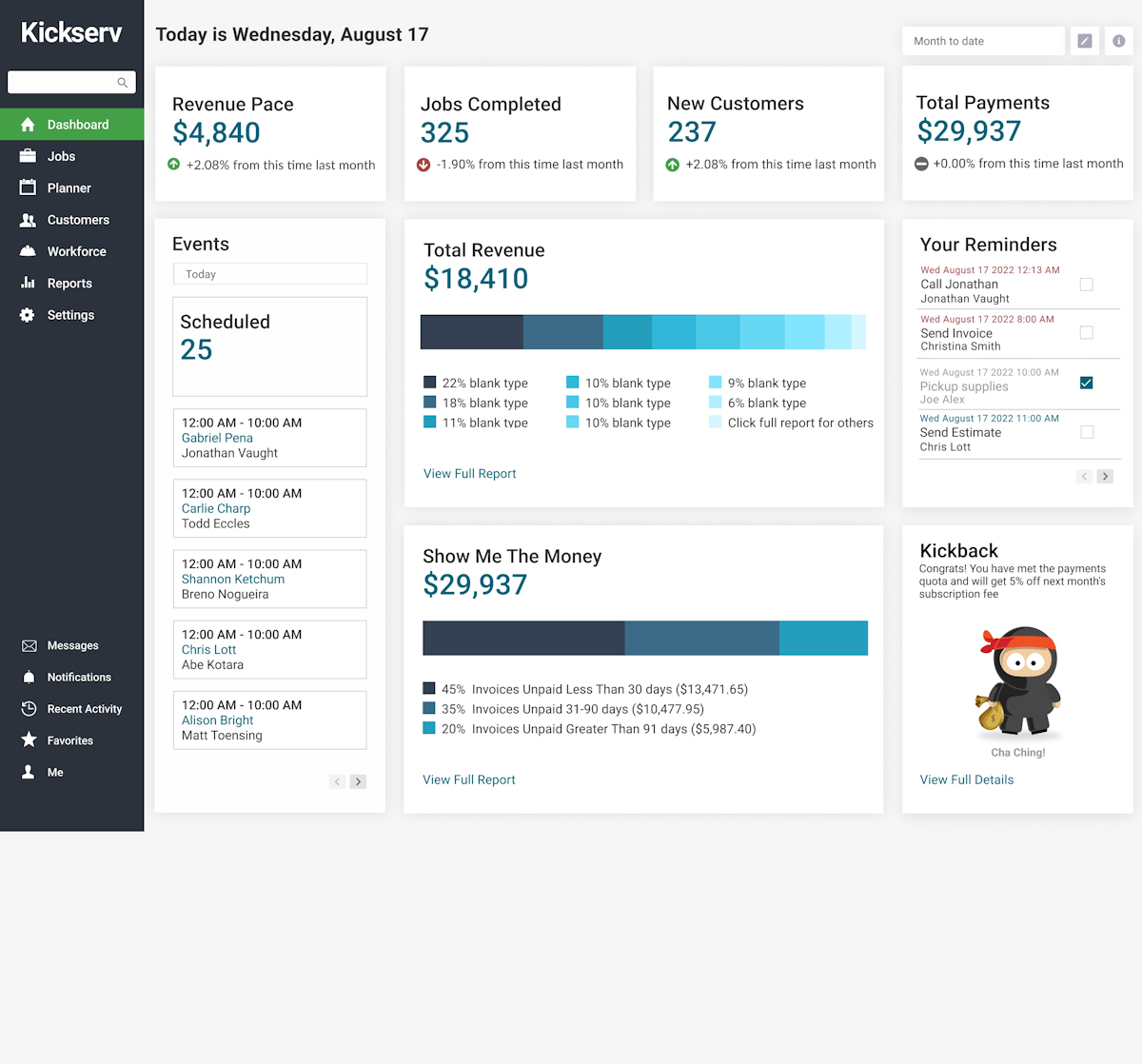
What draws small businesses in is value and simplicity. Kickserv starts at 60 dollars a month for five users, has a free plan and a 30-day free trial, and unlike per-seat rivals it bundles users into the plan. For a plumber, HVAC shop, cleaner or landscaper moving off paper, that low entry price plus a clean, drag-and-drop calendar and a friendly setup make it easy to adopt. The dashboard surfaces revenue, jobs and unpaid invoices at a glance, and there is even a Kickback rewards discount for businesses that process enough online payments.
The day-to-day workflow is solid. A job flows from lead to estimate to scheduled work to invoice and payment, with automated email and text reminders, time and expense tracking, and over 20 business reports. Higher tiers add dispatch mapping, GPS check-ins, custom fields and custom reports. The customer account center lets clients view service history, approve estimates and pay invoices online, and payments run through Stripe with ACH and Tap to Pay.
The accounting story is a real strength. Kickserv offers deep two-way QuickBooks integration, both Online and Desktop, plus Xero, so invoices and payments sync to the books without double entry. Reviewers who run QuickBooks consistently rate this as the feature that sold them, and it is a big reason Kickserv software keeps its 4.4 out of 5 rating for value.
The honest weak spots matter. The mobile app draws the most criticism, with reports of bugs and crashes, especially on Android, and limited offline use because the app is server-dependent. Reporting is powerful but not always intuitive, inventory management is thin, and a minority of reviewers report slow support responses even though most praise the support team. Kickserv is not the most modern or the most powerful FSM on the market.
Across Kickserv reviews the verdict is clear: for a small service business that wants an affordable, easy all-rounder with excellent QuickBooks sync, it is a strong, proven choice, backed by a 4.4 out of 5 from nearly 400 reviews. Larger operations, or any crew that lives in the mobile app, should weigh the mobile and stability complaints and trial it first, but for budget-conscious small trades, Kickserv earns its place.
Kickserv pros and cons
Pros
- Affordable: from $60/mo for five users, with a free plan and 30-day trial
- Easy to learn with a clean drag-and-drop scheduling calendar
- Deep two-way QuickBooks integration (Online and Desktop) plus Xero
- Full workflow: leads, estimates, invoicing, payments and CRM in one place
- Customer account center for online estimate approval and payment
- Responsive customer support praised by most reviewers
Cons
- Aging mobile app with reports of bugs and crashes, especially on Android
- Limited offline use: the app is server-dependent and needs a connection
- Reporting is powerful but not always intuitive
- Inventory management is thin
- A minority of reviewers report slow support response times
Who should use Kickserv, and who should skip it
A great fit if you
- You are a small home-service business of 1 to 20 users
- You run QuickBooks and want tight two-way accounting sync
- You want an affordable all-rounder without per-seat pricing
- You are moving off paper and want an easy setup and calendar
- You want a customer portal for online estimate approval and payment
Look elsewhere if you
- Your crew lives in the mobile app and needs it rock-solid (esp. Android)
- You need heavy inventory management
- You are a large operation that needs deep, enterprise reporting
- You need reliable offline access with poor connectivity
Is Kickserv right for your trade?
Kickserv is used across the main home-service trades. Here is how it fits each one, and what its reviews tend to say in that niche.
Kickserv for Plumbing
Plumbers use Kickserv for scheduling, on-site estimates, invoicing and QuickBooks sync; it is a common budget pick in plumbing software reviews.
Kickserv for HVAC
HVAC shops run dispatch, reminders and payments affordably, a fit its HVAC software reviews highlight for value.
Kickserv for Electrical
Electricians use quotes, the customer portal and accounting sync to run a small shop, a fit noted in electrical software reviews.
Kickserv for Carpet & cleaning
Cleaning and carpet-cleaning businesses use recurring scheduling, reminders and online payment to run route-based work.
Kickserv for Landscaping & lawn
Lawn and landscaping crews use the drag-and-drop calendar and mobile app to schedule and invoice seasonal work.
Kickserv for Appliance & handyman
Appliance repair and handyman businesses use Kickserv to quote, schedule and get paid with minimal setup and cost.
Kickserv scorecard
How Kickserv scored across our rubric. Every tool is measured on the same areas.
Kickserv pricing and plans
Real starting prices, dated and re-checked each pass. Kickserv has a free plan and a 30-day free trial, then three paid tiers: Start at $60/mo (5 users), Run at $119/mo (10 users) and Scale at $199/mo (20 users), with 20% off on annual billing. Users are bundled into the plan rather than charged per seat. A Kickback rewards program gives a 5% discount to businesses that process enough online payments each month.
Kickserv integrations
Tools Kickserv connects with out of the box, so it fits the stack you already run.
 QuickBooks Online
QuickBooks Desktop
QuickBooks Online
QuickBooks Desktop
 Xero
Xero
 Stripe
 Google Calendar
 Mailchimp
Support, training and deployment
How you can reach the Kickserv team, how they onboard you, and where it runs.
Support
- Email / Help Desk
- Phone
- Chat
- Knowledge Base
- FAQs / Forum
Training
- Live Online
- Documentation
- Videos
Deployment
- Cloud, SaaS, Web-Based
- Mobile - iPhone / iPad
- Mobile - Android
Typical customers
- Freelancers
- Small businesses
Kickserv alternatives
If Kickserv is not the fit, these are the closest tools we rank, in order.



 Kickserv
How to test Kickserv before you commit
Every tool demos well. These are the checks that actually tell you whether Kickserv fits your shop, while the free trial is still running.
Run a real job end to end
- Book it, schedule it, dispatch a tech, then invoice and take payment
- Do it on the phone your techs actually carry, not a demo laptop
- Try it with weak signal in the field, not just on office wifi
- Add a second user and watch how the per-seat price moves
Watch for the catch
- Payment-processing fees taken on every card and ACH run
- Features quietly locked to a higher tier than the one you tried
- Onboarding or data import sold as a paid add-on
- How hard it is to export your data if you decide to leave
Kickserv FAQ
How much does Kickserv cost?
Kickserv has a free plan and a 30-day free trial, then three paid tiers: Start at $60/mo for 5 users, Run at $119/mo for 10 users and Scale at $199/mo for 20 users, with 20% off on annual billing. Users are bundled into the plan rather than charged per seat, which keeps it affordable for a growing team.
What do Kickserv reviews say?
Kickserv holds a 4.4 out of 5 from nearly 400 reviews, with 75% positive. Small businesses praise the low price, the easy scheduling and interface, the responsive support and the deep QuickBooks integration. The most common complaints are an aging mobile app with bugs (especially on Android), limited offline use and reporting that is not always intuitive.
Does Kickserv integrate with QuickBooks?
Yes, and it is Kickserv's standout feature. Kickserv offers deep two-way integration with both QuickBooks Online and QuickBooks Desktop, plus Xero, so estimates, invoices and payments sync to the books without double entry. Many reviewers say the QuickBooks sync is the main reason they chose Kickserv.
Is Kickserv good for small businesses?
Yes, small home-service businesses are its core market. Plumbers, HVAC shops, electricians, cleaners, landscapers and handymen use Kickserv to schedule, estimate, invoice and get paid affordably. Its low price, free plan and easy setup make it a natural fit for a small team moving off paper or spreadsheets.
Is there a free version of Kickserv?
Yes. Kickserv offers a free plan as well as a 30-day free trial of the paid tiers. The free version lets a very small operator try core scheduling and job management at no cost before upgrading to Start, Run or Scale.
How good is the Kickserv mobile app?
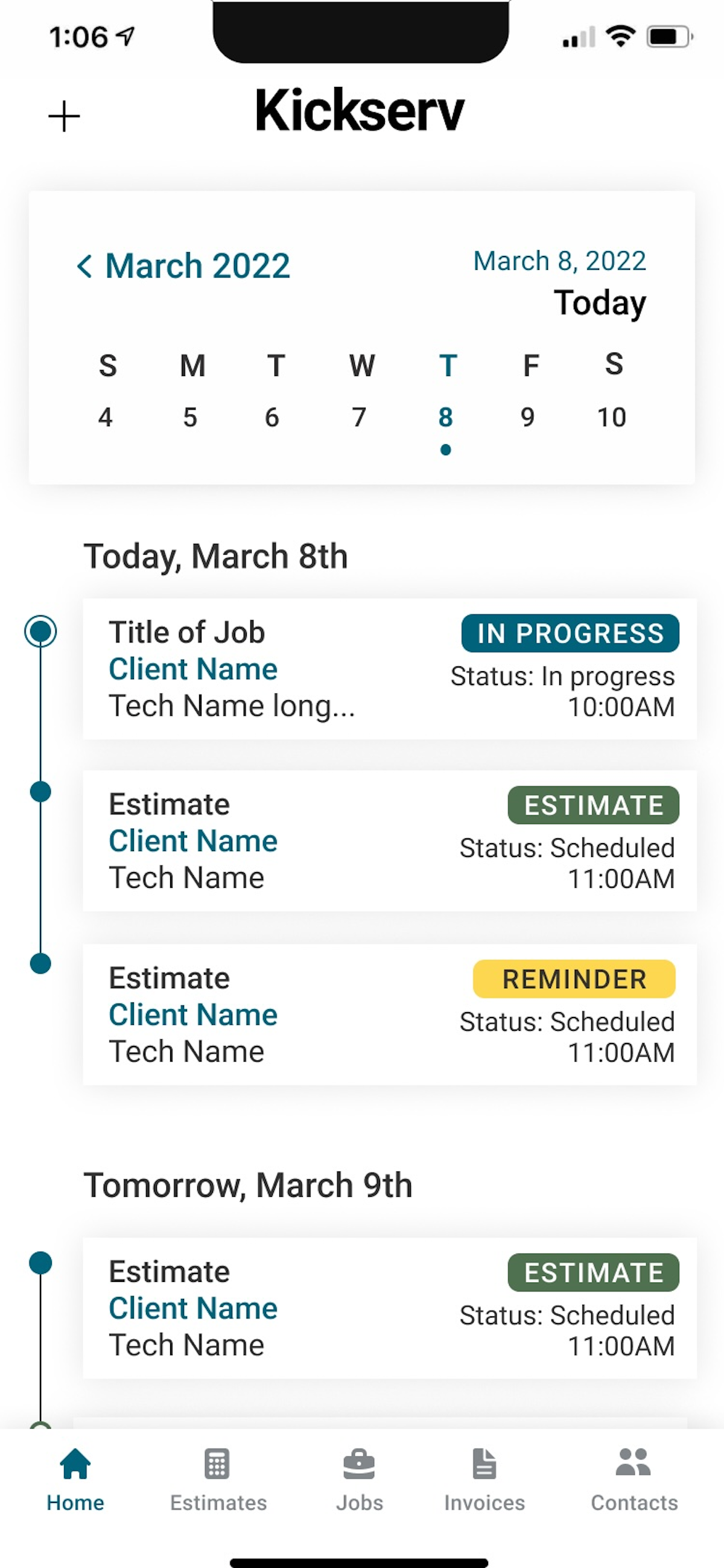
It is functional but the weakest part of the product. The app covers schedules, jobs, estimates and invoices on iOS and Android, but reviewers report bugs and crashes, particularly on Android, and limited offline use because it is server-dependent. If your crew lives in the app, trial it thoroughly first.
Who owns Kickserv?
Kickserv is owned by EverCommerce, which acquired it in 2023. The product launched in 2006 as ServiceSidekick, rebranded to Kickserv in 2011, changed hands several times, and is based in Denver, Colorado.
Kickserv vs Jobber: which is better?
Kickserv is cheaper and has stronger QuickBooks Desktop sync, making it a good budget pick for QuickBooks-based shops. Jobber has a more polished, more reliable mobile app and a slicker overall experience at a higher price. Choose Kickserv for value and accounting, and Jobber for a better mobile and client experience.
Is Kickserv worth it?
For a small, budget-conscious service business, especially one running QuickBooks, yes. It delivers a full estimate-to-invoice workflow, a customer portal and strong accounting sync at a low price. If your team depends heavily on a flawless mobile app, or you need deep inventory and enterprise reporting, look at pricier alternatives.
Kickserv reviews from real users
Verified reviews from people running Kickserv in the field. Every review is read by our team before it goes live, so this is honest signal, not spam.
No user reviews yet. If you use Kickserv, be the first to tell other shops how it works in the real world.
You need a free account to post a review. Create one in under a minute and you will come right back here to write it.
Why our ranking is worth trusting
“We run a real week of jobs through every tool and score it against the same 40 points. If it wins, it earned it, and no vendor can change that.”
The Duhari review teamProud of your score? Show it.
Add your independent Duhari rating to your site. It is free, it updates on its own, and it links back to this review.
Get your badge →
Not sure which tool fits?
Start from the full ranking, filtered by your trade and crew size, and pick the right tool with honest scores and real starting prices.