
ServiceM8 Review
ServiceM8 is a polished, affordable job management app for small Apple-using trade businesses, covering quoting, scheduling, invoicing and payments, with a free plan and pay-per-job pricing and unlimited staff logins.
On this page
The verdict
ServiceM8 reviews rate it one of the best-value job apps for small trades: it holds a 4.5 out of 5 on Capterra from more than 300 reviews with standout marks for value. Built Apple-first, it gives a solo plumber, electrician or small HVAC crew a genuinely polished iOS app to quote, schedule, invoice and take payment from a phone, and its pay-per-job pricing with unlimited staff logins is far cheaper than per-seat rivals for a growing team. The honest catch is that it is Apple-first, the Android app is much weaker, so it does not suit mixed-device or Android crews, and job-based pricing can climb at high volume. For a small Apple-using trade business, ServiceM8 is hard to beat on polish and price.
ServiceM8 at a glance
| Vendor | ServiceM8 | Category | Field service management |
|---|---|---|---|
| Best for | solo tradespeople and small crews (1 to 8) on iPhone or iPad | Starting price | Free to $349/mo |
| Free trial | Yes | Free plan | Yes |
| User rating | 4.5/5 (311 reviews) | Our score | 8.3/10 |
| Deployment | Cloud, iOS, Mac (limited Android) | Founded | 2010 |
| Headquarters | Australia | Users | Small trade businesses |
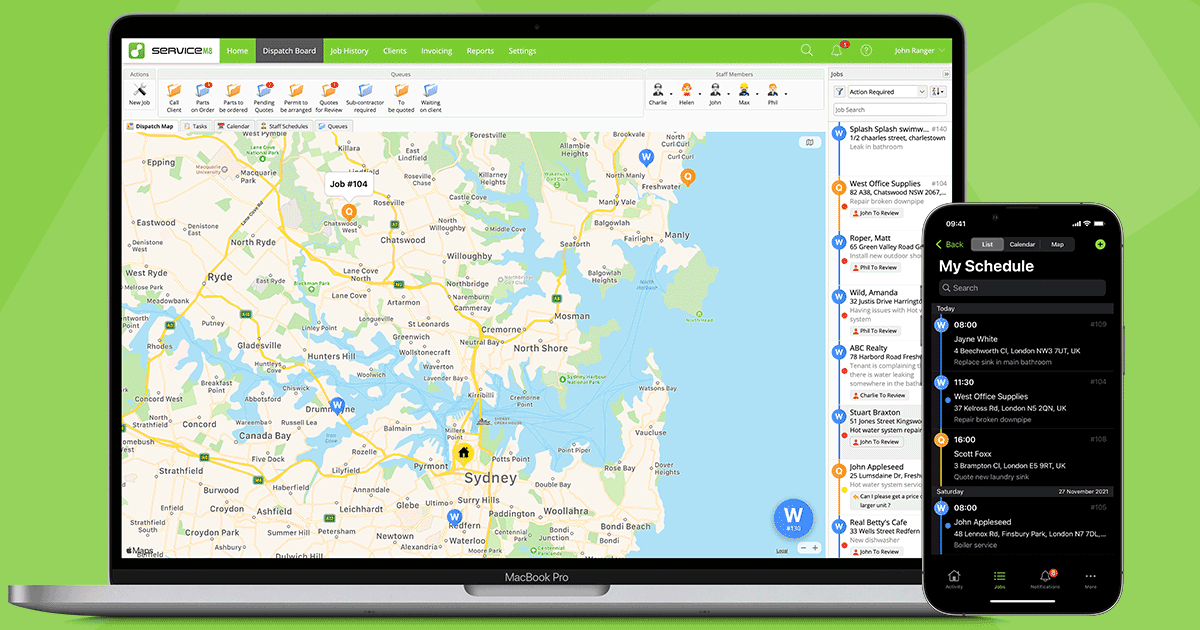
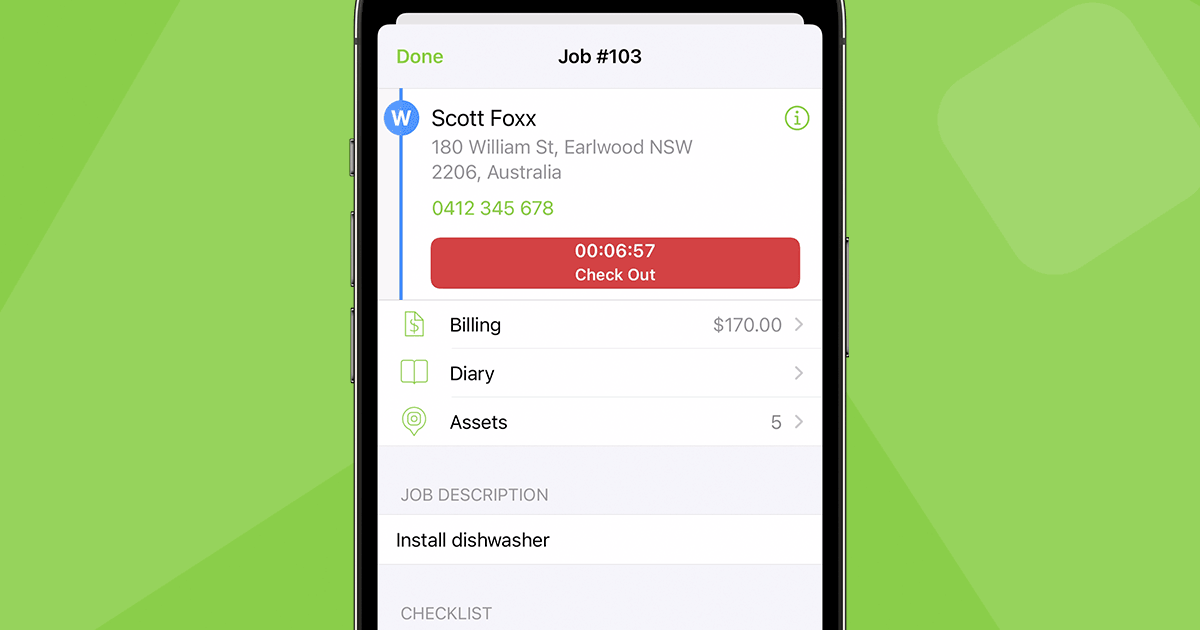
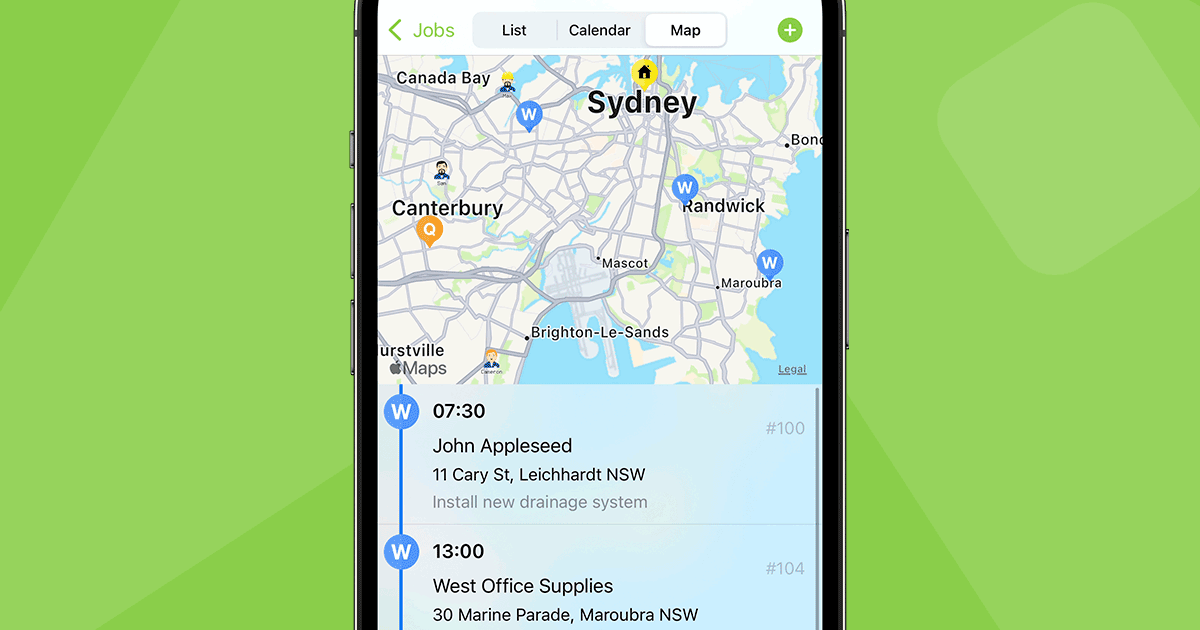
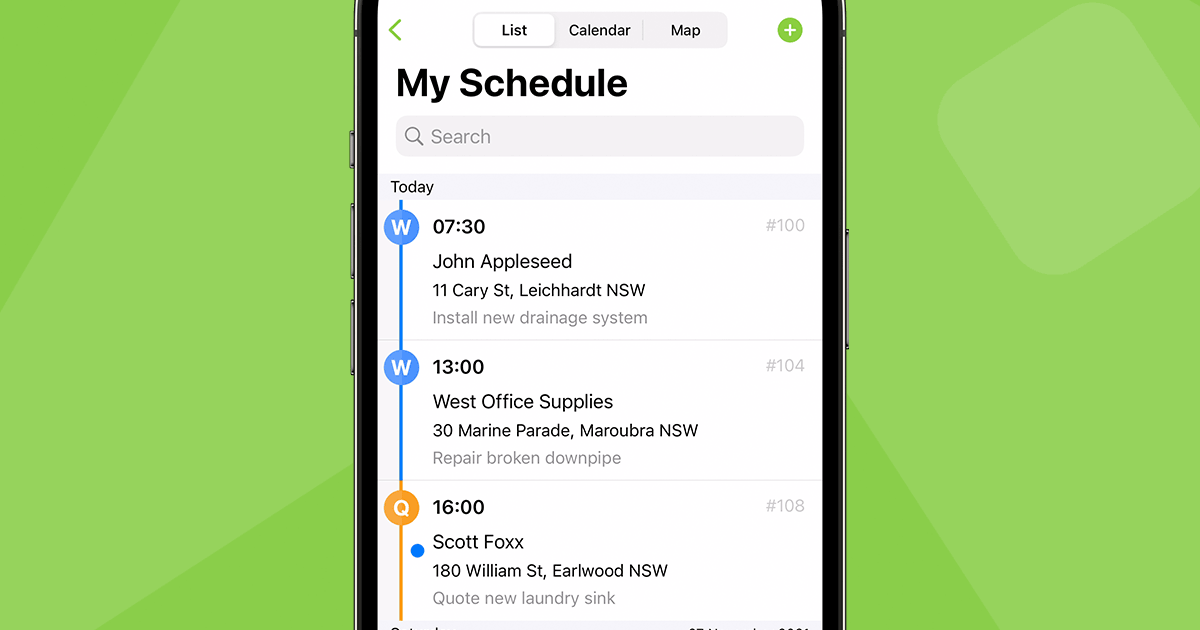
See ServiceM8 in action
A quick look at the interface, so you know what you are getting before the trial.
What ServiceM8 does
The areas we lean on most in daily use, and how ServiceM8 handles each.
On-site quoting & signatures
Build a professional quote on site, capture a digital signature and win the job before you leave the driveway.
Scheduling & dispatch
A drag-and-drop dispatch board with a map view assigns jobs and keeps a small crew organised through the day.
Job card & mobile app
The polished iOS job card holds billing, diary, photos, assets and a checklist so the tech runs the whole job from a phone.
Invoicing & payments
Turn a completed job into an invoice and take card payment on site with Stripe, plus online booking and online invoice payment, with no contracts and no per-user fees.
Automated SMS & communication
Automated SMS and email keep customers updated on bookings and arrivals without office effort.
Custom forms
Replace paper with custom digital forms for compliance, safety and job documentation.
Accounting integrations
Two-way sync with Xero and QuickBooks Online keeps invoices and payments in the books without double entry.
Add-on marketplace
Add-ons extend ServiceM8 with asset management, safety forms and more as a business grows.
How ServiceM8 works day to day
ServiceM8 is a polished, affordable job management app built for small trade and service businesses, and it has two traits that set it apart: it is Apple-first, and it charges by the job rather than by the seat. Founded in 2010 in Australia, ServiceM8 has become a favourite of solo plumbers, electricians and small HVAC crews who run their day on an iPhone or iPad, covering the full lifecycle from quote to schedule to invoice and payment in one clean, fast app.
The experience is the selling point. Reviewers describe the iOS app as genuinely polished and quick to learn, something a field tech can pick up in a day. On site, a tradesperson builds a quote, captures a signature, schedules the work, completes the job with photos and notes, and sends an invoice with card payment, all from the phone. A drag-and-drop dispatch board with a map runs the office side, automated SMS keeps customers updated, and custom forms replace paper for compliance and safety documentation.
The pricing model is the other differentiator, and it is genuinely good for small crews. ServiceM8 has a free plan and paid tiers from about 29 dollars a month, but it charges based on active jobs, not per user, and staff logins are unlimited on every plan. For a small business adding techs, that unlimited-user model is far cheaper than the per-seat pricing of most competitors, which is why ServiceM8 reviews so often praise the value.
The honest limits are real and worth knowing. ServiceM8 is Apple-first: the iOS and Mac experience is excellent, but the Android app is significantly less capable, which effectively rules the platform out for any crew on mixed or Android devices. The job-based pricing that is a bargain at low volume can climb as job counts grow past the mid tiers, reporting and custom workflows are lighter than larger-crew platforms, and support draws some complaints. This is software tuned for a small Apple-using trade business, not a large or Android-based operation.
Under the hood, ServiceM8 is a complete job management system. A tech creates a digital job card, adds photos and notes, builds quotes and estimates and captures a signature on site, while the office tracks staff by GPS location on a live map. Customers get online booking and can pay an invoice online, and there are no contracts and no per-user fees, only the monthly plan. Accounting flows to Xero, MYOB or QuickBooks Online without double entry.
The rough edges are worth naming. Beyond the weak Android app, some reviewers report that job and travel time tracking can be fiddly, a few features feel glitchy, and heavier reporting is thin. These are the trade-offs of a lightweight app built for freelancers and small construction and trade businesses rather than large fleets.
Across ServiceM8 reviews the verdict is consistent: for a solo tradesperson or a small crew of up to eight on iPhones or iPads, it is one of the best-value, best-designed job management apps available, with a 4.5 out of 5 on Capterra from more than 300 reviews and standout marks for value. It is not the tool for an Android crew, a large operation, or a business that needs deep reporting, but for its target, a small Apple-first trade business that wants to quote, schedule and get paid from a phone, ServiceM8 software is hard to beat on polish and price.
ServiceM8 pros and cons
Pros
- Genuinely polished, fast iOS app a field tech can learn in a day
- Pay-per-job pricing with unlimited staff logins, not per-seat
- Free plan plus low-cost paid tiers from about $29/mo
- Integrated on-site quoting, signatures and instant invoicing
- Solid Xero and QuickBooks Online accounting integrations
- Custom forms replace paper for compliance and safety docs
Cons
- Apple-first: the Android app is significantly less capable
- Rules the platform out for mixed-device or Android crews
- Job-based pricing can climb as volume grows past mid tiers
- Limited reporting and custom workflows versus larger platforms
- Customer support draws some complaints
Who should use ServiceM8, and who should skip it
A great fit if you
- You are a solo tradesperson or a small crew of 1 to 8
- Your team runs on iPhones and iPads
- You want to quote, schedule and invoice from a phone on site
- You want unlimited staff logins without per-seat pricing
- You are moving off paper or spreadsheets and want low learning curve
Look elsewhere if you
- Your crew uses Android phones, even partially
- You are a larger operation (10+ field staff)
- You need deep reporting or subcontractor management
- You run very high job volumes where per-job pricing climbs
Is ServiceM8 right for your trade?
ServiceM8 is used across the main home-service trades. Here is how it fits each one, and what its reviews tend to say in that niche.
ServiceM8 for Plumbing
Plumbers use on-site quoting, the iOS job card and instant invoicing with card payment; ServiceM8 is a favourite in plumbing software reviews for its polish and value.
ServiceM8 for Electrical
Electricians run scheduling, custom compliance forms and quote-to-invoice from an iPhone, a fit its electrical software reviews consistently praise.
ServiceM8 for HVAC & refrigeration
Small HVAC and refrigeration crews use job cards, photos and instant invoicing on site, with pay-per-job pricing that suits a small team.
ServiceM8 for Handyman & general trades
Handyman and general trade businesses use the polished app to quote, schedule and get paid, moving off paper with a low learning curve.
ServiceM8 for Cleaning
Small cleaning businesses use recurring scheduling, the mobile app and invoicing to run route-based service on Apple devices.
ServiceM8 scorecard
How ServiceM8 scored across our rubric. Every tool is measured on the same areas.
ServiceM8 pricing and plans
Real starting prices, dated and re-checked each pass. ServiceM8 has a free plan and paid tiers from about $29/mo (Starter), $79 (Growing), $149 (Premium) and $349 (Premium Plus). Pricing is job-based, tied to active jobs per month rather than per user, and staff logins are unlimited on every plan, which makes it unusually cheap for a growing crew. Costs can climb as job volume grows past the mid tiers.
ServiceM8 integrations
Tools ServiceM8 connects with out of the box, so it fits the stack you already run.
 Xero
Xero
 QuickBooks Online
 MYOB
MYOB
 Stripe
 Google Calendar
 Zapier
Support, training and deployment
How you can reach the ServiceM8 team, how they onboard you, and where it runs.
Support
- Email / Help Desk
- Chat
- Knowledge Base
- Community
Training
- Live Online
- Webinars
- Documentation
- Videos
Deployment
- Cloud, SaaS, Web-Based
- Mobile - iPhone / iPad
- Mac
Typical customers
- Freelancers
- Small businesses
ServiceM8 alternatives
If ServiceM8 is not the fit, these are the closest tools we rank, in order.



 ServiceM8
How to test ServiceM8 before you commit
Every tool demos well. These are the checks that actually tell you whether ServiceM8 fits your shop, while the free trial is still running.
Run a real job end to end
- Book it, schedule it, dispatch a tech, then invoice and take payment
- Do it on the phone your techs actually carry, not a demo laptop
- Try it with weak signal in the field, not just on office wifi
- Add a second user and watch how the per-seat price moves
Watch for the catch
- Payment-processing fees taken on every card and ACH run
- Features quietly locked to a higher tier than the one you tried
- Onboarding or data import sold as a paid add-on
- How hard it is to export your data if you decide to leave
ServiceM8 FAQ
How much does ServiceM8 cost?
ServiceM8 has a free plan and paid tiers from about $29/mo (Starter), $79 (Growing), $149 (Premium) and $349 (Premium Plus). Crucially, pricing is job-based, tied to active jobs per month rather than per user, and staff logins are unlimited on every plan, which makes it unusually cheap for a growing crew. Costs can climb as job volume grows.
What do ServiceM8 reviews say?
ServiceM8 holds a 4.5 out of 5 on Capterra from more than 300 reviews, with standout marks for value for money. Small trade businesses praise the polished iOS app, the unlimited-user pricing and the integrated quote-to-invoice workflow. The most common complaints are the weak Android app, pricing that climbs at high volume and some support issues.
Does ServiceM8 work on Android?
Only partly. ServiceM8 is Apple-first: the iOS and Mac experience is excellent, but the Android app is significantly less capable and updated more slowly. For any crew using Android phones, even partially, ServiceM8 is hard to recommend, and Jobber or Housecall Pro are better fits.
Is ServiceM8 good for plumbers and electricians?
Yes, they are among its core users. Solo plumbers, electricians and small HVAC crews on iPhones use ServiceM8 for on-site quoting, scheduling, job cards with photos and forms, and instant invoicing with card payment. Its polish and pay-per-job value fit exactly how small trade businesses work.
Is ServiceM8 free?
ServiceM8 has a genuinely free plan with a limited number of active jobs, plus a free trial of the paid tiers. The free plan lets a very small operator quote, schedule and invoice at no cost, and paid plans add more monthly jobs and features as the business grows.
Does ServiceM8 integrate with QuickBooks and Xero?
Yes. ServiceM8 integrates with both Xero and QuickBooks Online, so invoices and payments flow to the books without double entry. It also uses Stripe for card and card-on-file payments taken on site.
Is ServiceM8 worth it?
For a solo tradesperson or a small crew on Apple devices, yes, it is one of the best-value, best-designed job apps available, especially thanks to unlimited staff logins. It is not worth it for Android crews, larger operations or businesses needing deep reporting, where other tools fit better.
ServiceM8 vs Jobber: which should I choose?
ServiceM8 is more polished on iOS and cheaper for a growing crew thanks to pay-per-job, unlimited-user pricing, but it is Apple-first with a weak Android app. Jobber works well on any device with stronger reporting. Choose ServiceM8 for a small Apple-based crew and value, and Jobber for mixed devices or heavier reporting needs.
What are ServiceM8's main downsides?
The biggest is that it is Apple-first, with an Android app that is much weaker, ruling it out for mixed-device crews. Job-based pricing can climb at high volume, reporting and custom workflows are lighter than larger platforms, and customer support draws some complaints.
ServiceM8 reviews from real users
Verified reviews from people running ServiceM8 in the field. Every review is read by our team before it goes live, so this is honest signal, not spam.
No user reviews yet. If you use ServiceM8, be the first to tell other shops how it works in the real world.
You need a free account to post a review. Create one in under a minute and you will come right back here to write it.
Why our ranking is worth trusting
“We run a real week of jobs through every tool and score it against the same 40 points. If it wins, it earned it, and no vendor can change that.”
The Duhari review teamProud of your score? Show it.
Add your independent Duhari rating to your site. It is free, it updates on its own, and it links back to this review.
Get your badge →
Not sure which tool fits?
Start from the full ranking, filtered by your trade and crew size, and pick the right tool with honest scores and real starting prices.