Connecteam Review
Connecteam is a hugely popular all-in-one workforce app for deskless and field teams, built around GPS time tracking, employee scheduling and communication, with a generous free plan. It is a workforce tool rather than a full field service platform.
On this page
The verdict
Connecteam reviews make it one of the highest-rated apps for managing deskless and field teams, with a 4.6 out of 5 from more than 5,000 reviews and 50,000-plus companies on board. It is an all-in-one workforce app: a GPS time clock, drag-and-drop employee scheduling, team chat, digital forms and an HR hub, with a Small Business plan that is free for life for up to 10 users and paid plans from just $29/mo. The important caveat is scope: Connecteam is a workforce management app, not a full field service platform, so it does not handle customer jobs, estimates, dispatching or invoicing. For scheduling, time tracking and communicating with a frontline team, it is superb value; most service businesses run it alongside a dedicated FSM.
Connecteam at a glance
| Vendor | Connecteam | Category | Workforce management |
|---|---|---|---|
| Best for | field & deskless teams needing scheduling, time tracking & comms | Starting price | Free to $99/mo (per hub) |
| Free trial | Yes | Free plan | Yes |
| User rating | 4.6/5 (5309 reviews) | Our score | 8.6/10 |
| Deployment | Cloud, iOS, Android | Founded | 2016 |
| Headquarters | New York, NY | Users | 50,000+ companies |
See Connecteam in action
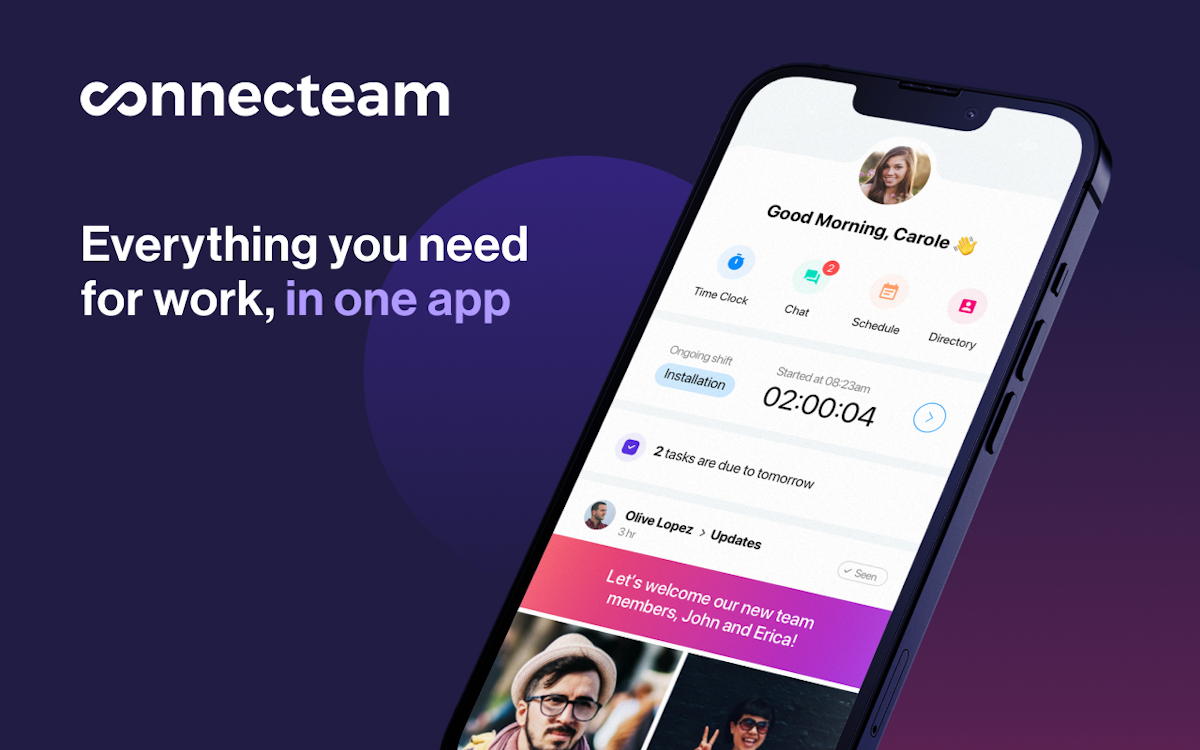
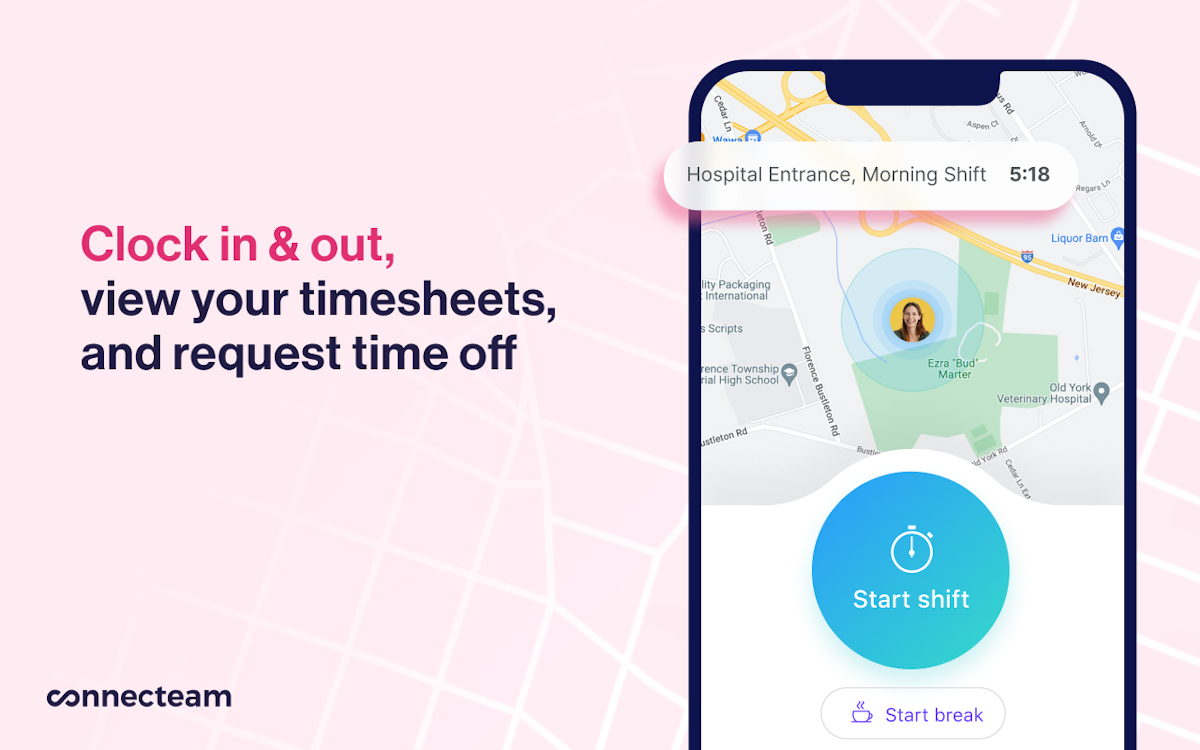
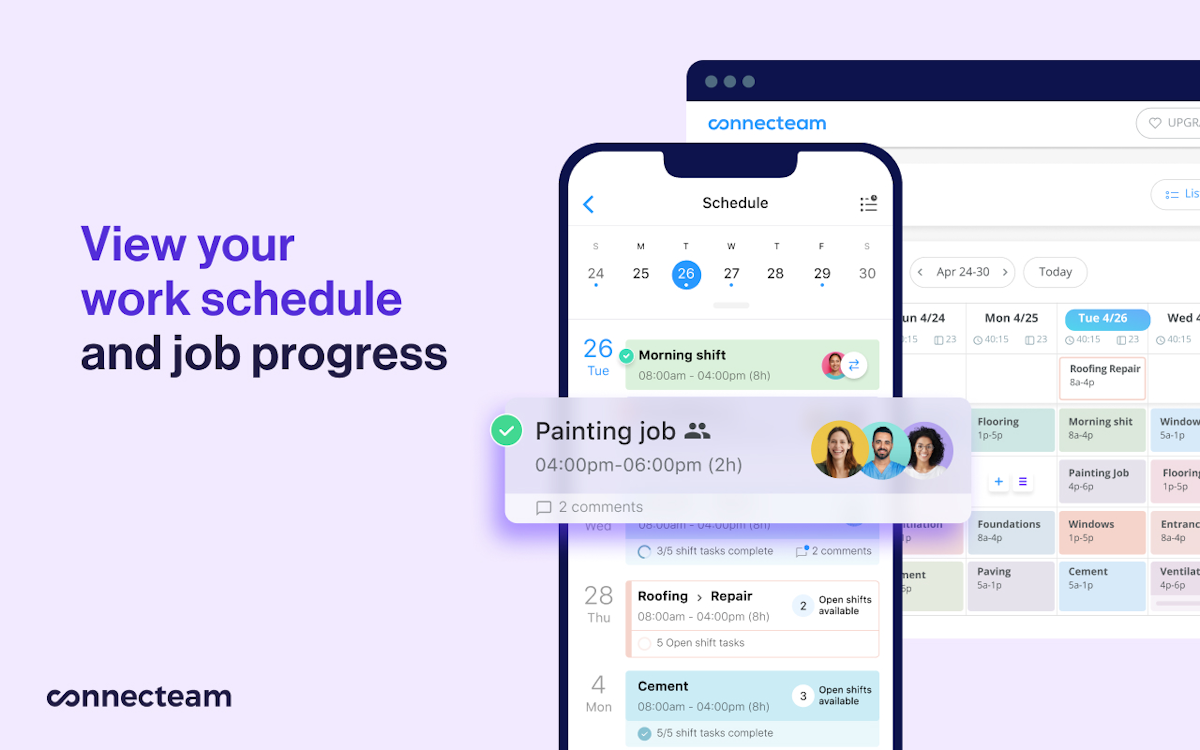
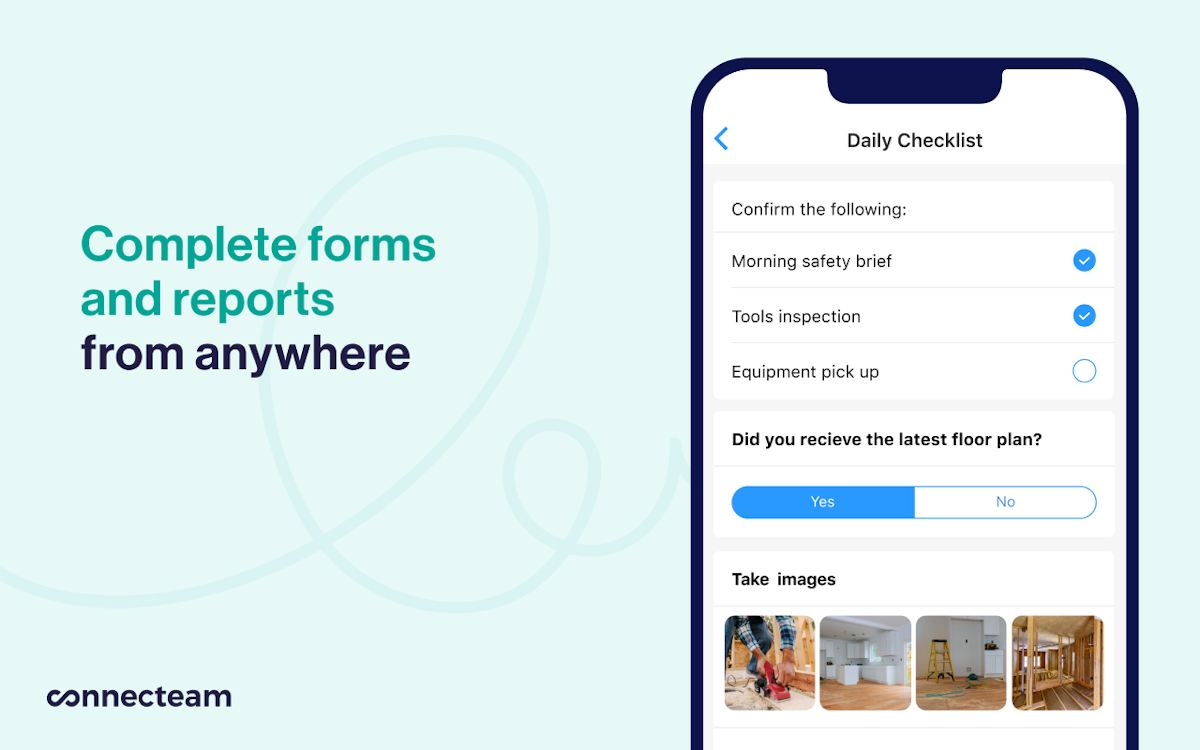
A quick look at the interface, so you know what you are getting before the trial.
What Connecteam does
The areas we lean on most in daily use, and how Connecteam handles each.
GPS time clock
One-tap clock in and out from the job site with GPS and geofencing, feeding accurate timesheets straight into payroll.
Employee scheduling
Drag-and-drop scheduling with open shifts, recurring shifts and real-time updates tames complex, shift-based rosters.
Timesheets & payroll
Automatic timesheets with overtime and breaks export to QuickBooks Payroll, Gusto and Xero to speed up payroll.
Team chat & feed
Real-time group and one-to-one chat plus a company feed keep an entire deskless team connected from their phones.
Forms & checklists
Digital forms, daily checklists and reports replace paper for safety briefs, inspections and job documentation.
Task management
Assign and track tasks with due dates and photos so nothing on a shift falls through the cracks.
HR & skills hub
Time-off requests, training courses, e-signed documents and employee recognition live in a dedicated HR hub.
Knowledge base
A searchable knowledge base puts policies, guides and resources in every frontline worker's pocket.
How Connecteam works day to day
Connecteam is the most popular app for managing deskless and field teams, and its numbers show it: a 4.6 out of 5 from more than 5,000 reviews, trusted by 50,000-plus companies. Founded in 2016 and based in New York, Connecteam is an all-in-one workforce app built around time tracking, scheduling and communication for the frontline workers who never sit at a desk. It is worth being clear up front, though: Connecteam is a workforce management app, not a full field service management platform, and that distinction shapes who it is for.
Where Connecteam shines is the employee side of a field business. Its GPS time clock lets crews clock in and out from the job site with geofencing, feeding accurate timesheets straight into payroll and cutting the hours managers spend on wages. The scheduling module handles complex, shift-based rosters with drag-and-drop, open shifts and recurring shifts, and reviewers consistently praise how it tames complicated schedules with real-time updates. For a construction, cleaning or trade company juggling many workers, that alone is a major upgrade over spreadsheets.
Beyond time and scheduling, Connecteam is genuinely all-in-one. A team chat and company feed keep everyone connected, digital forms and checklists replace paper for daily safety briefs and reports, and an HR and skills hub covers time-off, training courses and employee recognition. Across Connecteam reviews, owners love that communication, scheduling, time tracking and staff engagement live in one affordable app instead of four separate tools.
Value is a real strength. Connecteam offers a Small Business plan that is free for life for up to 10 users, plus a 14-day trial of the paid hubs. Paid plans start at 29 dollars a month for the first 30 users across the Operations, Communications and HR hubs, so a small field team can run a lot of the platform for very little. That generosity is a big reason Connecteam software scores 4.5 for value.
The honest limits are twofold. First, the app is not a full FSM: it does not manage customer jobs, estimates, dispatching to clients or invoicing, so a service business will usually pair Connecteam with a dedicated FSM tool rather than replace one. Second, reviewers report lag and slowdowns, occasional bugs and glitches, inconsistent notifications, payroll-sync hiccups and a hub-based pricing model that can get confusing as you add features.
Across Connecteam reviews the verdict is clear: for scheduling, time tracking and communicating with a deskless or field workforce, it is one of the best and best-value apps available, backed by a huge, overwhelmingly positive review base. Just go in knowing it is the workforce layer, not a customer-facing field service platform, and for many trade businesses it is the perfect complement to one.
Connecteam pros and cons
Pros
- Huge, overwhelmingly positive review base: 4.6/5 from 5,000+ reviews
- GPS time clock with geofencing for accurate timesheets and payroll
- Powerful drag-and-drop scheduling for complex, shift-based teams
- Genuinely all-in-one: time, scheduling, chat, forms and HR in one app
- Excellent value: free for up to 10 users, paid plans from $29/mo
- Strong mobile app built for frontline, deskless workers
Cons
- Not a full FSM: no customer jobs, estimates, dispatch or invoicing
- Reviewers report lag, slowdowns and occasional bugs or glitches
- Inconsistent push-notification experience
- Payroll-sync issues reported (hours not always transferring correctly)
- Hub-based pricing can get confusing as you add features
- Limited PTO options for some workflows
Who should use Connecteam, and who should skip it
A great fit if you
- You manage a deskless or field workforce (construction, cleaning, trades)
- You want GPS time tracking that feeds straight into payroll
- You juggle complex, shift-based schedules across many workers
- You want chat, forms and HR in the same app as scheduling
- You want a generous free plan and low starting price
Look elsewhere if you
- You need customer job management, estimates or invoicing (a full FSM)
- You need dispatching work orders to clients
- You want a single tool to run the whole service business end to end
- You need rock-solid, lag-free performance above all
Is Connecteam right for your trade?
Connecteam is used across the main home-service trades. Here is how it fits each one, and what its reviews tend to say in that niche.
Connecteam for Construction
Construction crews use GPS time tracking, scheduling and daily safety checklists; Connecteam is a top pick in construction workforce reviews.
Connecteam for Cleaning & janitorial
Cleaning companies schedule shifts, verify on-site clock-ins and communicate with distributed teams from one app.
Connecteam for HVAC & trades
HVAC and trade shops use Connecteam for the employee side, scheduling and time tracking, alongside a dedicated FSM for jobs.
Connecteam for Landscaping
Landscaping crews track time by job site with geofencing and manage seasonal shift schedules on mobile.
Connecteam for Field service teams
Field service teams pair Connecteam's workforce tools with job-management software to cover both staff and customers.
Connecteam scorecard
How Connecteam scored across our rubric. Every tool is measured on the same areas.
Connecteam pricing and plans
Real starting prices, dated and re-checked each pass. Connecteam has a Small Business plan that is free for life for up to 10 users, plus a 14-day trial of the paid hubs. Paid pricing is per hub (Operations, Communications, HR & Skills) at Basic $29/mo, Advanced $49/mo and Expert $99/mo for the first 30 users, with a small per-user fee beyond that, and a custom Enterprise tier. Buying multiple hubs adds up, so the hub-based model can get confusing.
Connecteam integrations
Tools Connecteam connects with out of the box, so it fits the stack you already run.
 QuickBooks Payroll
QuickBooks Online
QuickBooks Payroll
QuickBooks Online
 Gusto
Gusto
 Xero
Xero
 Google Calendar
 Zapier
Support, training and deployment
How you can reach the Connecteam team, how they onboard you, and where it runs.
Support
- Chat
- Email / Help Desk
- Phone
- 24/7 Live Rep
- Knowledge Base
- FAQs / Forum
Training
- Live Online
- In Person
- Webinars
- Documentation
- Videos
Deployment
- Cloud, SaaS, Web-Based
- Mobile - iPhone / iPad
- Mobile - Android
Typical customers
- Freelancers
- Small businesses
- Mid-size businesses
- Enterprises
Connecteam alternatives
If Connecteam is not the fit, these are the closest tools we rank, in order.



 Connecteam
How to test Connecteam before you commit
Every tool demos well. These are the checks that actually tell you whether Connecteam fits your shop, while the free trial is still running.
Run a real job end to end
- Book it, schedule it, dispatch a tech, then invoice and take payment
- Do it on the phone your techs actually carry, not a demo laptop
- Try it with weak signal in the field, not just on office wifi
- Add a second user and watch how the per-seat price moves
Watch for the catch
- Payment-processing fees taken on every card and ACH run
- Features quietly locked to a higher tier than the one you tried
- Onboarding or data import sold as a paid add-on
- How hard it is to export your data if you decide to leave
Connecteam FAQ
How much does Connecteam cost?
Connecteam has a Small Business plan that is free for life for up to 10 users, plus a 14-day trial of the paid hubs. Paid pricing is per hub (Operations, Communications, HR & Skills) at Basic $29/mo, Advanced $49/mo and Expert $99/mo for the first 30 users, with a small per-user fee beyond that, and a custom Enterprise tier. Buying multiple hubs adds up.
What do Connecteam reviews say?
Connecteam holds a 4.6 out of 5 from more than 5,000 reviews, one of the largest and most positive review bases in the category. Users love the GPS time clock, the scheduling, the all-in-one design and the value. The most common complaints are occasional lag and bugs, inconsistent notifications, payroll-sync issues and hub-based pricing that can get confusing.
Is Connecteam a field service management (FSM) tool?
Not a full one. Connecteam is a workforce management app focused on time tracking, scheduling and communication for deskless teams. It does not manage customer jobs, estimates, dispatching to clients or invoicing. Many field service and trade businesses use Connecteam for the employee side and pair it with a dedicated FSM like Jobber or Housecall Pro for the customer side.
Is Connecteam really free?
Yes. The Small Business plan is free for life for up to 10 users and includes all hubs and features, which is unusually generous. Above 10 users you move to paid plans, and there is also a 14-day free trial of the paid tiers, so a small team can run Connecteam at no cost for a long time.
Does Connecteam track employee time and GPS location?
Yes, that is its most-used feature. Connecteam offers a GPS time clock with geofencing, so employees clock in and out from the job site, timesheets are accurate, and managers can see where staff clocked in. Timesheets then export to payroll tools like QuickBooks Payroll, Gusto and Xero.
Who owns Connecteam?
Connecteam was founded in 2016 by Amir Nehemia and co-founders and is a privately held company headquartered in New York, with operations in Tel Aviv. It raised significant venture funding as it grew into one of the leading apps for managing deskless workers.
Connecteam vs Jobber: which do I need?
They solve different problems. Connecteam manages your workforce, time tracking, scheduling and communication, while Jobber manages your customers, jobs, quotes, dispatching and invoicing. A trade business often uses both: Connecteam for the team and Jobber for the client-facing field service work. If you can only pick one, choose based on whether your bigger pain is staff management or job management.
Is Connecteam good for construction and trades?
Yes. Construction is one of its biggest industries, and trade businesses use Connecteam to schedule crews, track GPS-verified time on site, run daily safety checklists and communicate with the whole team from a phone. It is a strong workforce tool for the trades, used alongside job-management software rather than instead of it.
Connecteam reviews from real users
Verified reviews from people running Connecteam in the field. Every review is read by our team before it goes live, so this is honest signal, not spam.
No user reviews yet. If you use Connecteam, be the first to tell other shops how it works in the real world.
You need a free account to post a review. Create one in under a minute and you will come right back here to write it.
Why our ranking is worth trusting
“We run a real week of jobs through every tool and score it against the same 40 points. If it wins, it earned it, and no vendor can change that.”
The Duhari review teamProud of your score? Show it.
Add your independent Duhari rating to your site. It is free, it updates on its own, and it links back to this review.
Get your badge →
Not sure which tool fits?
Start from the full ranking, filtered by your trade and crew size, and pick the right tool with honest scores and real starting prices.