
GorillaDesk Review
GorillaDesk is an easy-to-use field service platform built for small pest control, lawn care and pool service businesses, with recurring routes, chemical tracking and automated billing.
On this page
The verdict
GorillaDesk reviews are among the strongest in the category: it earns a standout 4.9 out of 5 from more than 800 verified reviews, and business owners consistently praise the ease of use and the responsive customer support. GorillaDesk software is purpose-built for small pest control, lawn care and pool service businesses that want recurring routes, FIFRA chemical tracking and transparent pricing without enterprise complexity. It is not the tool for a large operation of 20-plus technicians that needs deep reporting or heavy customization, but for a one-to-fifteen-technician shop it is one of the easiest, best-supported and best-value options available.
GorillaDesk at a glance
| Vendor | GorillaDesk | Category | Field service management |
|---|---|---|---|
| Best for | small pest control, lawn care and pool service teams (1 to 15 techs) | Starting price | $49 to $149/mo |
| Free trial | Yes | Free plan | No |
| User rating | 4.9/5 (800+ reviews) | Our score | 8.7/10 |
| Deployment | Cloud, iOS, Android | Founded | 2014 |
| Headquarters | Gainesville, FL, USA | Users | 20,000+ |
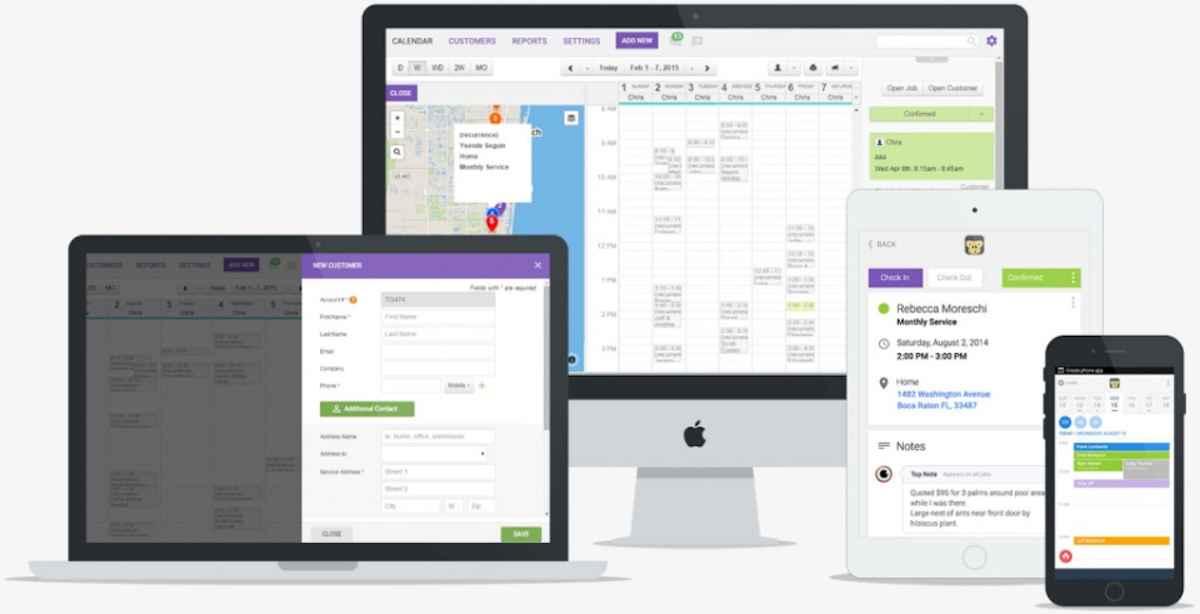
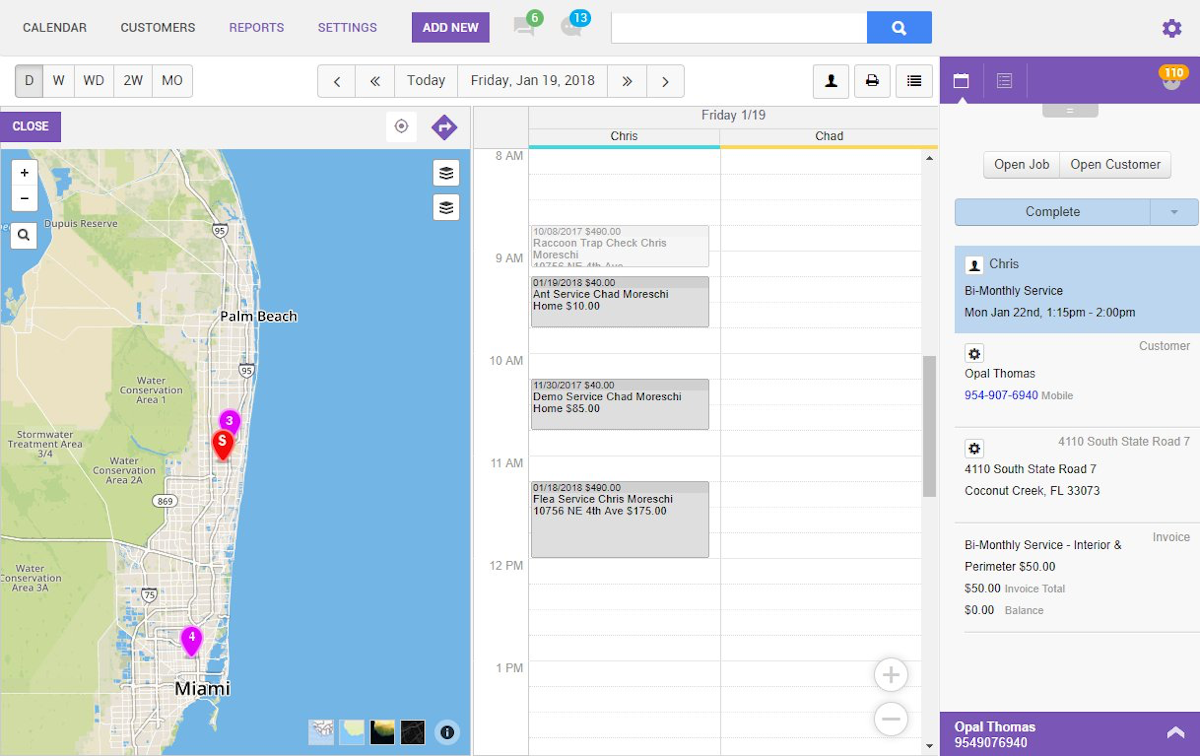
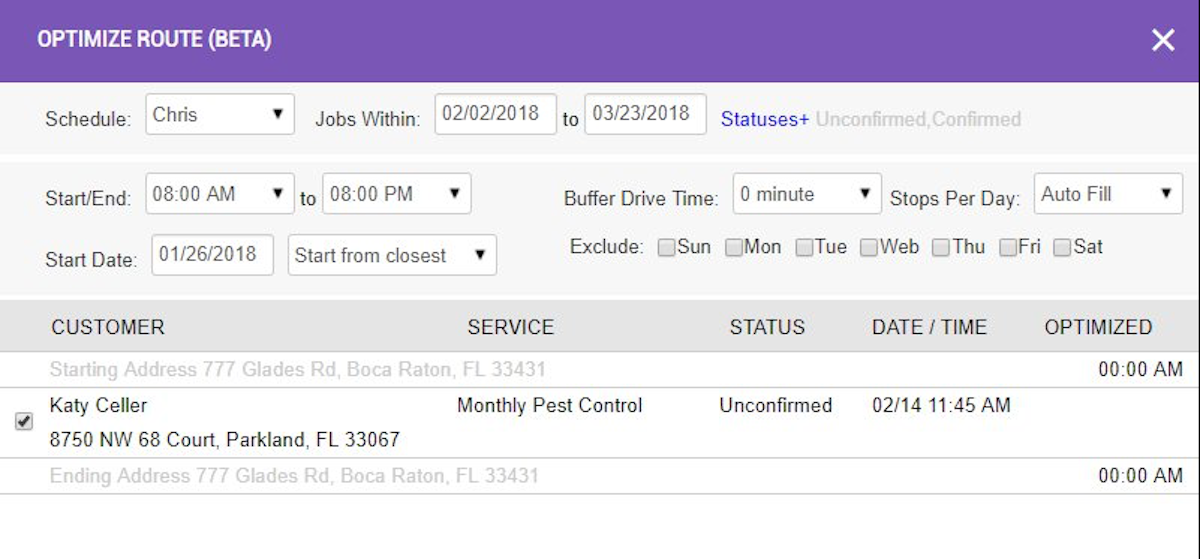
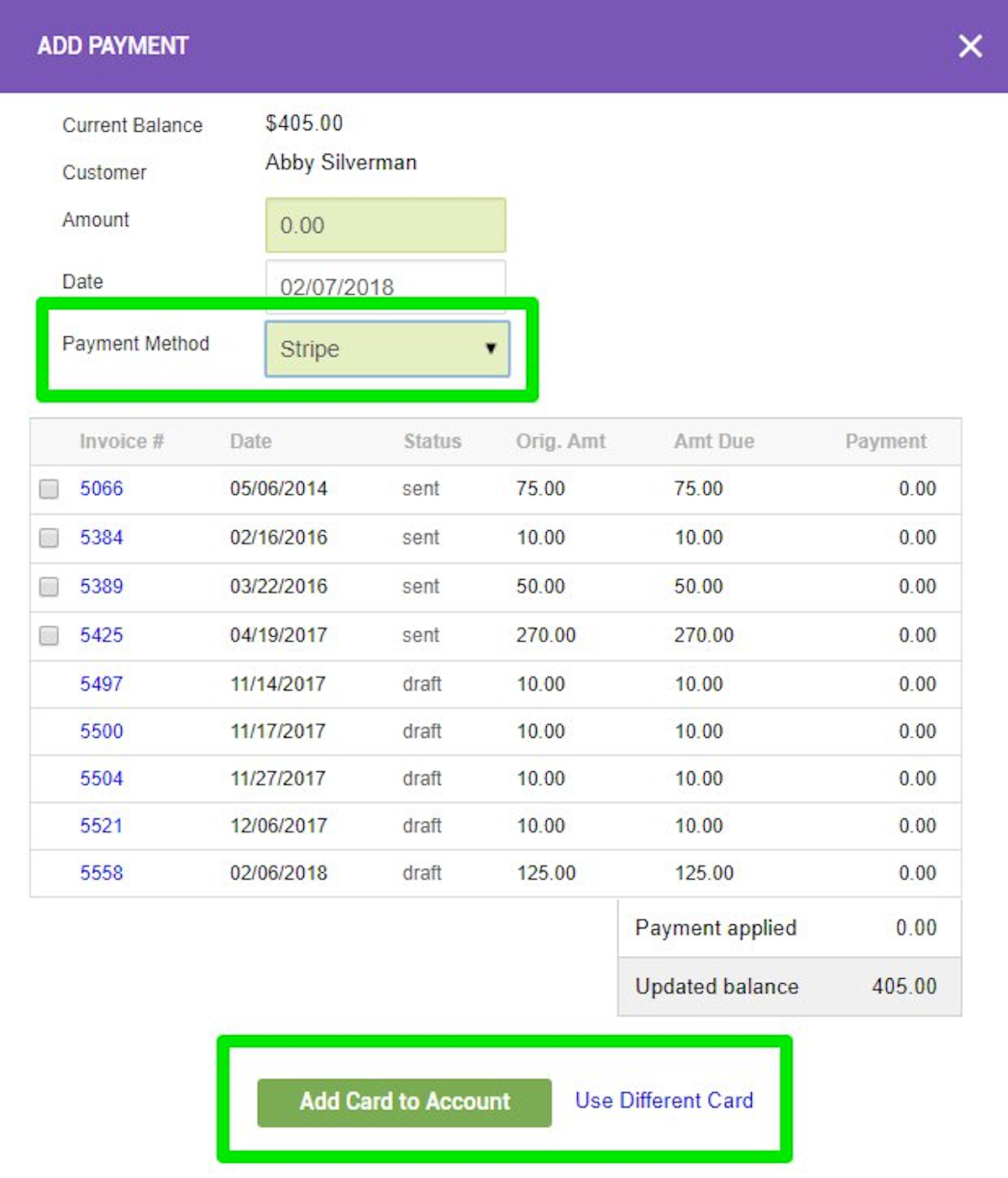
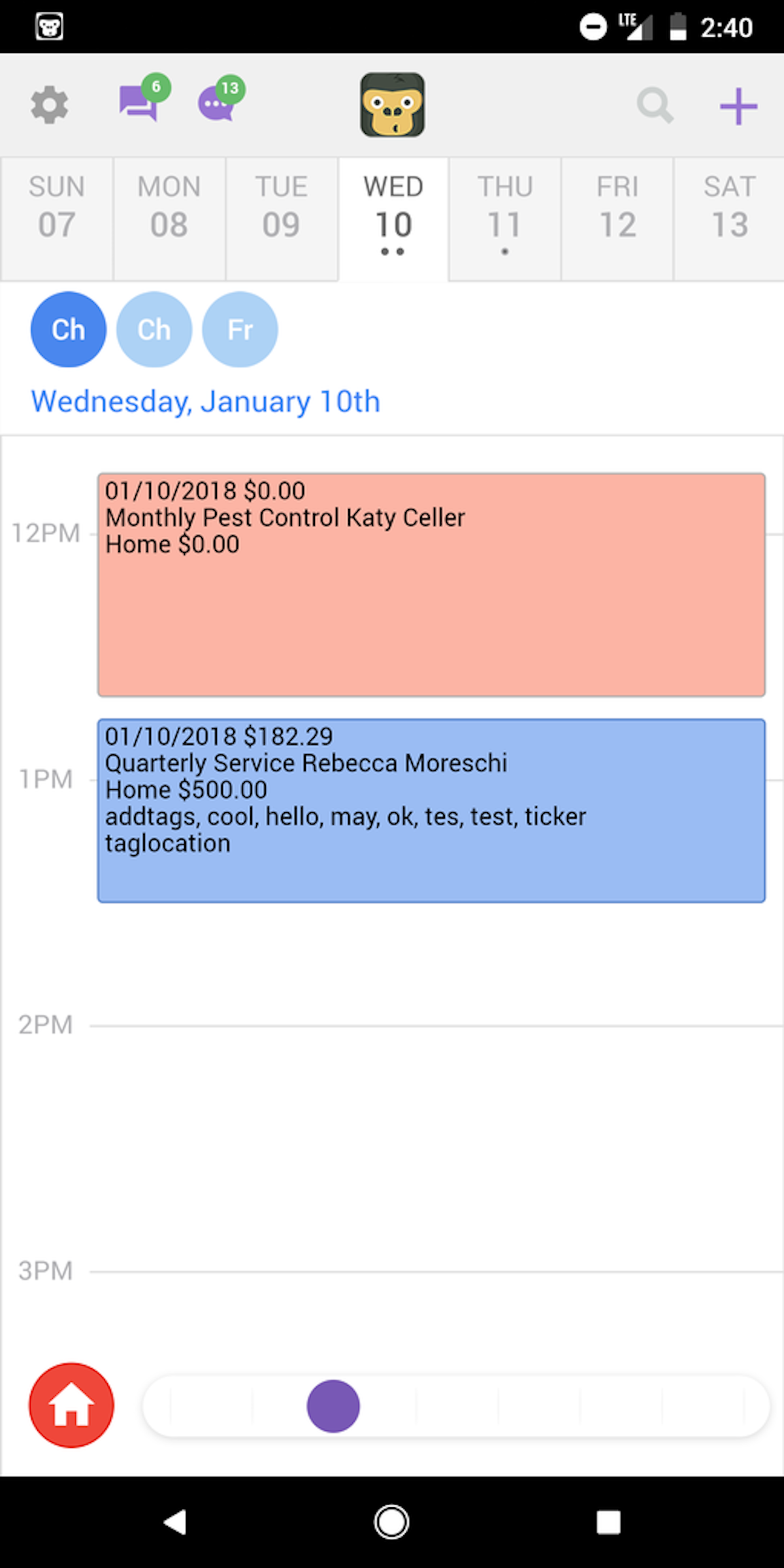
See GorillaDesk in action
A quick look at the interface, so you know what you are getting before the trial.
What GorillaDesk does
The areas we lean on most in daily use, and how GorillaDesk handles each.
Recurring scheduling & route optimisation
Book a plan once and GorillaDesk repeats the visits automatically, then optimises each day's route to cut drive time between stops.
Chemical & pesticide tracking
FIFRA-compliant tracking of chemicals and quantities applied on each visit keeps a pest control business audit-ready.
Automated billing & payments
Bill recurring customers on their own schedule, keep a card on file and take payment automatically, with QuickBooks sync.
Customer database & CRM
A full history for every property and account, with notes, photos and past invoices one tap away.
Two-way texting & reminders
Automated appointment reminders and service-complete notifications, plus two-way texting that keeps the conversation in one place.
Mobile app
Technicians see the route, log the visit, capture chemicals and photos and collect payment from a phone in the field.
Online booking & reviews
Let customers book online and automatically request reviews after a completed job to build the business.
QuickBooks sync
Two-way QuickBooks sync flows invoices and payments to the books without double entry.
How GorillaDesk works day to day
GorillaDesk is a highly rated, deliberately simple field service platform built for small service businesses, and it has earned a following in pest control, lawn care and pool service. Rather than chase enterprise breadth, it does the core of a route-based service business, scheduling, recurring work, chemical tracking, automated billing and customer communication, and does it in a way a one-to-fifteen-technician shop can set up in an afternoon.
In daily use, GorillaDesk runs the recurring route. A customer signs up for a plan, the software drops the visits onto a repeating schedule, optimises the day's route, and sends the customer an automated reminder and a service-complete notification. Technicians work from a mobile app, logging the visit, the chemicals applied and photos on site, and the invoice bills automatically against the plan. For a pest control operator, that FIFRA-compliant pesticide and chemical tracking is not a nice-to-have, it is the compliance record the business runs on, and it is one of the reasons GorillaDesk shows up on so many pest control shortlists.
The customer side is just as central. A clean customer database holds the full history for every property, two-way texting keeps the conversation in one place, and an online booking and review-request flow helps a small operator look as polished as a national brand. Payments are built in, with card on file and automatic billing, and GorillaDesk syncs with QuickBooks so the books stay clean without double entry.
What reviewers consistently praise is the ease of use and the customer service. GorillaDesk carries a standout 4.9 out of 5 from more than 800 verified Capterra reviews, one of the highest ratings in field service software, and support is repeatedly called out as fast and genuinely helpful. The trade-off is depth: reporting is basic, customisation for complex or multi-tier service plans is limited, and a few users mention the app being occasionally glitchy. This is software tuned for a small, focused operation, not a large enterprise with heavy reporting needs.
Pricing is refreshingly transparent, which sets GorillaDesk apart from the sales-led quotes common in this category. Plans run from Basic at 49 dollars a month for a single user, to Pro at 99 dollars for up to three users, to Business at 149 dollars for up to five, with additional seats charged per user and a 14-day free trial and no setup fee. For a solo operator or a small crew, that predictable, published pricing and the low entry point are a large part of the appeal.
Overall, GorillaDesk is one of the easiest, best-supported ways for a small pest control, lawn care or pool service business to get off spreadsheets and onto a real recurring-route system. It will not satisfy a large operation that needs deep reporting or heavy customisation, but for its target customer it is hard to beat on simplicity, support and value.
Across GorillaDesk reviews the pattern is consistent. Business owners and small pest control operators rate the software 4.9 out of 5 for ease of use and give it an equally high rating for customer support, and the overall experience reviewers describe is of software that is quick to learn and quick to run a route-based business on. The most common criticisms in GorillaDesk pest control software reviews are the basic reporting and the limited customization for complex, multi-tier service plans, along with a niche ceiling: GorillaDesk is built for pest control, lawn care and pool service, not for a company that wants to expand into HVAC or plumbing.
On value, GorillaDesk pricing is one of its strongest points. Where much of the category hides behind sales-led quotes, GorillaDesk publishes its plans, starts at a low entry point and adds technicians per seat, so a small business can see exactly what it will pay. Combined with route optimization, automated billing and a mobile app technicians actually use, that transparent pricing is why GorillaDesk software shows up on so many pest control, lawn care and pool service shortlists.
GorillaDesk pros and cons
Pros
- Standout 4.9/5 from 800+ verified reviews, among the highest in the category
- Genuinely easy to set up and use for a small team
- Fast, well-reviewed customer support
- FIFRA-compliant chemical and pesticide tracking for pest control
- Recurring route optimisation and automated billing built in
- Transparent, published pricing from $49/mo with a 14-day free trial
Cons
- Basic reporting and analytics
- Limited customisation for complex, multi-tier service plans
- Not designed for large enterprise operations
- App can be occasionally glitchy per some reviewers
- Per-seat pricing adds up as the team grows
Who should use GorillaDesk, and who should skip it
A great fit if you
- You run a small pest control, lawn care or pool service business
- You want recurring routes and automated billing without complexity
- You need FIFRA-compliant chemical tracking
- You value easy setup and responsive support
- You want transparent, published pricing and a low entry point
Look elsewhere if you
- You are a large operation that needs deep reporting
- You need heavy customisation for complex service plans
- You want a broad all-trades platform with enterprise features
- You need advanced analytics to run a big team
Is GorillaDesk right for your trade?
GorillaDesk is used across the main home-service trades. Here is how it fits each one, and what its reviews tend to say in that niche.
GorillaDesk for Pest control
Pest control operators use GorillaDesk for FIFRA-compliant chemical tracking, recurring routes and automated billing; its pest control software reviews praise the ease of use and support for small teams.
GorillaDesk for Lawn care
Lawn care crews run recurring mowing and treatment routes with automated scheduling and billing, a natural fit that its lawn care software reviews consistently highlight.
GorillaDesk for Pool service
Pool service businesses use recurring scheduling, chemical logging and automatic invoicing to run weekly routes from a phone, a strength noted across its pool service software reviews.
GorillaDesk for Cleaning
Cleaning companies rely on recurring scheduling, reminders and the customer database to manage repeat visits, a lighter but common use of GorillaDesk software.
GorillaDesk for Tree service
Smaller tree care and arborist shops use GorillaDesk for scheduling, customer history and mobile invoicing on recurring and one-off jobs.
GorillaDesk scorecard
How GorillaDesk scored across our rubric. Every tool is measured on the same areas.
GorillaDesk pricing and plans
Real starting prices, dated and re-checked each pass. GorillaDesk uses transparent, published pricing: Basic $49/mo (1 user), Pro $99/mo (up to 3 users) and Business $149/mo (up to 5 users), with extra seats charged per user. A 14-day free trial is available with no setup fee.
GorillaDesk integrations
Tools GorillaDesk connects with out of the box, so it fits the stack you already run.
 QuickBooks Online
 Stripe
 Square
 Twilio
 Zapier
 Google Calendar
Support, training and deployment
How you can reach the GorillaDesk team, how they onboard you, and where it runs.
Support
- Email / Help Desk
- Phone Support
- Chat
- Knowledge Base
Training
- Live Online
- Webinars
- Documentation
- Videos
Deployment
- Cloud, SaaS, Web-Based
- Mobile - Android
- Mobile - iPhone / iPad
Typical customers
- Freelancers
- Small businesses
GorillaDesk alternatives
If GorillaDesk is not the fit, these are the closest tools we rank, in order.



 GorillaDesk
How to test GorillaDesk before you commit
Every tool demos well. These are the checks that actually tell you whether GorillaDesk fits your shop, while the free trial is still running.
Run a real job end to end
- Book it, schedule it, dispatch a tech, then invoice and take payment
- Do it on the phone your techs actually carry, not a demo laptop
- Try it with weak signal in the field, not just on office wifi
- Add a second user and watch how the per-seat price moves
Watch for the catch
- Payment-processing fees taken on every card and ACH run
- Features quietly locked to a higher tier than the one you tried
- Onboarding or data import sold as a paid add-on
- How hard it is to export your data if you decide to leave
GorillaDesk FAQ
How much does GorillaDesk cost?
GorillaDesk uses transparent, published pricing: Basic is $49/mo for one user, Pro is $99/mo for up to three users, and Business is $149/mo for up to five, with extra seats per user. A 14-day free trial is available with no setup fee, which is unusually clear pricing for this category.
What do GorillaDesk reviews say?
GorillaDesk carries a standout 4.9 out of 5 from more than 800 verified Capterra reviews, one of the highest ratings in field service software. Reviewers consistently praise the ease of use and the fast, helpful customer support. The most common criticisms are basic reporting and the occasional glitch.
Is GorillaDesk good for pest control?
Yes, it is one of the most popular pest control tools for small operators. GorillaDesk includes FIFRA-compliant chemical and pesticide tracking, recurring route optimisation and automated billing, the core of what a pest control business needs, in an easy-to-use package.
Is GorillaDesk good for lawn care and pool service?
Yes. GorillaDesk is built around recurring, route-based service, which fits lawn care and pool service as naturally as pest control. Recurring scheduling, route optimisation and automated billing are exactly what these route-based trades run on.
Does GorillaDesk have a mobile app?
Yes. GorillaDesk has iOS and Android apps that technicians use to see their route, log visits, record chemicals and photos, and take payment in the field.
Does GorillaDesk integrate with QuickBooks?
Yes. GorillaDesk syncs with QuickBooks so invoices and payments flow to your accounting without double entry, and it also integrates with payment processors and Zapier.
Is GorillaDesk worth it?
For a small pest control, lawn care or pool service business, yes. Its ease of use, excellent support and transparent low pricing make it one of the simplest ways to get off spreadsheets. It is less worth it for a large operation that needs deep reporting or heavy customisation.
What are GorillaDesk's main downsides?
The most common are basic reporting and analytics, limited customisation for complex service plans, and the fact that it is not built for large enterprise operations. A few reviewers also mention the app being occasionally glitchy.
GorillaDesk reviews from real users
Verified reviews from people running GorillaDesk in the field. Every review is read by our team before it goes live, so this is honest signal, not spam.
No user reviews yet. If you use GorillaDesk, be the first to tell other shops how it works in the real world.
You need a free account to post a review. Create one in under a minute and you will come right back here to write it.
Why our ranking is worth trusting
“We run a real week of jobs through every tool and score it against the same 40 points. If it wins, it earned it, and no vendor can change that.”
The Duhari review teamProud of your score? Show it.
Add your independent Duhari rating to your site. It is free, it updates on its own, and it links back to this review.
Get your badge →
Not sure which tool fits?
Start from the full ranking, filtered by your trade and crew size, and pick the right tool with honest scores and real starting prices.