
Skimmer Review
Skimmer is the highest-rated pool service software, a fast, modern mobile app built around pool routes, water chemistry, photo-verified service and customer notifications, used by nearly 7,000 pool service companies.
On this page
The verdict
Skimmer reviews make it the clear leader in pool service software, with a 4.9 out of 5 from more than 230 reviews (97% positive) and nearly 7,000 pool service companies on board. Founded in 2017 in Austin, it is built around the pool route: optimized stops, a service checklist, water chemistry readings, before-and-after photos and an automatic service email to the customer, the photo-verified loop that pool pros love. It also handles multi-route scheduling, billing, work orders and QuickBooks sync, works offline, and has near-perfect support. The main gripe in recent reviews is cost: usage-based per-pool pricing has climbed, plus text messaging charges. It is a pool-only specialist, not a general FSM, but for a pool service business it is hard to beat.
Skimmer at a glance
| Vendor | Skimmer | Category | Pool service management |
|---|---|---|---|
| Best for | residential & commercial pool service companies | Starting price | Free to ~$98/mo+ (per pool) |
| Free trial | Yes | Free plan | Yes |
| User rating | 4.9/5 (232 reviews) | Our score | 8.7/10 |
| Deployment | Cloud, iOS, Android | Founded | 2017 |
| Headquarters | Austin, TX | Users | ~7,000 pool service companies |
See Skimmer in action
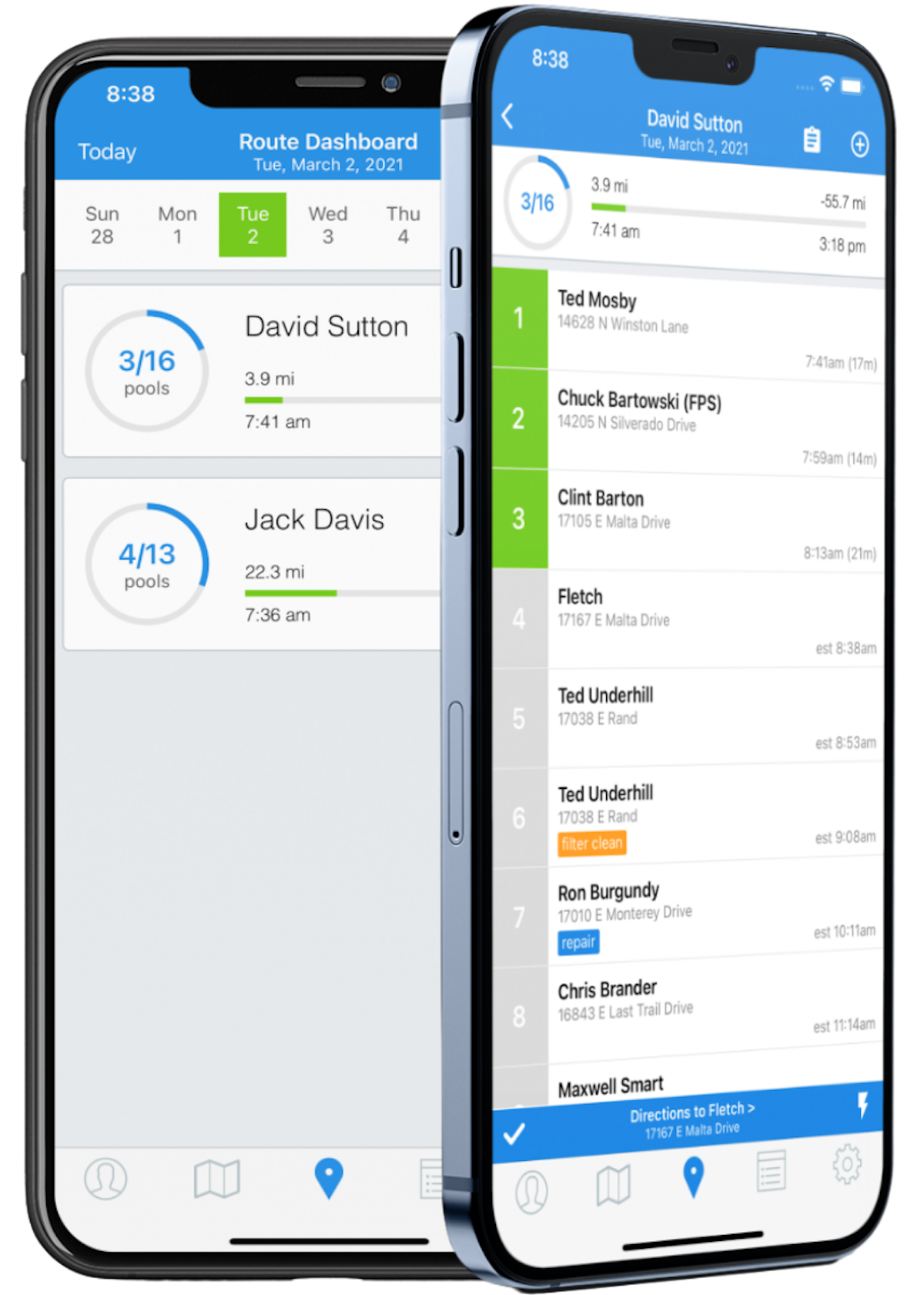
A quick look at the interface, so you know what you are getting before the trial.
What Skimmer does
The areas we lean on most in daily use, and how Skimmer handles each.
Route optimization
Techs get an optimized daily list of pool stops with drive times and ETAs, and the office manages multiple routes at once.
Service checklist
A per-visit service checklist walks the tech through each pool so nothing is missed on the route.
Water chemistry & chemicals
Record water readings and the chemicals dosed on every visit, keeping a chemical history for each pool.
Photo service emails
Before-and-after photos and an automatic service email prove the visit was completed and keep pool owners informed.
Billing & invoicing
Invoice recurring service and repairs and take payment through Stripe, with QuickBooks Online sync.
Work orders
Track repairs, filter cleans and green-to-clean jobs as work orders alongside the recurring route.
Offline mobile app
The app works with no internet connection, so techs keep working in signal-dead backyards.
Customer management
A central customer record ties routes, service history, photos and billing to each pool and owner.
How Skimmer works day to day
Skimmer is the runaway favorite of the pool service industry, and the ratings tell the story: a 4.9 out of 5 from more than 230 reviews, with 97% positive, the highest marks of any pool service software. Founded in 2017 in Austin, Texas, and now used by nearly 7,000 pool service companies, Skimmer set out to drag pool route management off paper and clipboards and into a fast, modern mobile app, and across Skimmer reviews that is exactly what pool pros credit it with doing.
The app is built around the pool route. A technician opens the day to an optimized list of stops, works each pool through a service checklist, records water chemistry readings and the chemicals added, snaps before and after photos, and the customer automatically gets a service email showing the visit was completed. That closed loop, route to checklist to photo-verified service email, is Skimmer's signature, and it is the feature reviewers rave about most, because it builds trust with pool owners and cuts down on "did you actually come?" calls.
Beyond the route, Skimmer runs the office side too. It handles multi-route scheduling and route optimization, billing and invoicing with Stripe, customer management, work orders for repairs and green-to-clean jobs, and QuickBooks Online sync. The mobile app works offline, so techs are not stuck when a backyard has no signal, and support is consistently rated as fast and genuinely helpful, another reason its customer support score sits at a near-perfect 4.9.
The honest weak spots are mostly about cost. Skimmer uses usage-based, per-pool pricing (roughly a dollar or two per pool per month) with monthly minimums, and the most common complaint in recent Skimmer reviews is that those per-pool fees have climbed noticeably over the past few years. Text messaging carries extra charges, the app occasionally logs users out, and per-pool checklist customization is more limited than some would like. None of this dents the core experience, but growing routes should model the cost.
Skimmer is also, deliberately, a pool-only specialist. It is not a general home-service FSM, and a plumber or landscaper should look elsewhere. But for a pool service business, that focus is the whole point: every feature is shaped around water chemistry, routes and recurring pool visits rather than bolted on.
Across Skimmer reviews the verdict could hardly be clearer: for a residential or commercial pool service company that wants the easiest, most polished way to run routes, prove service with photos and keep customers informed, Skimmer is the category leader, backed by a 4.9 out of 5 and nearly 7,000 companies. Just budget for the per-pool pricing as you grow, and Skimmer software will be hard to beat for pool service.
Skimmer pros and cons
Pros
- Highest-rated pool software: 4.9/5 from 230+ reviews, 97% positive
- Photo-verified service emails build trust and cut "did you come?" calls
- Fast, polished, genuinely easy mobile app for technicians
- Route optimization and multi-route scheduling built for pool routes
- Water chemistry readings and chemical tracking on every visit
- Works offline, with near-perfect (4.9) customer support
Cons
- Usage-based per-pool pricing has climbed noticeably in recent years
- Text messaging carries extra charges
- App occasionally logs users out
- Per-pool checklist customization is limited
- Pool-only: not a general home-service FSM
Who should use Skimmer, and who should skip it
A great fit if you
- You run a residential or commercial pool service business
- You want the easiest, most polished pool route app
- You want photo-verified service emails to build customer trust
- You need water chemistry and chemical tracking on every visit
- You want strong support and an app techs actually like
Look elsewhere if you
- You are a general home-service trade (plumbing, HVAC, landscaping)
- You run very large routes and want to avoid per-pool cost creep
- You need deep per-pool checklist customization
- You want a flat, predictable price regardless of pool count
Is Skimmer right for your trade?
Skimmer is used across the main home-service trades. Here is how it fits each one, and what its reviews tend to say in that niche.
Skimmer for Residential pool service
Residential pool routes run on Skimmer's optimized stops, service checklists and photo emails; it leads pool service software reviews.
Skimmer for Commercial pool service
Commercial and HOA pool accounts use water-chemistry logging and photo-verified service for compliance and trust.
Skimmer for Pool cleaning & maintenance
Recurring cleaning and maintenance routes are tracked visit by visit with chemicals dosed and readings recorded.
Skimmer for Pool repairs & green-to-clean
One-off repairs, filter cleans and green-to-clean jobs are managed as work orders alongside the recurring route.
Skimmer scorecard
How Skimmer scored across our rubric. Every tool is measured on the same areas.
Skimmer pricing and plans
Real starting prices, dated and re-checked each pass. Skimmer uses usage-based, per-pool pricing of roughly $1-2 per pool per month, with monthly minimums: a Getting Started tier around $49/mo and a Scaling Up tier around $98/mo, plus a free version and a free trial. Most companies pay somewhere in the $99-299/mo range. The most common pricing complaint in recent reviews is that per-pool fees have increased over the past few years, so growing routes should model the cost.
Skimmer integrations
Tools Skimmer connects with out of the box, so it fits the stack you already run.
 QuickBooks Online
 Stripe
Google Maps
Stripe
Google Maps
 Microsoft Outlook
Support, training and deployment
How you can reach the Skimmer team, how they onboard you, and where it runs.
Support
- Phone
- 24/7 Live Rep
- Chat
- Email / Help Desk
- Knowledge Base
- FAQs / Forum
Training
- Live Online
- In Person
- Webinars
- Documentation
- Videos
Deployment
- Cloud, SaaS, Web-Based
- Mobile - iPhone / iPad
- Mobile - Android
Typical customers
- Freelancers
- Small businesses
- Mid-size businesses
Skimmer alternatives
If Skimmer is not the fit, these are the closest tools we rank, in order.



 Skimmer
How to test Skimmer before you commit
Every tool demos well. These are the checks that actually tell you whether Skimmer fits your shop, while the free trial is still running.
Run a real job end to end
- Book it, schedule it, dispatch a tech, then invoice and take payment
- Do it on the phone your techs actually carry, not a demo laptop
- Try it with weak signal in the field, not just on office wifi
- Add a second user and watch how the per-seat price moves
Watch for the catch
- Payment-processing fees taken on every card and ACH run
- Features quietly locked to a higher tier than the one you tried
- Onboarding or data import sold as a paid add-on
- How hard it is to export your data if you decide to leave
Skimmer FAQ
How much does Skimmer cost?
Skimmer uses usage-based, per-pool pricing of roughly $1-2 per pool per month with monthly minimums: a Getting Started tier around $49/mo and a Scaling Up tier around $98/mo, plus a free version and a free trial. Most companies pay in the $99-299/mo range. The most common complaint in recent Skimmer reviews is that per-pool fees have climbed, so model the cost as your routes grow.
What do Skimmer reviews say?
Skimmer holds a 4.9 out of 5 from more than 230 reviews (97% positive), the highest of any pool service software, and it has won Capterra Best Ease of Use and Best Value awards. Pool pros praise the polished mobile app, the photo-verified service emails and the excellent support. The main criticism is that per-pool pricing has increased, plus extra text-messaging charges.
Is Skimmer only for pool service?
Yes. Skimmer is a dedicated pool service specialist, built around pool routes, water chemistry, photo service reports and recurring pool visits. It is not a general field service platform, so a plumbing, HVAC or landscaping business should choose a broader FSM. That pool-only focus is exactly why it is the category leader for pool pros.
What makes Skimmer stand out for pool techs?
Its route-to-service-email loop. A tech works an optimized route, completes a service checklist, records water chemistry and chemicals, and snaps before-and-after photos, and the customer automatically gets an email proving the visit happened. That photo-verified workflow builds trust with pool owners and is the feature reviewers highlight most.
Does Skimmer work offline?
Yes. The Skimmer mobile app works with no internet connection, so technicians can keep logging service, readings and photos in backyards with poor or no signal, then sync when they are back online. Reliable offline use is important for pool routes and is a frequently praised feature.
Does Skimmer integrate with QuickBooks?
Yes. Skimmer integrates with QuickBooks Online for accounting and uses Stripe for billing and card payments, plus Google Maps for routing. Its integration set is focused on what pool service businesses actually need rather than being broad.
Who owns Skimmer?
Skimmer was founded in 2017 and is headquartered in Austin, Texas. It has grown into the leading pool service software, backed by significant venture funding and used by nearly 7,000 pool service companies.
Skimmer vs Pool Brain: which is better?
Both are strong pool-only tools. Skimmer is the market leader, prized for its polished, easy app, photo service emails and huge, near-perfect review base. Pool Brain leans harder into automated water-chemistry dosing and job accountability. Choose Skimmer for ease of use and customer-facing service proof, and Pool Brain if deep chemistry automation is your priority.
Is Skimmer worth it?
For a residential or commercial pool service company, yes, it is widely regarded as the best pool route app and has the ratings to back it up. Just budget for the usage-based per-pool pricing as your route count grows. If you need a general home-service FSM or a flat price regardless of pools, look elsewhere.
Skimmer reviews from real users
Verified reviews from people running Skimmer in the field. Every review is read by our team before it goes live, so this is honest signal, not spam.
No user reviews yet. If you use Skimmer, be the first to tell other shops how it works in the real world.
You need a free account to post a review. Create one in under a minute and you will come right back here to write it.
Why our ranking is worth trusting
“We run a real week of jobs through every tool and score it against the same 40 points. If it wins, it earned it, and no vendor can change that.”
The Duhari review teamProud of your score? Show it.
Add your independent Duhari rating to your site. It is free, it updates on its own, and it links back to this review.
Get your badge →
Not sure which tool fits?
Start from the full ranking, filtered by your trade and crew size, and pick the right tool with honest scores and real starting prices.