
HoneyBook Review
HoneyBook is the most popular all-in-one client-management platform for photographers, taking the whole path from inquiry to proposal, contract, invoice and payment through one polished clientflow. It is a clientflow CRM rather than a photography-native tool.
On this page
The verdict
HoneyBook reviews make it the most popular client-management CRM for photographers, with a 4.7 out of 5 from nearly 700 reviews and photographers as its single largest audience. Its signature is the smart file: one branded, interactive document that carries the proposal, the contract with built-in e-signature, and the deposit payment in a single client-facing flow, so a client can review, sign and pay in one sitting. Around it sit a lead pipeline, scheduler, invoicing, autopay, a client portal, automations and QuickBooks sync. The honest catches are payment processing fees and occasional payout quirks, a clientflow that can feel rigid for unusual workflows, and no free plan. Crucially it is an all-in-one clientflow CRM, not a photography-native tool, so it has no built-in image galleries or proofing; many photographers pair it with Pixieset or ShootProof for delivery. HoneyBook for photographers combines contract, invoice and project management with responsive support in one workflow, and its pricing is fair for what it replaces.
HoneyBook at a glance
| Vendor | HoneyBook | Category | Client management CRM for photographers |
|---|---|---|---|
| Best for | photographers & studios who want inquiry-to-payment in one polished flow | Starting price | $36 to $129/mo |
| Free trial | Yes | Free plan | No |
| User rating | 4.7/5 (687 reviews) | Our score | 8.7/10 |
| Deployment | Cloud, iOS, Android | Founded | 2013 |
| Headquarters | San Francisco, CA | Users | Photographers & independent businesses |
See HoneyBook in action
A quick look at the interface, so you know what you are getting before the trial.

What HoneyBook does
The areas we lean on most in daily use, and how HoneyBook handles each.
Smart files (clientflow)
One branded, interactive document carries the proposal, contract and payment together, so clients review, sign and pay in a single flow.
Proposals & booking
Send custom proposals with packages and add-ons, and let clients book and pay a retainer to lock the date.
Contracts & e-signature
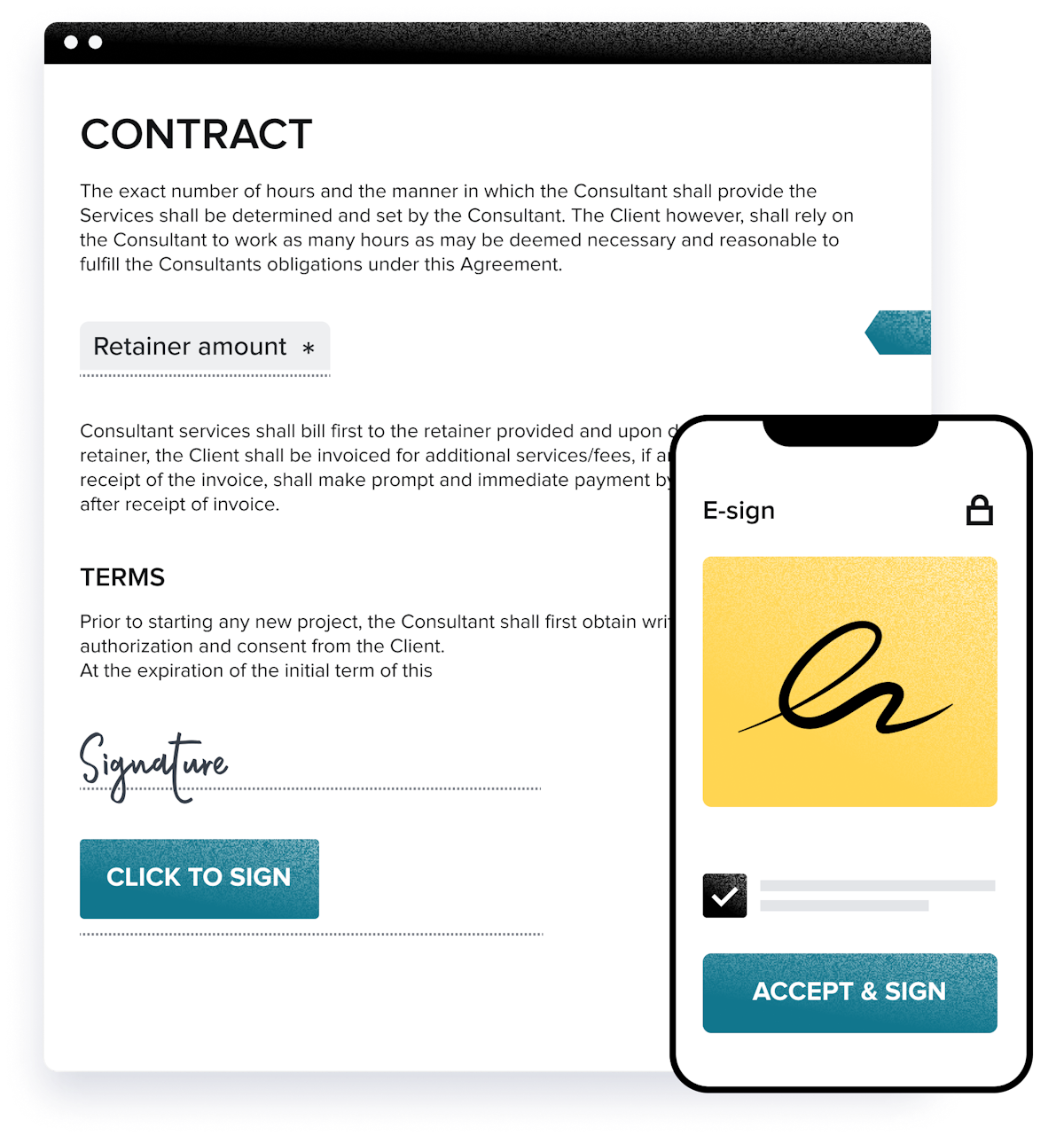
Built-in legally binding e-signature handles contract signing on any device, with no third-party tool needed.
Invoicing & payments
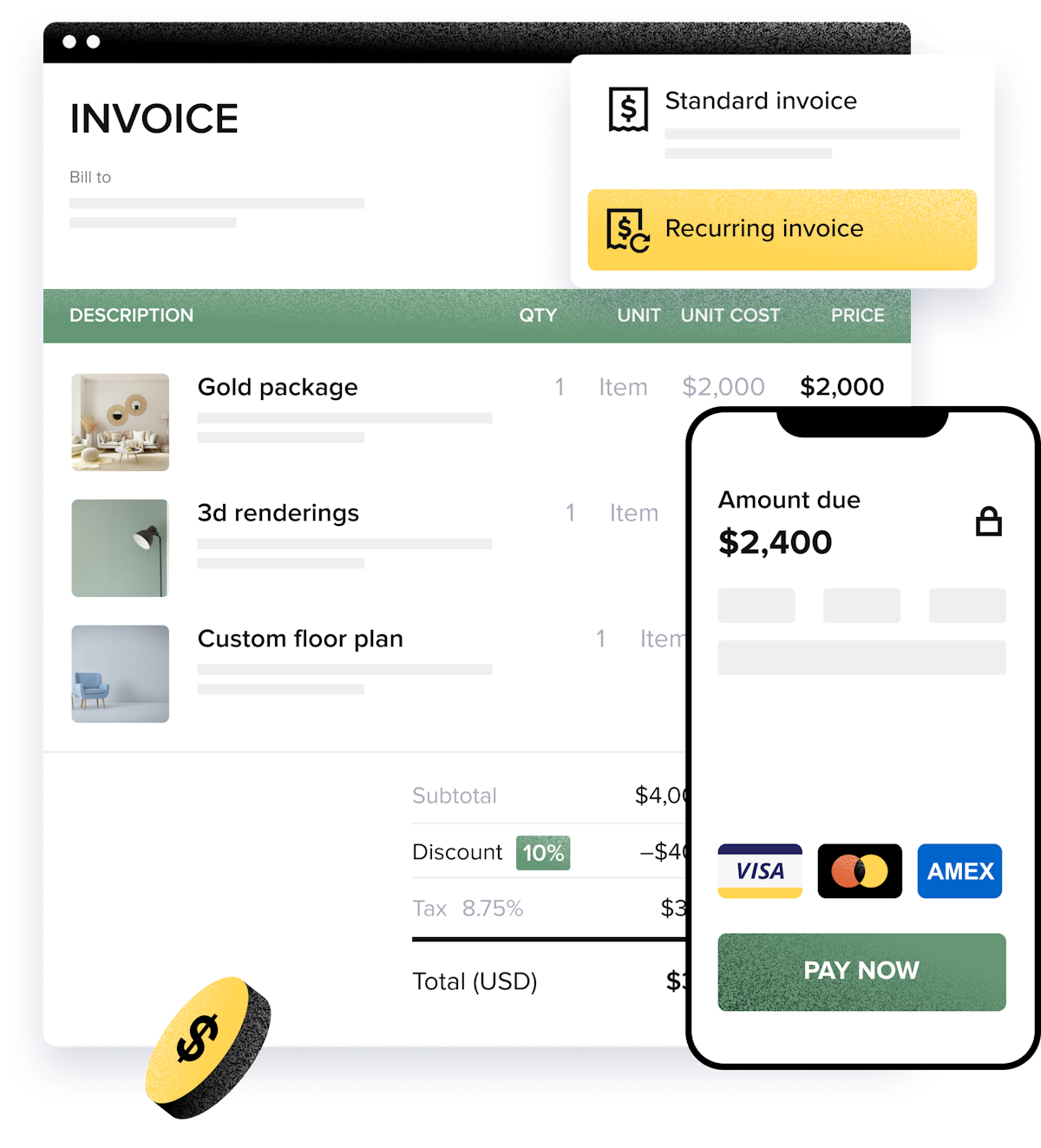
Invoice with card and bank payments, recurring and installment billing, automatic reminders and autopay.
Scheduler
A built-in scheduler books consultations and shoots and syncs with Google Calendar so nothing double-books.
Automations
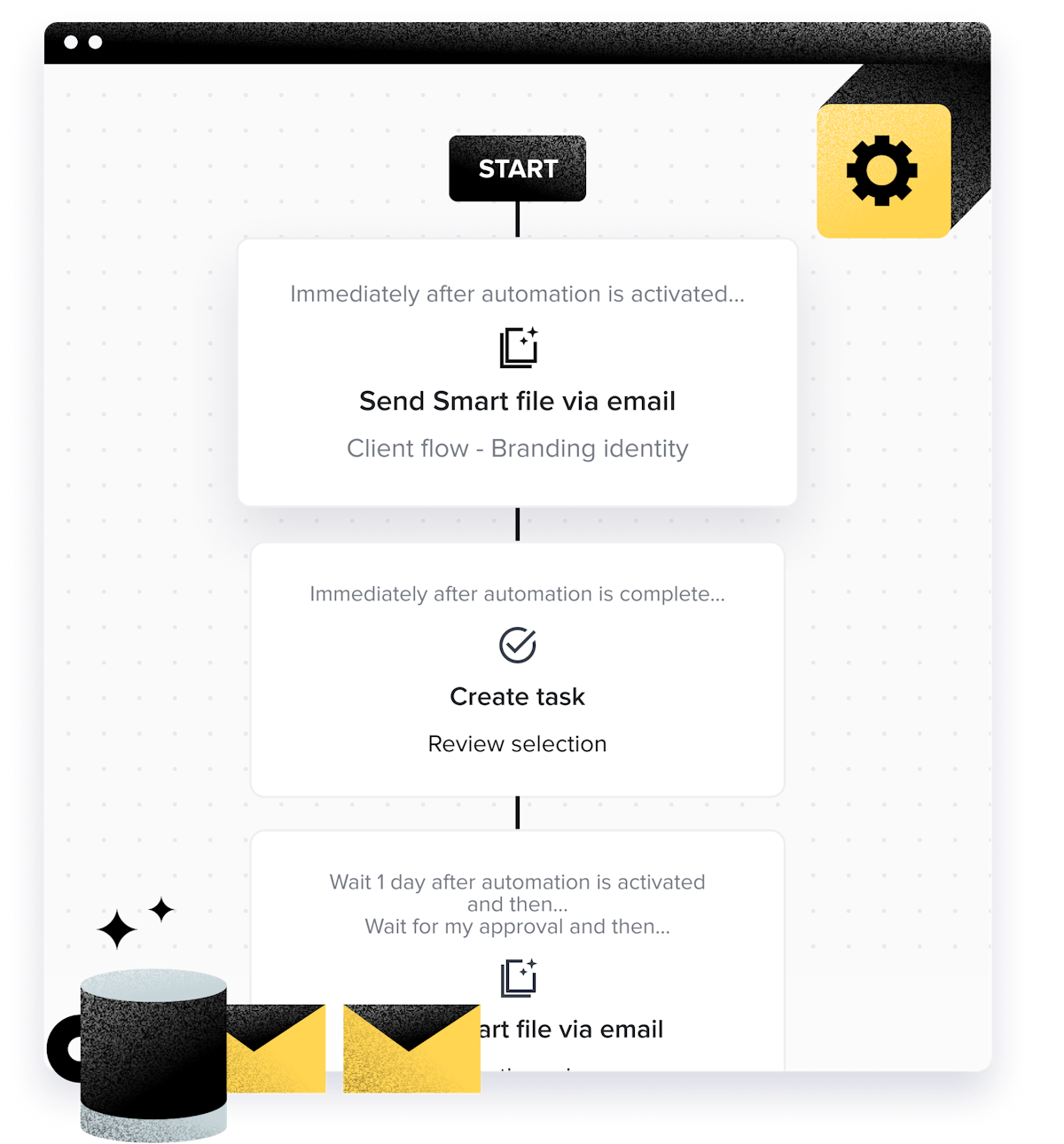
Trigger the next smart file, email or task automatically when a stage completes, automating follow-up and onboarding.
Client portal & pipeline
A branded client portal and a visual lead-to-booked pipeline keep every project and client in one place.
QuickBooks & integrations
Two-way QuickBooks Online sync plus Gmail, Google Calendar, Calendly, Zoom and Zapier connect the rest of your stack.
How HoneyBook works day to day
HoneyBook is the most popular client-management platform for photographers, and it is easy to see why: it takes the whole messy path from a first inquiry to a paid invoice and puts it on rails. Founded in 2013 in San Francisco and now used by hundreds of thousands of independent businesses, HoneyBook is an all-in-one clientflow CRM, and photographers are its single largest audience, making up more than a quarter of its users. Across HoneyBook reviews the platform earns a strong 4.7 out of 5 from nearly 700 reviews, with owners repeatedly saying it replaced four or five separate tools.
The heart of HoneyBook is the smart file. Instead of emailing a PDF quote, then a separate contract, then chasing an invoice, a photographer sends one branded, interactive document that carries the proposal, the contract with built-in e-signature, and the deposit payment in a single client-facing flow. A couple can review a wedding package, sign, and pay a retainer in one sitting, on their phone, and the photographer watches it happen in real time. That inquiry-to-payment clientflow is what reviewers love most, because it books clients faster and looks polished doing it.
Around that core, HoneyBook is genuinely all-in-one. It handles a lead pipeline, a scheduler for consultations and shoots, invoicing with card and bank payments, recurring and installment billing, automatic payment reminders and autopay, a client portal, task management, and automations that send the next smart file or create a task the moment a stage completes. Built-in e-signature means no separate DocuSign, and a two-way QuickBooks Online sync keeps the books straight. For a solo or small photography studio, it is a professional back office out of the box.
The honest limitations are worth knowing. Because HoneyBook is built around one opinionated clientflow, some photographers with unusual workflows find it repetitive or not customizable enough, and control over certain client-facing details is limited. Its payments are convenient but carry processing fees, and reviewers report occasional slow payouts and auto-pay quirks. Support is generally praised, but a minority cite slow responses and difficulty reaching a person by phone. It is also priced as software, with no free plan, only a trial.
The most important thing to understand is scope. HoneyBook is an all-in-one clientflow CRM, not a photography-native tool. It does not include image galleries, proofing, or shoot-day scheduling views the way a photographer-specific platform such as Studio Ninja or Tave does. Many photographers happily run their whole business on HoneyBook and deliver galleries through a separate tool like Pixieset or ShootProof; others who want galleries in the same account prefer a photography-first CRM.
Across HoneyBook reviews the verdict is clear: for a photographer who wants the smoothest possible path from inquiry to signed contract to paid deposit, with a polished client experience and one tool instead of five, HoneyBook is a top choice, backed by a 4.7 out of 5 and a huge, loyal user base. Just weigh the payment fees and the lack of native galleries, and if a client-facing gallery in the same platform matters more than clientflow polish, compare it against a photography-specific CRM before you commit.
Under the hood, HoneyBook is really a workflow and client management engine. It combines contract management, invoice management, payment management and project management in one place, so a photographer replaces the multiple apps they used to juggle with a single system. Online booking, online invoicing and online payments all run through the same client management workflow, every invoice is tracked from sent to paid, and automations handle the repetitive follow-ups. Beyond the core, HoneyBook layers in task management, expense management and lead management, a calendar that syncs with Google Calendar, and time-tracking-style records so you can track where every project and payment stands. Reviewers who leave the highest HoneyBook reviews consistently point to this consolidation, and to responsive support, as the reason they stay; the most common complaint is that the client flow can feel less customizable than they want.
For the money, HoneyBook pricing is mid-market: the Starter plan gives unlimited clients and projects, invoices, payments, proposals, contracts and a client portal, while Essentials adds the scheduler, automations and QuickBooks Online, and Premium unlocks unlimited team members, priority support and advanced reports. That puts HoneyBook pricing above the cheapest photography CRMs but below enterprise tools, and most photographers find the value fair for what it replaces. If it is not the right fit, the strongest HoneyBook alternatives are Dubsado for deeper customization, Studio Ninja for a photography-native workflow, and Sprout Studio if you want galleries built in; we cover the best HoneyBook alternatives in the comparison section below. Among cross-industry CRMs, HoneyBook for photographers remains the most popular pick, precisely because photographers are its largest user base and the workflow was refined around exactly this kind of client work.
HoneyBook pros and cons
Pros
- Smart files combine proposal, contract and payment in one client-facing flow
- Built-in e-signature, so no separate DocuSign
- Genuinely all-in-one: pipeline, scheduler, invoicing, portal, automations
- Polished, professional client experience that books faster
- Autopay, recurring billing and automatic payment reminders
- Huge, loyal base: 4.7/5 from nearly 700 reviews, photographers #1 industry
Cons
- No built-in image galleries or proofing (not photography-native)
- Opinionated clientflow can feel rigid or repetitive for unusual workflows
- Payment processing fees, with occasional slow payouts and autopay quirks
- Limited control over some client-facing details
- No free plan, only a trial
- A minority report slow support and hard-to-reach phone help
Who should use HoneyBook, and who should skip it
A great fit if you
- You are a photographer or small studio wanting one tool, not five
- You want the smoothest inquiry-to-signed-to-paid client experience
- You value built-in contracts, e-signature and payments
- You want automations to handle follow-up and onboarding
- You are happy to deliver galleries through a separate tool
Look elsewhere if you
- You want client galleries and proofing in the same platform
- You need photography-native features like shoot-day scheduling views
- You have an unusual workflow that resists a fixed clientflow
- You want a permanently free plan
Is HoneyBook right for your studio?
Here is how HoneyBook fits each type of studio, and what to check for yours.
HoneyBook for Wedding photography
Wedding photographers send packages, get contracts signed and collect retainers in one flow; HoneyBook leads wedding photography software reviews for its client experience.
HoneyBook for Portrait & family
Portrait and family studios use recurring sessions, automated reminders and easy online booking to keep the calendar full.
HoneyBook for Real estate photography
Real estate photographers use recurring invoicing and fast online booking to serve high-volume agent clients.
HoneyBook for Event & commercial
Event and commercial photographers manage proposals, contracts and installment payments for larger, multi-stage jobs.
HoneyBook for Creative freelancers
Beyond photography, designers, planners and other creatives use the same clientflow, since HoneyBook is cross-industry by design.
HoneyBook scorecard
How HoneyBook scored across our rubric. Every tool is measured on the same areas.
HoneyBook pricing and plans
Real starting prices, dated and re-checked each pass. HoneyBook has three plans: Starter around $36/mo, Essentials around $59/mo and Premium around $129/mo, all with unlimited clients and projects; annual billing is cheaper. There is a free trial but no permanent free plan. Payments run through HoneyBook with standard card processing fees, which is worth factoring in alongside the subscription.
HoneyBook integrations
Tools HoneyBook connects with out of the box, so it fits the stack you already run.
 QuickBooks Online
 Google Calendar
 Gmail
Calendly
Zoom
Gmail
Calendly
Zoom
 Zapier
Support, training and deployment
How you can reach the HoneyBook team, how they onboard you, and where it runs.
Support
- Phone
- Email / Help Desk
- Chat
- Knowledge Base
Training
- Live Online
- Webinars
- Documentation
- Videos
Deployment
- Cloud, SaaS, Web-Based
- Mobile - iPhone / iPad
- Mobile - Android
Typical customers
- Freelancers
- Small businesses
HoneyBook alternatives
If HoneyBook is not the fit, these are the closest tools we rank, in order.


 HoneyBook
How to test HoneyBook before you commit
Every tool demos well. These are the checks that actually tell you whether HoneyBook fits your studio, while the free trial is still running.
Run a real client workflow end to end
- Use your own templates and one of your busiest appointment or session types
- Test it on the devices your team actually use, not a demo laptop
- Move the result into the system you already use and time every step
- Add a second user and watch how the per-seat price moves
Watch for the catch
- Usage caps, credits or add-on fees that only show up on the invoice
- Features quietly locked to a higher tier than the one you tried
- Onboarding or data import sold as a paid add-on
- How hard it is to export your data if you decide to leave
HoneyBook FAQ
How much does HoneyBook cost?
HoneyBook has three plans: Starter around $36/mo, Essentials around $59/mo and Premium around $129/mo, all with unlimited clients and projects, and annual billing is cheaper. There is a free trial but no permanent free plan. Payments run through HoneyBook with standard card processing fees, so factor those in alongside the subscription.
What do HoneyBook reviews say?
HoneyBook holds a 4.7 out of 5 from nearly 700 reviews, and photographers are its single largest audience. Users love that it replaces several tools, praising the smart files, built-in e-signature and polished client experience. The most common complaints are payment processing fees and occasional payout quirks, a clientflow that can feel rigid, and no free plan.
Is HoneyBook good for photographers?
Yes, photographers are HoneyBook's biggest user group. It excels at the business side of photography: sending proposals and packages, getting contracts signed, collecting deposits and automating follow-up. The one gap is that it has no built-in image galleries or proofing, so most photographers deliver photos through a separate tool like Pixieset or ShootProof while running everything else in HoneyBook.
Does HoneyBook have client galleries?
No. HoneyBook is an all-in-one clientflow CRM focused on proposals, contracts, invoicing and payments, not a photography-native platform, so it does not include image galleries, proofing or print sales. Photographers who want galleries in the same account often prefer a photography-first CRM like Studio Ninja or Tave, or pair HoneyBook with a dedicated gallery tool.
HoneyBook vs Dubsado: which is better for photographers?
HoneyBook is easier and faster to set up, with a more polished client experience, making it the better pick for most photographers who want to be up and running quickly. Dubsado offers deeper workflow customization but takes more time to configure. Choose HoneyBook for speed and polish, and Dubsado if you need highly custom workflows and will invest the setup time.
What is a smart file in HoneyBook?
A smart file is HoneyBook's signature feature: one branded, interactive document that can combine a proposal, a contract with e-signature and a payment into a single client-facing flow. Instead of sending separate quotes, contracts and invoices, a photographer sends one smart file and the client reviews, signs and pays in one place, which is why it books clients faster.
Does HoneyBook integrate with QuickBooks?
Yes. HoneyBook offers a two-way QuickBooks Online integration on its Essentials plan and above, keeping invoices and payments in sync with your accounting. It also connects with Google Calendar, Gmail, Calendly, Zoom and Zapier, so it fits alongside the rest of a photographer's tools.
Who owns HoneyBook?
HoneyBook was founded in 2013 by Oz and Naama Alon and Dror Shimoni, and is headquartered in San Francisco. It is a well-funded private company that has raised close to $500 million and grown into the leading clientflow platform for independent service businesses, with photographers as its largest segment.
Is HoneyBook worth it?
For a photographer who wants inquiry, proposal, contract and payment in one polished workflow, yes, HoneyBook is one of the best-reviewed options and its all-in-one client management replaces multiple apps. Weigh the payment processing fees and the lack of native galleries. If it is not the fit, the top HoneyBook alternatives are Dubsado, Studio Ninja and Sprout Studio, and you can compare HoneyBook pricing and support against each before you commit.
HoneyBook reviews from real users
Verified reviews from people running HoneyBook in the field. Every review is read by our team before it goes live, so this is honest signal, not spam.
No user reviews yet. If you use HoneyBook, be the first to tell other studios how it works in the real world.
You need a free account to post a review. Create one in under a minute and you will come right back here to write it.
Why our ranking is worth trusting
“We score every tool against the same 40 points, from the same sources. If it wins, it earned it, and no vendor can change that.”
The Duhari review teamProud of your score? Show it.
Add your independent Duhari rating to your site. It is free, it updates on its own, and it links back to this review.
Get your badge →
Not sure which tool fits?
Start from the full ranking, compare honest scores and real starting prices, and pick the right tool for your studio.