
Pic-Time Review
Pic-Time is a client-gallery platform that pairs elegant galleries with the most sophisticated print store and sales-marketing engine in the category: automated campaigns, a global print-lab network, AI photo search and tiered digital pricing.
On this page
The verdict
Pic-Time reviews make it the client-gallery platform built to sell: elegant, minimalist galleries backed by the strongest print store and sales-marketing engine in the category. Founded in 2010, it pairs premium delivery, AI photo search and mobile galleries with a global print-lab network, automated email and sale campaigns, abandoned-cart reminders and tiered digital pricing that lift print revenue. Album proofing, client selections, guest pre-registration, slideshows and SEO blogs round it out, with Zapier connecting an outside CRM. The catches are a learning curve, overlay-only watermarks, and an album workflow lighter than a dedicated tool. Pricing starts free, then $8 to $50/mo by storage. For a photographer who prints, Pic-Time is the gallery tool that pays for itself.
Pic-Time at a glance
| Vendor | Pic-Time | Category | Photography galleries, store & sales |
|---|---|---|---|
| Best for | photographers who want to maximize print and product sales | Starting price | Free to $50/mo |
| Free trial | Yes | Free plan | Yes |
| User rating | 4.8/5 (70 reviews) | Our score | 8.6/10 |
| Deployment | Cloud, iOS, Android | Founded | 2010 |
| Headquarters | Tel Aviv, Israel | Users | Tens of thousands of photographers |
See Pic-Time in action
A quick look at the interface, so you know what you are getting before the trial.
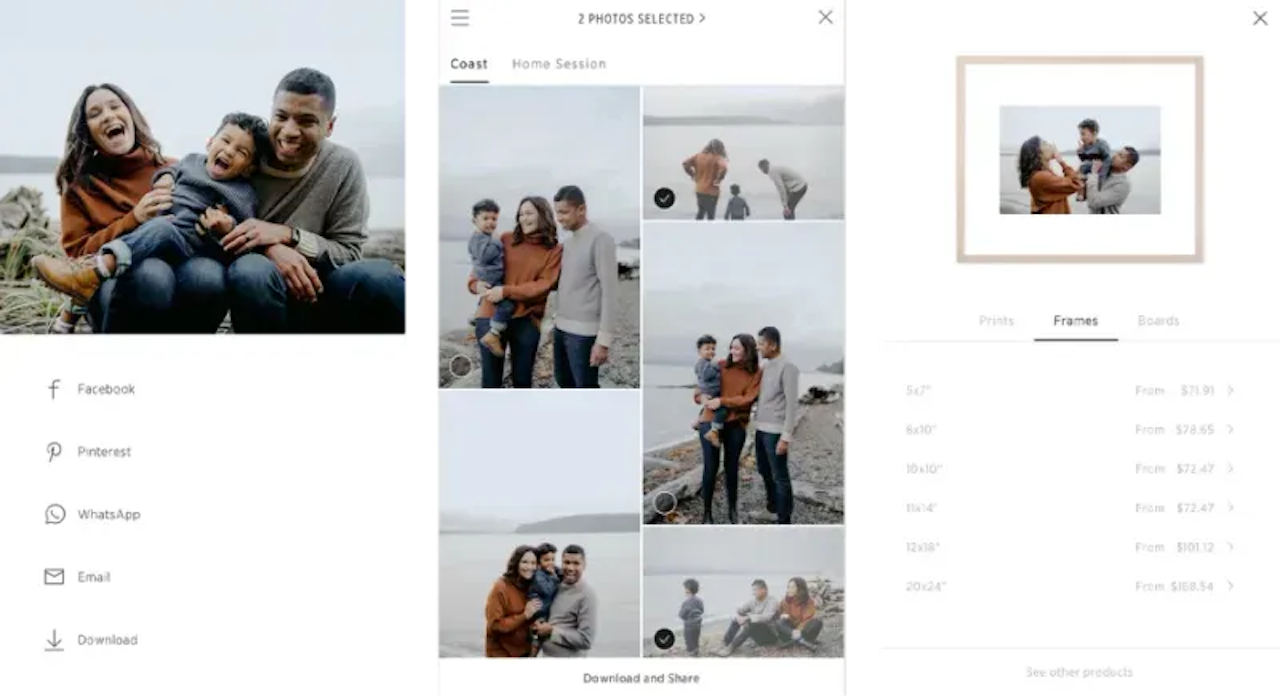
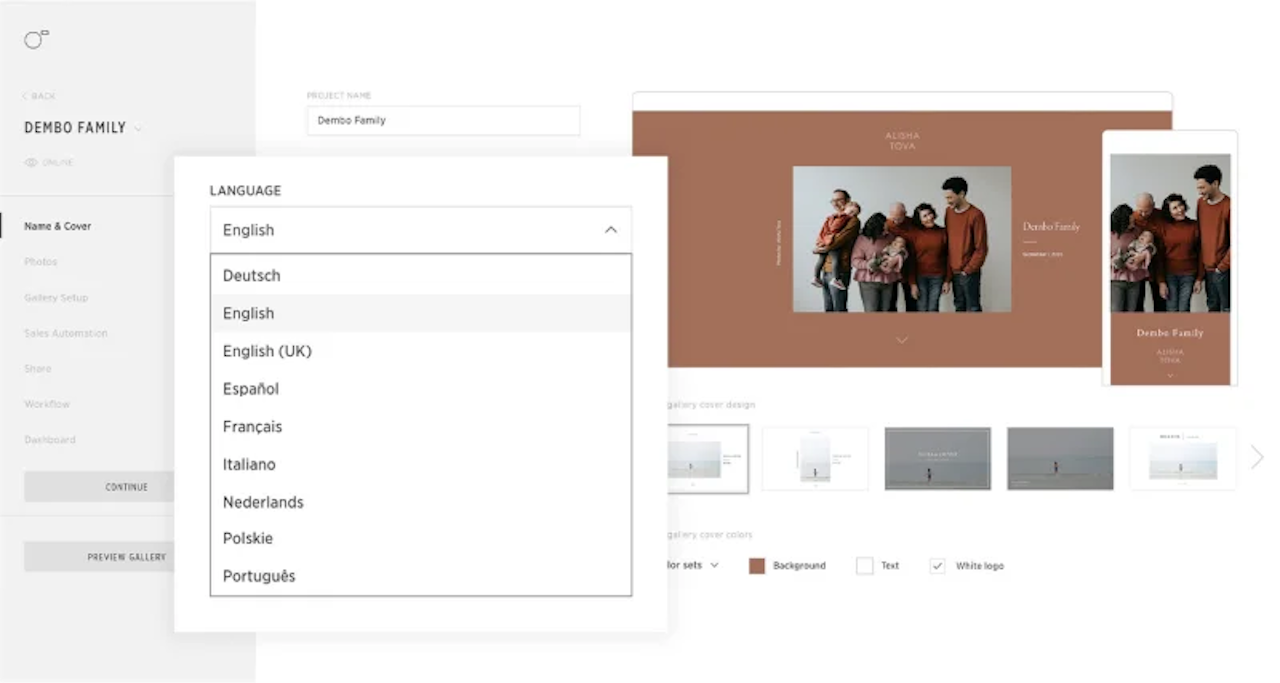
What Pic-Time does
The areas we lean on most in daily use, and how Pic-Time handles each.
Client galleries
Elegant, minimalist, password-protected galleries on your brand with email collection and a polished mobile experience.
Print store
Sell prints, albums, wall art and greeting cards through a global print-lab network, with you setting prices and keeping the margin.
Sales marketing
Automated email campaigns, abandoned-cart reminders, coupons and seasonal sale campaigns turn galleries into a sales channel.
Tiered digital pricing
Set decreasing per-image prices as order quantity rises to encourage clients to buy more digital files.
AI photo search
AI-powered image recognition lets clients find themselves or a subject in a large gallery in seconds.
Album proofing & selections
Client selections, favorites and album proofing let clients choose and approve images before you finalize.
Slideshows & SEO blogs
Music slideshows and SEO-friendly blog posts built from a gallery help present and market your work.
Automation & Zapier
Email automation templates plus a Zapier integration connect Pic-Time to an outside CRM for client management.
How Pic-Time works day to day
Pic-Time is the client-gallery platform built for photographers who want to sell, not just deliver. Founded in 2010 and headquartered in Tel Aviv, Pic-Time pairs elegant, minimalist galleries with the most sophisticated print store and sales-marketing engine in the category, which is why photographers focused on revenue keep switching to it. Across Pic-Time reviews the recurring theme is the same: the galleries look beautiful, and the store actually drives sales. It holds a strong rating on Capterra, with design and e-commerce as its standout strengths.
The client gallery is the foundation. A photographer uploads a shoot to a clean, elegant, password-protected gallery on their own brand, collects client emails, and delivers a premium viewing experience with AI-powered photo search that lets clients find themselves or a specific subject in seconds. Clients view, favorite, download and buy, and the mobile experience is polished. On delivery alone Pic-Time sits alongside Pixieset and ShootProof as a top client gallery, and you can compare all three on our client gallery software guide.
Where Pic-Time pulls ahead is the store and its marketing automation. The print store connects to a global network of print labs, so clients order prints, albums, wall art and greeting cards that fulfill locally for faster delivery, while the photographer sets prices and keeps the margin. On top of that sits a genuine sales engine: automated email campaigns, abandoned-cart reminders, coupons, seasonal sale campaigns and tiered digital pricing that drops the per-image price as clients buy more. That combination of store plus marketing is what makes Pic-Time the sales leader among gallery tools, and it is the reason many photographers report their print revenue rising after switching.
Round it out with client workflow and presentation features: album proofing, client selections and favorites, guest pre-registration for events, slideshows set to music, and SEO-friendly blog posts built from a gallery to help a photographer rank and market their work. Email automation templates handle welcome, confirmation and follow-up sequences, and a Zapier integration connects Pic-Time to an outside CRM for lead and client management, since Pic-Time itself is a gallery-and-sales tool rather than a booking CRM.
The honest trade-offs are a learning curve and a couple of gaps. Reviewers note the depth of the store and marketing tools means there is more to learn than a simple gallery, and the interface can feel busy at first. Security-minded photographers point out that gallery watermarks are an overlay rather than baked into the file, and a few find the album approval workflow less smooth than a dedicated album tool. None of these outweigh the sales upside for a photographer who prints, but they are worth knowing.
On price, Pic-Time pricing starts with a free plan, then runs from a Beginner plan around 8 dollars a month with 10GB of storage, to Professional near 25 dollars a month with 100GB plus slideshows and album proofing, to an Advanced plan around 50 dollars a month with unlimited storage, multi-brand support and the blog, with annual billing cheaper and lower store commissions on higher tiers. That makes Pic-Time for photographers easy to start and fair to scale, especially once print sales offset the subscription. If it is not the fit, the closest Pic-Time alternatives are Pixieset for the prettiest galleries plus a website builder, ShootProof for the most flexible print store, and PhotoShelter or SmugMug for high-volume archives; the best Pic-Time alternatives are compared below.
Across Pic-Time reviews the verdict is clear: for a photographer who wants beautiful galleries and the strongest print store and sales-marketing engine in one place, Pic-Time is the gallery tool that pays for itself, with a free plan to start. Pair it with a booking CRM like HoneyBook, Dubsado or Studio Ninja for the client-management side, and let the store do what it does best.
Pic-Time pros and cons
Pros
- Strongest print store and sales-marketing engine of any gallery tool
- Global print-lab network fulfills prints, albums and wall art locally
- Sales automation: email campaigns, abandoned-cart, coupons, seasonal sales
- Tiered digital pricing drops per-image price as clients buy more
- Elegant, minimalist galleries with AI-powered photo search
- Free plan to start, then fair $8 to $50/mo scaling by storage
Cons
- Learning curve: more store and marketing depth to master than a simple gallery
- Gallery watermark is an overlay, not baked into the file
- Album approval workflow lighter than a dedicated album tool
- Not a booking CRM: pair it with HoneyBook, Dubsado or Studio Ninja
- Interface can feel busy at first
Who should use Pic-Time, and who should skip it
A great fit if you
- You want to maximize print, album and product sales
- You want automated store marketing (campaigns, abandoned-cart, coupons)
- You value elegant galleries plus AI photo search
- You sell to events, weddings or sports and want fast local print fulfillment
- You already have a booking CRM and want the best sales gallery
Look elsewhere if you
- You need a dedicated booking CRM (choose HoneyBook or Dubsado)
- You want the simplest possible gallery with no learning curve
- You need baked-in watermark security on delivered files
- You want a built-in portfolio website (compare Pixieset)
Is Pic-Time right for your studio?
Here is how Pic-Time fits each type of studio, and what to check for yours.
Pic-Time for Wedding photography
Wedding photographers deliver premium galleries and drive album and print sales with Pic-Time store marketing.
Pic-Time for Event photography
Event photographers use AI photo search and guest pre-registration so attendees find and buy their photos fast.
Pic-Time for Sports & school
Sports and school photographers sell prints at volume through the print-lab network and tiered pricing.
Pic-Time for Portrait & family
Portrait and family photographers pair elegant galleries with automated sale campaigns to lift print revenue.
Pic-Time for Any photographer who sells prints
Photographers focused on print and product revenue choose Pic-Time for its store and sales automation.
Pic-Time scorecard
How Pic-Time scored across our rubric. Every tool is measured on the same areas.
Pic-Time pricing and plans
Real starting prices, dated and re-checked each pass. Pic-Time pricing starts with a free plan, then runs from a Beginner plan around $8/mo with 10GB storage, to Professional near $25/mo with 100GB plus slideshows and album proofing, to Advanced around $50/mo with unlimited storage, multi-brand and the blog. Annual billing is cheaper and higher tiers carry lower store commissions. Print sales often offset the subscription for photographers who sell.
Pic-Time integrations
Tools Pic-Time connects with out of the box, so it fits the stack you already run.
 Zapier
 Stripe
 PayPal
 QuickBooks
Google Analytics
Print labs (WHCC, Loxley & more)
QuickBooks
Google Analytics
Print labs (WHCC, Loxley & more)
Support, training and deployment
How you can reach the Pic-Time team, how they onboard you, and where it runs.
Support
- Email / Help Desk
- Chat
- Knowledge Base
- FAQs / Forum
Training
- Documentation
- Videos
- Webinars
Deployment
- Cloud, SaaS, Web-Based
- Mobile - iPhone / iPad
- Mobile - Android
Typical customers
- Freelancers
- Small businesses
Pic-Time alternatives
If Pic-Time is not the fit, these are the closest tools we rank, in order.



 Pic-Time
How to test Pic-Time before you commit
Every tool demos well. These are the checks that actually tell you whether Pic-Time fits your studio, while the free trial is still running.
Run a real client workflow end to end
- Use your own templates and one of your busiest appointment or session types
- Test it on the devices your team actually use, not a demo laptop
- Move the result into the system you already use and time every step
- Add a second user and watch how the per-seat price moves
Watch for the catch
- Usage caps, credits or add-on fees that only show up on the invoice
- Features quietly locked to a higher tier than the one you tried
- Onboarding or data import sold as a paid add-on
- How hard it is to export your data if you decide to leave
Pic-Time FAQ
How much does Pic-Time cost?
Pic-Time pricing starts with a free plan, then runs from a Beginner plan around $8/mo with 10GB storage, to Professional near $25/mo with 100GB plus slideshows and album proofing, to an Advanced plan around $50/mo with unlimited storage, multi-brand support and the SEO blog. Annual billing is cheaper and higher tiers carry lower store commissions, so print sales often offset the subscription.
What do Pic-Time reviews say?
Pic-Time reviews are strongly positive, with a high Capterra rating. Photographers praise the elegant galleries and, above all, the print store and sales-marketing engine, which many credit with lifting their print revenue. The most common critiques are a learning curve for the store and marketing depth, overlay-only watermarks, and an album approval workflow that is lighter than a dedicated album tool.
Is Pic-Time better than Pixieset or ShootProof?
They lead the gallery category for different reasons. Pixieset is known for the prettiest galleries plus a website builder, ShootProof for a flexible print store, and Pic-Time for the strongest store marketing and sales automation (email campaigns, abandoned-cart, coupons, tiered pricing) on top of elegant galleries. Choose Pic-Time if maximizing print and product sales is your priority. All three start free, so trial each on a real gallery.
Does Pic-Time sell prints and albums?
Yes, and it is its core strength. Pic-Time connects to a global network of print labs so clients order prints, albums, wall art and greeting cards that fulfill locally, while you set prices and keep the margin. Automated store marketing and tiered digital pricing help turn every gallery into real sales.
Is Pic-Time a CRM?
No. Pic-Time is a client-gallery and sales platform, not a booking CRM. It handles delivery, the store and sales marketing, and a Zapier integration connects it to an outside CRM for lead and client management. Most photographers pair Pic-Time with a booking CRM like HoneyBook, Dubsado or Studio Ninja.
What are the best Pic-Time alternatives?
The closest Pic-Time alternatives are Pixieset for the most beautiful galleries plus a website builder, ShootProof for the most flexible print store and added invoicing and contracts, and PhotoShelter or SmugMug for high-volume archiving. Compare all of them on our client gallery software guide.
Does Pic-Time have AI photo search?
Yes. Pic-Time includes AI-powered image recognition so clients can search a large gallery and instantly find photos of themselves or a specific subject. For events, weddings and sports galleries with thousands of images, that speeds up client selections and helps drive downloads and print sales.
Is Pic-Time worth it?
For a photographer who prints and wants to maximize sales, yes. Pic-Time offers elegant galleries and the strongest store and sales-marketing engine in the category, and the free plan makes it easy to start. If you only need simple delivery with no learning curve, a lighter gallery may suit you; if you want a built-in website, compare Pixieset.
Pic-Time reviews from real users
Verified reviews from people running Pic-Time in the field. Every review is read by our team before it goes live, so this is honest signal, not spam.
No user reviews yet. If you use Pic-Time, be the first to tell other studios how it works in the real world.
You need a free account to post a review. Create one in under a minute and you will come right back here to write it.
Why our ranking is worth trusting
“We score every tool against the same 40 points, from the same sources. If it wins, it earned it, and no vendor can change that.”
The Duhari review teamProud of your score? Show it.
Add your independent Duhari rating to your site. It is free, it updates on its own, and it links back to this review.
Get your badge →
Not sure which tool fits?
Start from the full ranking, compare honest scores and real starting prices, and pick the right tool for your studio.