
LawnPro Review
LawnPro is an affordable, easy lawn care business software with a genuinely free plan and a pay-for-what-you-need add-on model, covering scheduling, estimates, invoicing, payments and customer management for small operators.
On this page
The verdict
LawnPro reviews rate it one of the best-value tools in lawn care, with a 4.6 out of 5 and a standout 4.7 for value for money. Founded in 2003 and based in Alabama, it covers scheduling, estimates, invoicing, online payments, customer management and time tracking in a simple app, with a genuinely free plan for up to 50 customers and an add-on model where you pay only for the features you use. Higher tiers add unlimited customers, routing, auto card charging, ACH, QuickBooks sync and text messaging. The honest catches are some support and onboarding complaints, awkward handling of multiple properties per client, and a feature depth that suits small operators rather than large or complex businesses. For a budget-conscious solo or small lawn care business, LawnPro is hard to beat.
LawnPro at a glance
| Vendor | LawnPro Software | Category | Lawn care business management |
|---|---|---|---|
| Best for | solo operators & small lawn care businesses on a budget | Starting price | Free to $179/mo |
| Free trial | Yes | Free plan | Yes |
| User rating | 4.6/5 (188 reviews) | Our score | 8.2/10 |
| Deployment | Cloud, iOS, Android | Founded | 2003 |
| Headquarters | Gadsden, AL | Users | Small lawn care businesses |
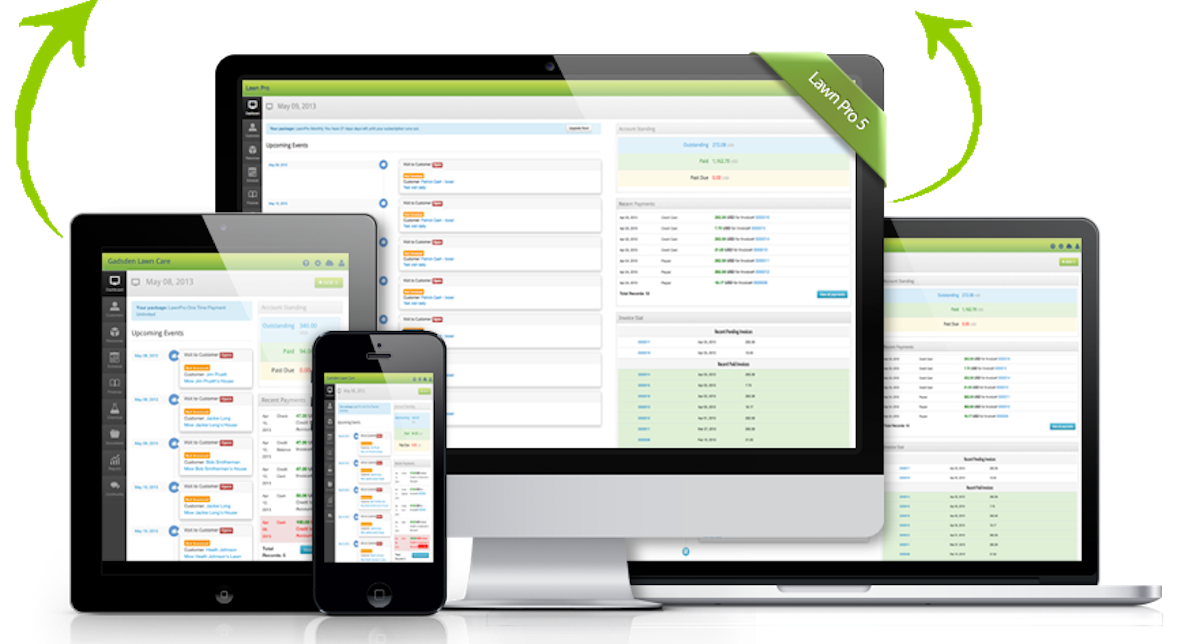
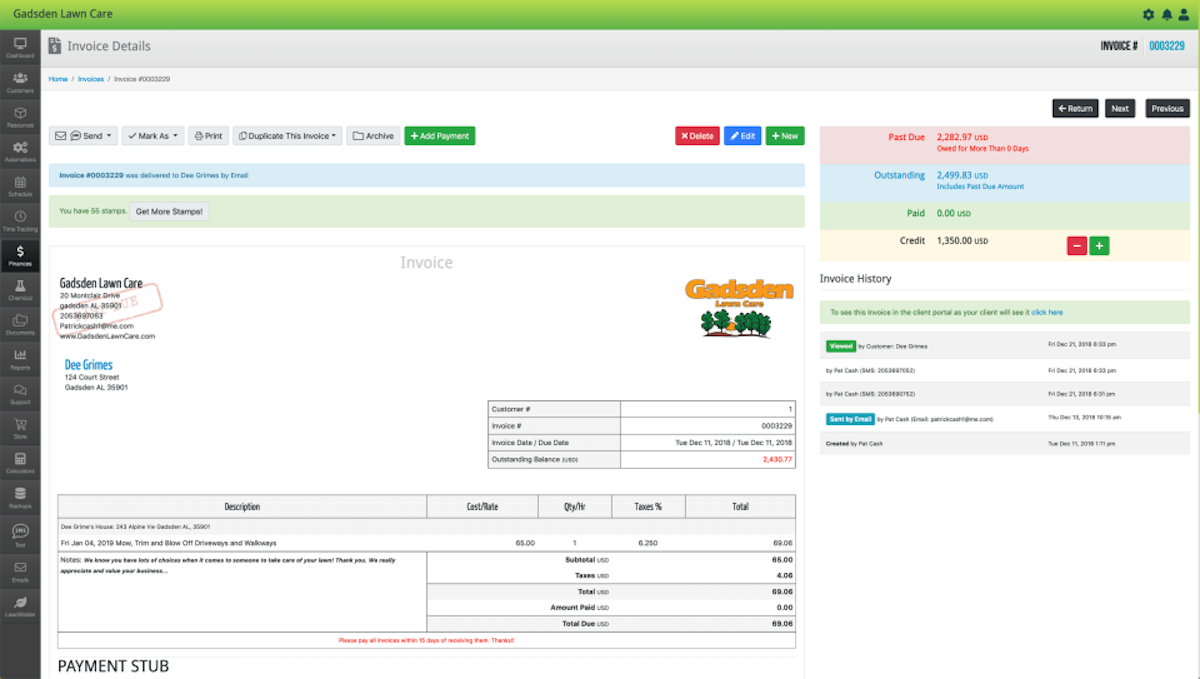
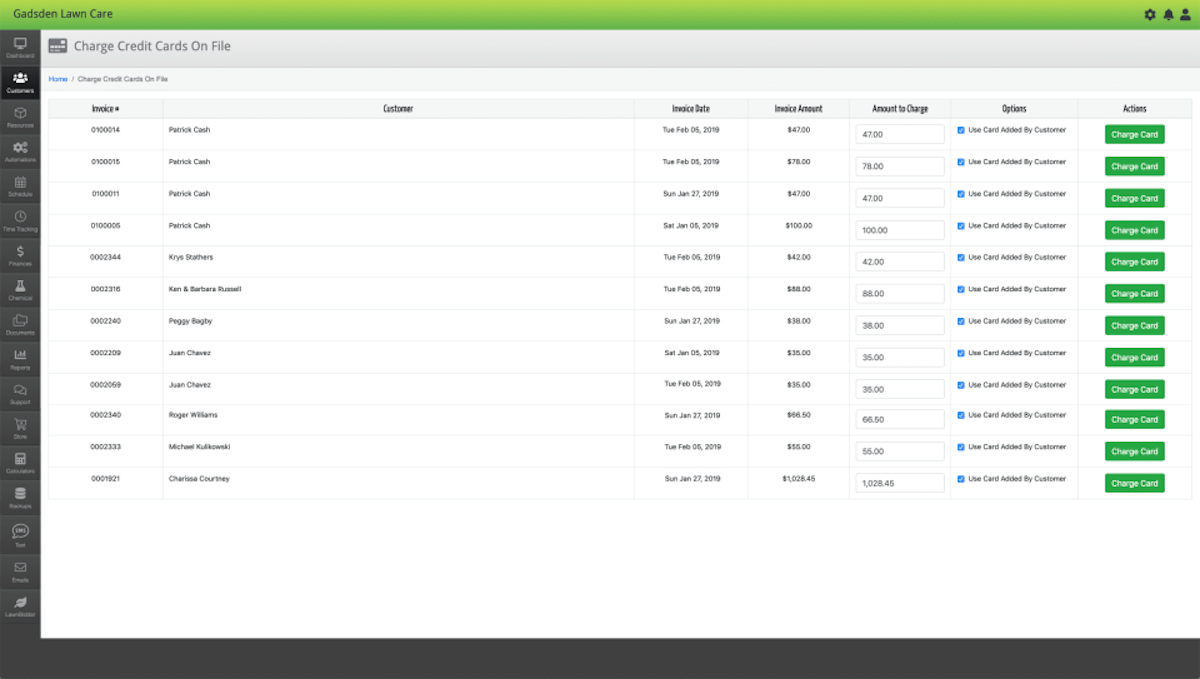
See LawnPro in action
A quick look at the interface, so you know what you are getting before the trial.
What LawnPro does
The areas we lean on most in daily use, and how LawnPro handles each.
Scheduling
Schedule recurring lawn visits and one-off jobs with a simple calendar built for route-based work.
Estimates & invoicing
Send estimates and email invoices with your logo, then collect online payments through the client portal.
Online payments & auto-charge
Take card and online payments, with automatic credit card charging and ACH on the top tier.
Customer management & portal
Manage customers and give them a portal to view invoices, estimates and pay online.
Routing & backups
Higher tiers add route planning and data backups to keep a growing crew efficient and safe.
Time & expense tracking
Track employee time and business expenses, included even on the free plan.
Text messaging
Two-way text messaging on the top tier keeps crews and customers informed about visits.
QuickBooks sync
QuickBooks Online syncing on the top tier keeps invoices and payments aligned with the books.
How LawnPro works day to day
LawnPro is one of the most affordable ways for a lawn care business to get organized, and its calling card is value: a genuinely free plan, low-cost paid tiers, and an add-on model where you pay only for the features you actually use. Founded back in 2003 and based in Gadsden, Alabama, LawnPro has quietly become a small-operator favorite, and across LawnPro reviews it earns a strong 4.6 out of 5 with a standout 4.7 for value for money, the highest marks in its category.
The appeal is straightforward. LawnPro covers the essentials a solo mower or small crew needs, scheduling, estimates, invoicing, online payments, customer management, a client portal and time tracking, in a simple web and mobile app. The free plan is not a crippled trial either: it supports up to 50 customers, two employee logins, email invoices, online payments and expense tracking, which is enough for a new operator to run a real route at no cost. That is the reason lawn pro software keeps showing up in recommendations for businesses just getting started.
As a business grows, LawnPro grows with it through tiers rather than forcing a big jump. Moving up unlocks unlimited customers, then routing and backups, and at the top tier automatic credit card charging, ACH payments, QuickBooks syncing and two-way text messaging. Reviewers specifically praise this pay-for-what-you-need structure, since a small company is not paying enterprise prices for features it will never touch.
The honest limitations reflect its budget positioning. Some reviewers report weak spots in customer support and onboarding, support channels are limited on lower tiers, and managing multiple properties under a single client name can be awkward. A few features, like calendar management, are rated lower than the core scheduling and invoicing tools, and certain add-ons and payment processing can add up. LawnPro is a capable, affordable tool, not a deep, enterprise-grade platform.
LawnPro is also, clearly, a lawn care specialist. It is built for lawn maintenance, lawn treatment and small landscaping operations rather than general home-service trades, and that focus keeps it simple and cheap. A larger company that needs heavy job costing, advanced estimating or rich CRM will outgrow it, but that is not who LawnPro is for.
Across LawnPro reviews the verdict is consistent: for a solo operator or small lawn care business that wants to leave paper behind without spending much, LawnPro is one of the best-value options available, anchored by a real free plan and a 4.7 value rating. If you need advanced estimating, budgeting or enterprise features you will look elsewhere, but for affordable, no-fuss lawn care management, LawnPro software is hard to beat on price.
LawnPro pros and cons
Pros
- Genuinely free plan for up to 50 customers, not just a trial
- Excellent value: 4.7 value-for-money rating, the highest in its class
- Pay-for-what-you-need add-on model instead of forced high tiers
- Covers the essentials: scheduling, estimates, invoicing, payments, CRM
- Client portal and online payments included even on the free plan
- Simple web and mobile app that a small operator can adopt quickly
Cons
- Some reviewers report weak customer support and onboarding
- Support channels are limited on lower tiers
- Awkward managing multiple properties under one client name
- Some features (e.g. calendar management) rated below the core tools
- Certain add-ons and payment processing can add up
Who should use LawnPro, and who should skip it
A great fit if you
- You are a solo operator or small lawn care business
- You want to start for free and pay only as you grow
- You want the essentials, scheduling, invoicing, payments, without complexity
- You want a client portal and online payments cheaply
- You are leaving paper or spreadsheets behind for the first time
Look elsewhere if you
- You need advanced estimating and budgeting (see LMN or Aspire)
- You need a deep CRM or rich two-way communication
- You manage many properties under single client accounts
- You are a large or multi-service operation with complex needs
Is LawnPro right for your trade?
LawnPro is used across the main home-service trades. Here is how it fits each one, and what its reviews tend to say in that niche.
LawnPro for Lawn maintenance
Lawn maintenance operators schedule recurring mows, invoice and take online payments cheaply; LawnPro leads lawn care software reviews on value.
LawnPro for Lawn treatment & fertilization
Fertilization and weed-control businesses manage recurring programs and customer billing on a low budget.
LawnPro for Small landscaping
Small landscaping operations use simple scheduling, estimates and invoicing without paying for enterprise features.
LawnPro for Solo & startup operators
New solo operators start on the free plan to run a real route at no cost, then upgrade as they grow.
LawnPro scorecard
How LawnPro scored across our rubric. Every tool is measured on the same areas.
LawnPro pricing and plans
Real starting prices, dated and re-checked each pass. LawnPro has a genuinely free plan ($0/mo, 2 logins, up to 50 customers) plus a free trial, then three paid tiers: Plan 2 at $39/mo (unlimited customers), Plan 3 at $97/mo (routes and backups) and Plan 4 at $179/mo (auto card charging, ACH, QuickBooks sync and texting). Annual billing lowers the cost, and the add-on model lets you pay only for the features you need, which is why value for money is its highest-rated dimension.
LawnPro integrations
Tools LawnPro connects with out of the box, so it fits the stack you already run.
 QuickBooks Online
 Stripe
 Square
 Zapier
Support, training and deployment
How you can reach the LawnPro team, how they onboard you, and where it runs.
Support
- Email / Help Desk
- Chat
- Knowledge Base
- FAQs / Forum
- Phone
Training
- Documentation
- Videos
- Webinars
Deployment
- Cloud, SaaS, Web-Based
- Mobile - iPhone / iPad
- Mobile - Android
Typical customers
- Freelancers
- Small businesses
LawnPro alternatives
If LawnPro is not the fit, these are the closest tools we rank, in order.



 LawnPro
How to test LawnPro before you commit
Every tool demos well. These are the checks that actually tell you whether LawnPro fits your shop, while the free trial is still running.
Run a real job end to end
- Book it, schedule it, dispatch a tech, then invoice and take payment
- Do it on the phone your techs actually carry, not a demo laptop
- Try it with weak signal in the field, not just on office wifi
- Add a second user and watch how the per-seat price moves
Watch for the catch
- Payment-processing fees taken on every card and ACH run
- Features quietly locked to a higher tier than the one you tried
- Onboarding or data import sold as a paid add-on
- How hard it is to export your data if you decide to leave
LawnPro FAQ
How much does LawnPro cost?
LawnPro has a genuinely free plan ($0/mo, two logins, up to 50 customers) plus a free trial, then three paid tiers: Plan 2 at $39/mo (unlimited customers), Plan 3 at $97/mo (adds routes and backups) and Plan 4 at $179/mo (adds auto card charging, ACH, QuickBooks sync and texting). Annual billing lowers the cost, and you pay only for the add-ons you need.
What do LawnPro reviews say?
LawnPro holds a 4.6 out of 5 with a standout 4.7 for value for money, the highest in its category. Reviewers love the affordable, pay-for-what-you-need pricing, the free plan and the core scheduling and invoicing tools. The most common complaints are inconsistent customer support and onboarding, limited support channels on lower tiers, and awkward handling of multiple properties under one client.
Is LawnPro really free?
Yes. LawnPro offers a genuinely free plan, not just a trial, supporting up to 50 customers with two employee logins, email invoices, online payments, a client portal, expenses and time tracking. That is enough for a new solo operator to run a real route at no cost, then upgrade for unlimited customers and more features as the business grows.
Is LawnPro only for lawn care?
Effectively yes. LawnPro is a lawn care specialist built for lawn maintenance, lawn treatment and small landscaping operations, which keeps it simple and inexpensive. A general home-service trade like plumbing or HVAC, or a large operation needing heavy job costing, should look at a broader field service or green-industry platform instead.
Does LawnPro integrate with QuickBooks?
Yes, on its top tier. QuickBooks Online syncing is included on Plan 4, keeping invoices and payments aligned with the books. LawnPro also supports online payments through processors like Stripe and Square, with automatic card charging and ACH available on the top plan.
Who owns LawnPro?
LawnPro Software was founded in 2003 and is based in Gadsden, Alabama. It is a long-running, lawn-care-focused software company that has built a loyal base of small operators thanks to its free plan and value-oriented pricing.
Is LawnPro the same as Lawn Pro?
Yes. LawnPro, sometimes written as "Lawn Pro" or "LawnPro Software", is the lawn care business software at lawnprosoftware.com. Note that several unrelated lawn care service companies also use the name "Lawn Pro"; the software is the platform reviewed here.
LawnPro vs Jobber: which should I choose?
LawnPro is cheaper, lawn-care-specific and has a genuinely free plan, making it ideal for solo and small lawn operators on a tight budget. Jobber is a broader, more polished field service platform with deeper features and a higher price. Choose LawnPro for the lowest cost and simplicity, and Jobber for more capability and multi-trade flexibility.
Is LawnPro worth it?
For a budget-conscious solo or small lawn care business, yes, it is one of the best-value options available, especially with its real free plan. If you need advanced estimating and budgeting, a deep CRM, or enterprise features, you will outgrow it and should consider LMN, Aspire or a broader FSM.
LawnPro reviews from real users
Verified reviews from people running LawnPro in the field. Every review is read by our team before it goes live, so this is honest signal, not spam.
No user reviews yet. If you use LawnPro, be the first to tell other shops how it works in the real world.
You need a free account to post a review. Create one in under a minute and you will come right back here to write it.
Why our ranking is worth trusting
“We run a real week of jobs through every tool and score it against the same 40 points. If it wins, it earned it, and no vendor can change that.”
The Duhari review teamProud of your score? Show it.
Add your independent Duhari rating to your site. It is free, it updates on its own, and it links back to this review.
Get your badge →
Not sure which tool fits?
Start from the full ranking, filtered by your trade and crew size, and pick the right tool with honest scores and real starting prices.