
Service Autopilot Review
Service Autopilot is a powerful lawn care, landscaping and snow software with best-in-class chemical tracking, dense-route optimization and the deepest automation in the category, best for mid-size operators willing to invest in setup.
On this page
The verdict
Service Autopilot reviews describe the most powerful lawn care, landscaping and snow software under $500 a month, and one of the most complained about. It has best-in-class chemical tracking, dense-route optimization and the deepest automation in the category, and mid-size operators who need that depth stay for years. The honest costs are a steep four-to-eight-week learning curve, a weak mobile app, and, since the 2022 Xplor acquisition, complaints about support and a forced payment processor. Its Capterra rating sits at 4.1 and has drifted down. For a serious green-industry operator with a chemical program and several crews, Service Autopilot is the deepest tool available; for a solo or simple mow-and-go crew, it is more than the job needs.
Service Autopilot at a glance
| Vendor | Service Autopilot (Xplor) | Category | Green industry field service management |
|---|---|---|---|
| Best for | mid-size lawn care, landscaping and snow companies (5 to 50 staff) with chemical programs | Starting price | $49 to $499+/mo |
| Free trial | Demo only | Free plan | No |
| User rating | 4.1/5 (139 reviews) | Our score | 7.6/10 |
| Deployment | Cloud, iOS, Android | Founded | 2011 |
| Headquarters | Dallas, TX, USA | Users | Green-industry businesses |
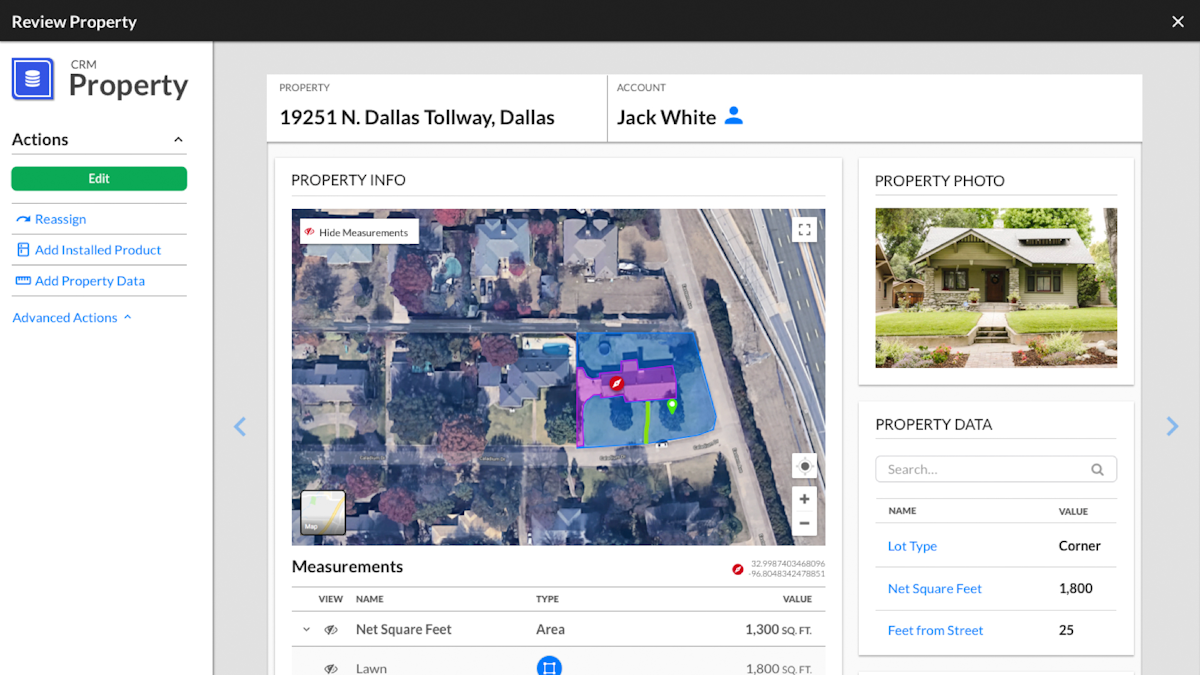
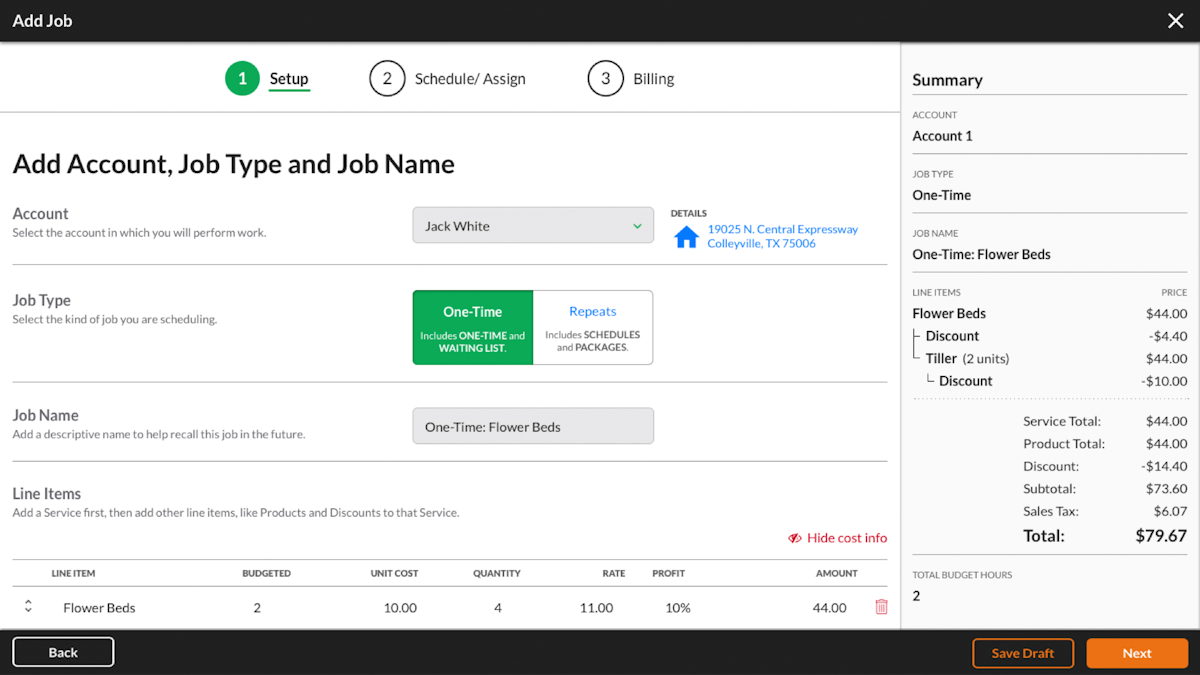
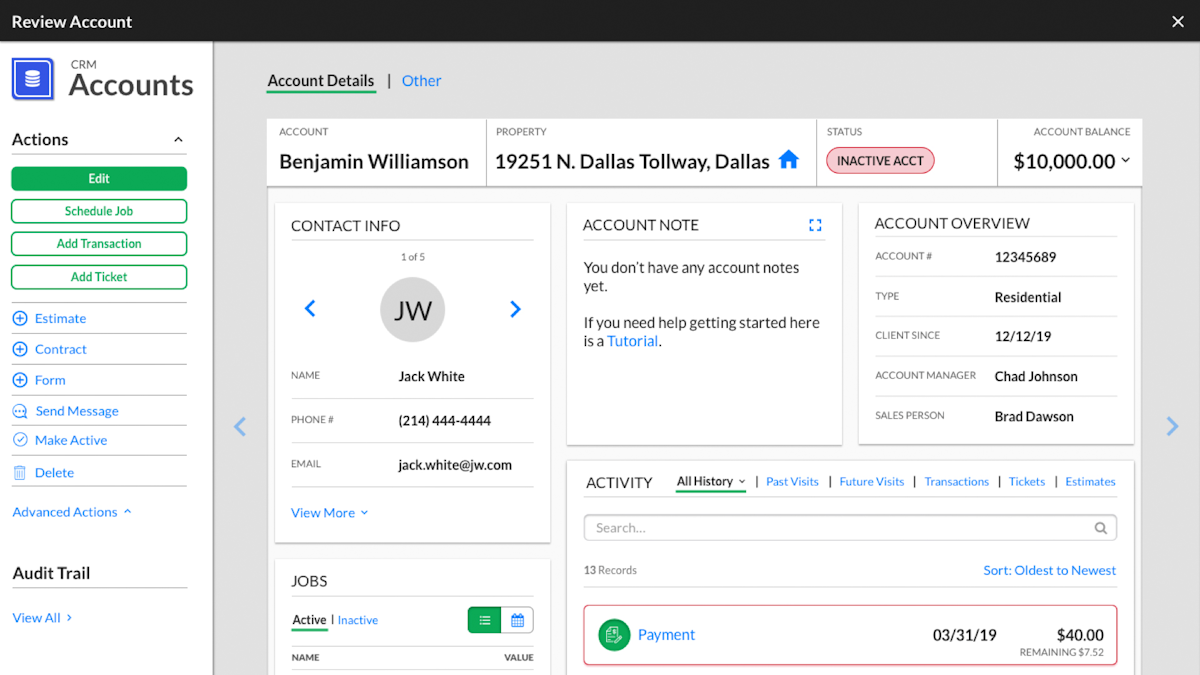
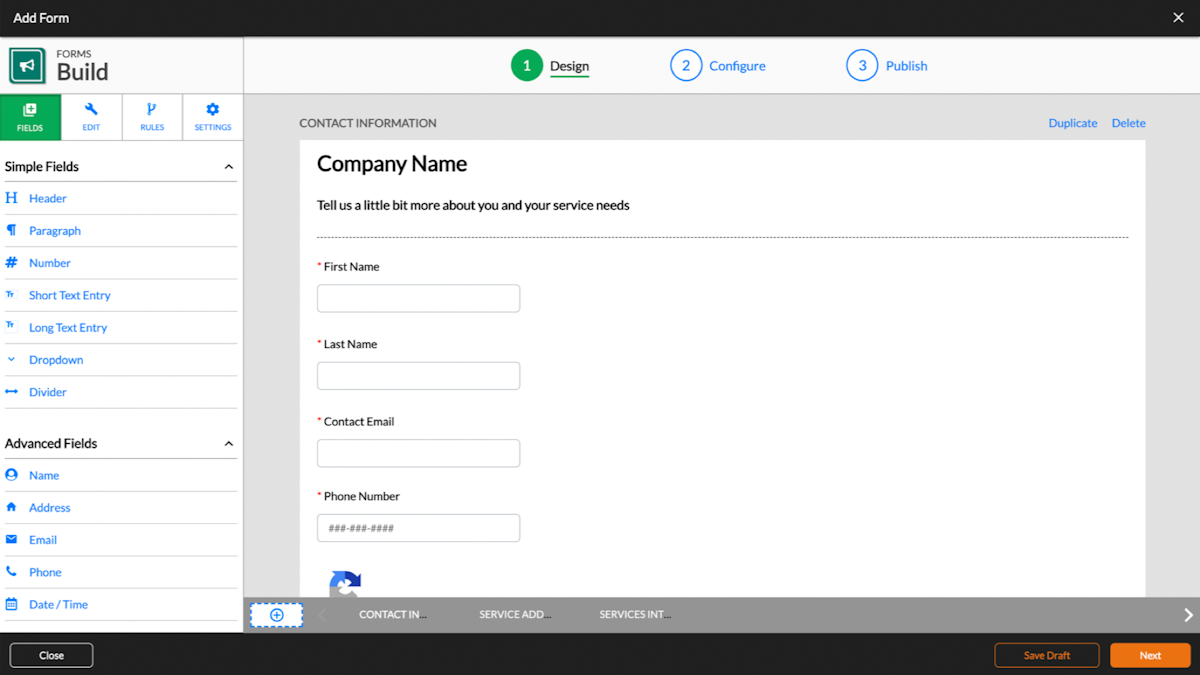
See Service Autopilot in action
A quick look at the interface, so you know what you are getting before the trial.
What Service Autopilot does
The areas we lean on most in daily use, and how Service Autopilot handles each.
Chemical tracking & spray logs
Record EPA numbers, rates, batches, weather and license data, and auto-calculate chemical amounts for state-audit-ready fert-and-squirt compliance.
Route optimization
Built for dense residential mow routes of 25-40 stops, cutting 15-20% of the miles versus manual scheduling.
Automation engine
Trigger-based workflows auto-send renewals, invoice on completion, chase payments on a schedule and assign leads, saving 10+ hours a week.
CRM & lead pipeline
Full pipeline tracking from prospect to signed contract, with acquisition-cost and channel visibility beyond most competitors.
Job costing & gate rates
Track the actual man-hour rate on every route and crew so you know which divisions are profitable and which are underwater.
Scheduling & dispatch
Schedule one-time and recurring jobs, assign crews and manage the day for a route-based operation.
Estimating & property measurement
Build estimates with aerial property measurement and line-item pricing tied to the customer and job.
Invoicing & payments
Automated billing and integrated payments close the loop, though the payment processor is fixed to the vendor.
Mobile app
Crews clock in and update jobs from the field, though the app rates poorly and is the platform's weakest area.
How Service Autopilot works day to day
Service Autopilot is the most powerful software you can buy for a lawn care, landscaping or snow business under about 500 dollars a month, and it is also one of the most complained about. That is not a contradiction; it is the central tension for a mid-size green-industry operator. If you need its specific depth, especially chemical tracking, dense-route optimization and deep automation, nothing in the category matches it. If you do not, the complexity and the cost are hard to justify.
Founded in 2011 and based in Dallas, Service Autopilot built its reputation on capability. The standout is chemical tracking and spray logs for licensed fert-and-squirt programs: it records EPA numbers, application rates, batch numbers, weather and applicator license data, and calculates chemical amounts by property square footage, producing state-audit-ready documentation. For a lawn care company running a chemical program, most reviews agree nothing else does this as well.
The other two pillars are routing and automation. Route optimization is built for dense residential mow routes of 25 to 40 stops per crew, and operators report cutting 15 to 20 percent of the miles versus manual scheduling. The automation engine is the deepest in the category: trigger-based workflows auto-send renewal contracts before the spring rush, auto-invoice on completion, chase payments on an escalating schedule and assign leads by zip code, and reviewers say the automations save ten or more hours a week once they are dialed in. Add a full CRM pipeline and genuine job costing that shows the man-hour rate on every route, and Service Autopilot software is a complete operating system for a serious green-industry business.
The cost is real, and honesty demands naming it. The interface takes work: new users consistently report a four-to-eight-week learning curve, and setup wants dedicated ownership. The mobile app is weak, rating about 2.4 on iOS, with reviewers reporting it fails to upload jobs and clock times. And since the 2022 acquisition by Xplor, complaints about slow support and a forced payment processor, which lets card rates creep up, appear repeatedly across industry forums. Pricing compounds it: plans run 49, 199 and 499 dollars a month plus a sign-up fee, with route optimization, QuickBooks and chemical tracking as paid add-ons, so a fifteen-person operation lands north of 500 dollars a month once the extras are counted.
The pattern in Service Autopilot reviews is clear and worth trusting: operators who genuinely need chemical tracking, deep automation and advanced routing tend to stay for years and rate it highly despite the friction, while those who do not need that depth leave for something simpler. Its Capterra rating sits at 4.1 from about 140 reviews and has drifted down, which reflects that split rather than a broken product.
The bottom line: for a mid-size lawn care, landscaping or snow removal company managing several crews and a chemical program, and willing to invest four to six weeks in setup, Service Autopilot is the deepest tool available and can pay for itself in automation and routing alone. For a solo operator or a simple mow-and-go crew, it is more software than the job needs, and a lighter tool like Jobber or SingleOps will serve better.
Service Autopilot pros and cons
Pros
- Best-in-class chemical tracking and spray logs for licensed programs
- Route optimization built for dense residential routes (15-20% fewer miles)
- The deepest automation engine in the green-industry category
- Genuine job costing and gate-rate analysis by route and crew
- Full CRM and lead pipeline, more complete than most rivals
- A true operating system for a mid-size lawn or landscape business
Cons
- Steep four-to-eight-week learning curve and heavy setup
- Weak mobile app (about 2.4 on iOS) that reviewers say drops data
- Support quality complaints, worse since the 2022 Xplor acquisition
- Forced payment processor, so card rates can creep up
- Sign-up fee and paid add-ons (route optimization, QuickBooks, chemical) raise the real cost
Who should use Service Autopilot, and who should skip it
A great fit if you
- You run a mid-size lawn care, landscaping or snow business (5 to 50 staff)
- You run a licensed chemical program and need compliance logs
- You manage several crews with dense residential routes
- You want the deepest automation and will invest weeks in setup
- You value capability over interface polish
Look elsewhere if you
- You are a solo operator or simple mow-and-go crew
- You want a modern, polished mobile app
- You are sensitive to support quality issues
- You want to choose your own payment processor
Is Service Autopilot right for your trade?
Service Autopilot is used across the main home-service trades. Here is how it fits each one, and what its reviews tend to say in that niche.
Service Autopilot for Lawn care
Lawn care companies use chemical tracking, dense-route optimization and automation; Service Autopilot leads many lawn care software reviews for depth, if you can invest in setup.
Service Autopilot for Landscaping
Landscaping firms use the CRM, estimating, job costing and automation to run a full operation, a strength its landscaping software reviews highlight.
Service Autopilot for Snow removal
Snow and ice operators use scheduling, routing and automated billing for seasonal winter routes alongside their green-industry work, noted in its snow removal software reviews.
Service Autopilot for Cleaning
Cleaning businesses use recurring scheduling, automation and job costing to run route-based residential and commercial service.
Service Autopilot scorecard
How Service Autopilot scored across our rubric. Every tool is measured on the same areas.
Service Autopilot pricing and plans
Real starting prices, dated and re-checked each pass. Service Autopilot plans are Startup $49/mo, Pro $199/mo and Pro Plus $499/mo on annual billing, all with an unpublished sign-up fee, plus a custom Elite tier. Add-ons raise the real cost: route optimization ($47/mo), QuickBooks ($25/mo, Elite-only), chemical tracking ($3/mo), extra business users ($29/mo) and mobile-only users ($19/mo). There is no free trial, only a demo.
Service Autopilot integrations
Tools Service Autopilot connects with out of the box, so it fits the stack you already run.
 QuickBooks Online
 Stripe
 Google Calendar
 Zapier
 CompanyCam
Support, training and deployment
How you can reach the Service Autopilot team, how they onboard you, and where it runs.
Support
- Email / Help Desk
- Phone Support
- Chat
- Knowledge Base
Training
- Live Online
- Webinars
- Documentation
- Videos
Deployment
- Cloud, SaaS, Web-Based
- Mobile - Android
- Mobile - iPhone / iPad
Typical customers
- Small businesses
- Mid-size businesses
Service Autopilot alternatives
If Service Autopilot is not the fit, these are the closest tools we rank, in order.



 Service Autopilot
How to test Service Autopilot before you commit
Every tool demos well. These are the checks that actually tell you whether Service Autopilot fits your shop, while the free trial is still running.
Run a real job end to end
- Book it, schedule it, dispatch a tech, then invoice and take payment
- Do it on the phone your techs actually carry, not a demo laptop
- Try it with weak signal in the field, not just on office wifi
- Add a second user and watch how the per-seat price moves
Watch for the catch
- Payment-processing fees taken on every card and ACH run
- Features quietly locked to a higher tier than the one you tried
- Onboarding or data import sold as a paid add-on
- How hard it is to export your data if you decide to leave
Service Autopilot FAQ
How much does Service Autopilot cost?
Service Autopilot plans are Startup $49/mo, Pro $199/mo and Pro Plus $499/mo on annual billing, plus an unpublished sign-up fee, with a custom Elite tier. Paid add-ons raise the real cost, including route optimization ($47/mo), QuickBooks ($25/mo, Elite-only), chemical tracking and extra users. A fifteen-person operation typically lands north of $500 a month. There is no free trial, only a demo.
What do Service Autopilot reviews say?
Service Autopilot holds a 4.1 out of 5 on Capterra from about 140 reviews, and the rating has drifted down. Operators praise the best-in-class chemical tracking, dense-route optimization and deep automation. The most common complaints are a steep learning curve, a weak mobile app, and declining support and a forced payment processor since the 2022 Xplor acquisition.
Is Service Autopilot good for lawn care?
Yes, for a serious lawn care operation. It offers the deepest lawn-care-specific feature set in the category, including chemical tracking for licensed programs, route optimization for dense mow routes and automation that saves hours every week. It is best for mid-size operators, not solo mow-and-go crews.
Is Service Autopilot good for snow and cleaning?
Yes. Service Autopilot is built for the wider green industry and is used by snow removal and cleaning businesses as well as lawn and landscape. Its scheduling, routing, automation and job costing apply across seasonal and recurring service work.
Why is Service Autopilot so complained about?
The complaints cluster around three things: a brutal four-to-eight-week learning curve, a weak mobile app, and a decline in support quality plus a forced payment processor since Xplor acquired the company in 2022. Operators who need its depth accept the friction; those who do not tend to leave for simpler tools.
Does Service Autopilot have a mobile app?
Yes, but it is the platform's weakest area. The iOS app rates around 2.4 out of 5, and reviewers report it failing to upload jobs and clock-in and clock-out times to the office. If a strong field app is a priority, this is a real drawback.
Is Service Autopilot worth it?
For a mid-size lawn, landscape or snow company running a chemical program and several crews, and willing to invest weeks in setup, yes, the automation and routing can pay for it. For a solo operator or a simple mow-and-go crew, it is more software than the job needs, and a lighter tool like Jobber or SingleOps is a better fit.
Does Service Autopilot integrate with QuickBooks?
Yes, but with a catch: the QuickBooks integration is a paid add-on (around $25/mo) and is limited to the Elite tier. Service Autopilot also uses a fixed payment processor, so you cannot bring your own, which reviewers cite as a source of creeping card rates.
Service Autopilot vs Jobber: which should I choose?
They suit different operators. Service Autopilot is deeper, with chemical tracking, advanced routing and the strongest automation, but it is complex and pricier once add-ons are counted. Jobber is simpler, more modern and easier to adopt. Choose Service Autopilot for depth and automation, and Jobber for ease and a better app.
What are Service Autopilot's main downsides?
The steep learning curve, the weak mobile app, declining support and a forced payment processor since the Xplor acquisition, and a cost structure of sign-up fees plus paid add-ons that pushes the real monthly price well above the headline plan.
Service Autopilot reviews from real users
Verified reviews from people running Service Autopilot in the field. Every review is read by our team before it goes live, so this is honest signal, not spam.
No user reviews yet. If you use Service Autopilot, be the first to tell other shops how it works in the real world.
You need a free account to post a review. Create one in under a minute and you will come right back here to write it.
Why our ranking is worth trusting
“We run a real week of jobs through every tool and score it against the same 40 points. If it wins, it earned it, and no vendor can change that.”
The Duhari review teamProud of your score? Show it.
Add your independent Duhari rating to your site. It is free, it updates on its own, and it links back to this review.
Get your badge →
Not sure which tool fits?
Start from the full ranking, filtered by your trade and crew size, and pick the right tool with honest scores and real starting prices.