
SingleOps Review
SingleOps is an all-in-one platform for the green industry, built for tree care, landscaping and lawn care with standout estimating, aerial line-item mapping, route optimization, job costing and QuickBooks-synced invoicing.
On this page
The verdict
SingleOps reviews rate it one of the best-built tools in the green industry: it holds a 4.4 out of 5 on Capterra from more than 100 reviews, with a standout 4.5 for customer service, and owners single out its estimating and job costing as the strongest in tree care and landscaping software. SingleOps runs a green-industry business end to end, from aerial line-item proposals through route optimization, invoicing and QuickBooks-synced payments. The trade-offs are a steep learning curve, a mobile app less polished than some rivals, and per-user pricing that starts around $200 a month. But for a serious tree care, landscaping or lawn care company that lives on accurate estimates and job costing, SingleOps is close to the category best.
SingleOps at a glance
| Vendor | SingleOps (Granum) | Category | Green industry field service management |
|---|---|---|---|
| Best for | tree care, landscaping and lawn care companies with 5 to 100 technicians | Starting price | From ~$200/user/mo |
| Free trial | Yes | Free plan | No |
| User rating | 4.4/5 (107 reviews) | Our score | 8.2/10 |
| Deployment | Cloud, iOS, Android | Founded | 2015 |
| Headquarters | Atlanta, GA, USA | Users | 1,000+ |
See SingleOps in action
A quick look at the interface, so you know what you are getting before the trial.
What SingleOps does
The areas we lean on most in daily use, and how SingleOps handles each.
Estimating & proposals
Build detailed, line-item proposals with options, photos and e-signature approval, the feature reviewers rate the best part of SingleOps.
Aerial line-item mapping
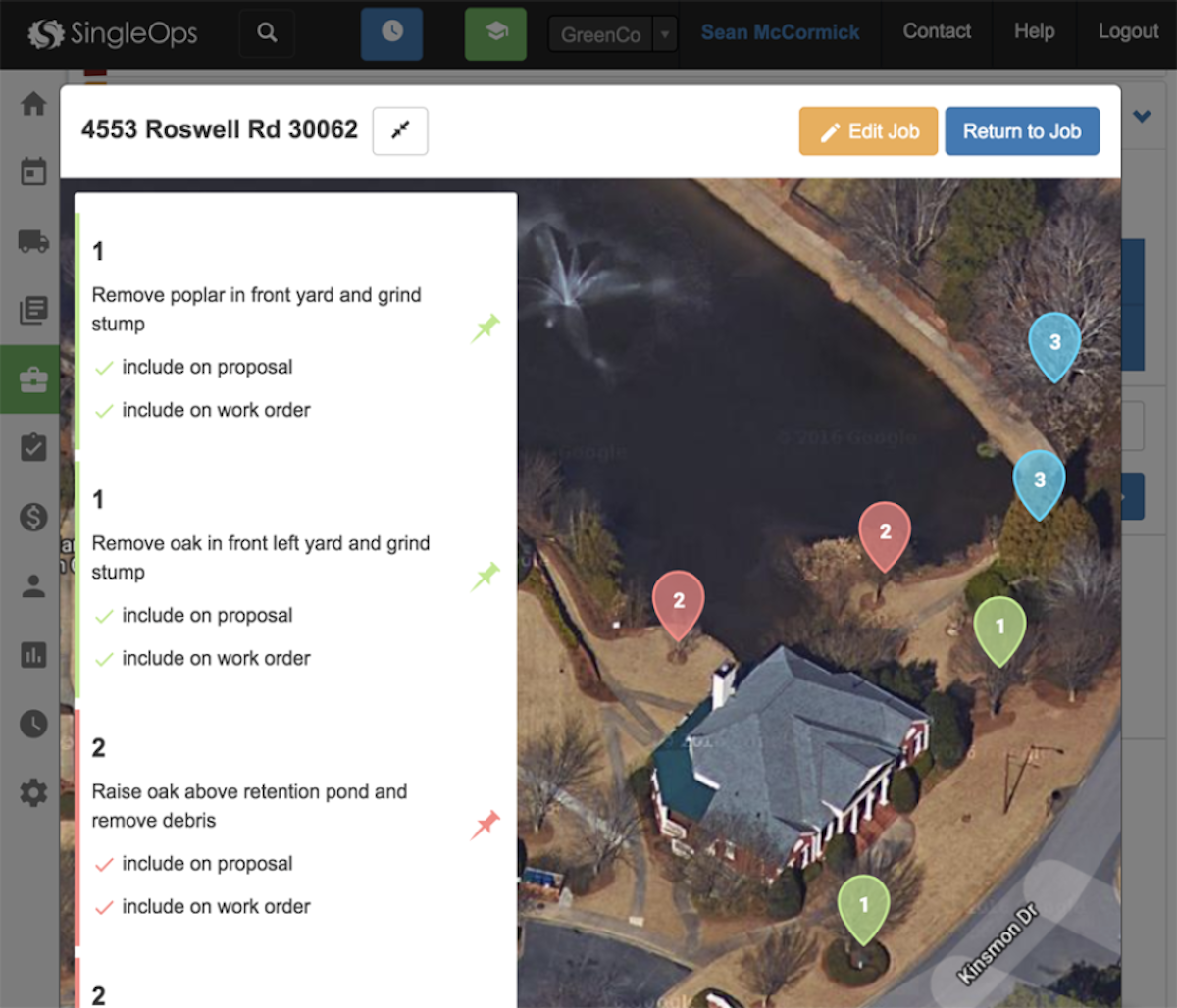
Map each work item, a tree removal, a bed, a treatment zone, onto an aerial photo of the property, tied to the proposal and work order.
Scheduling, dispatch & routing
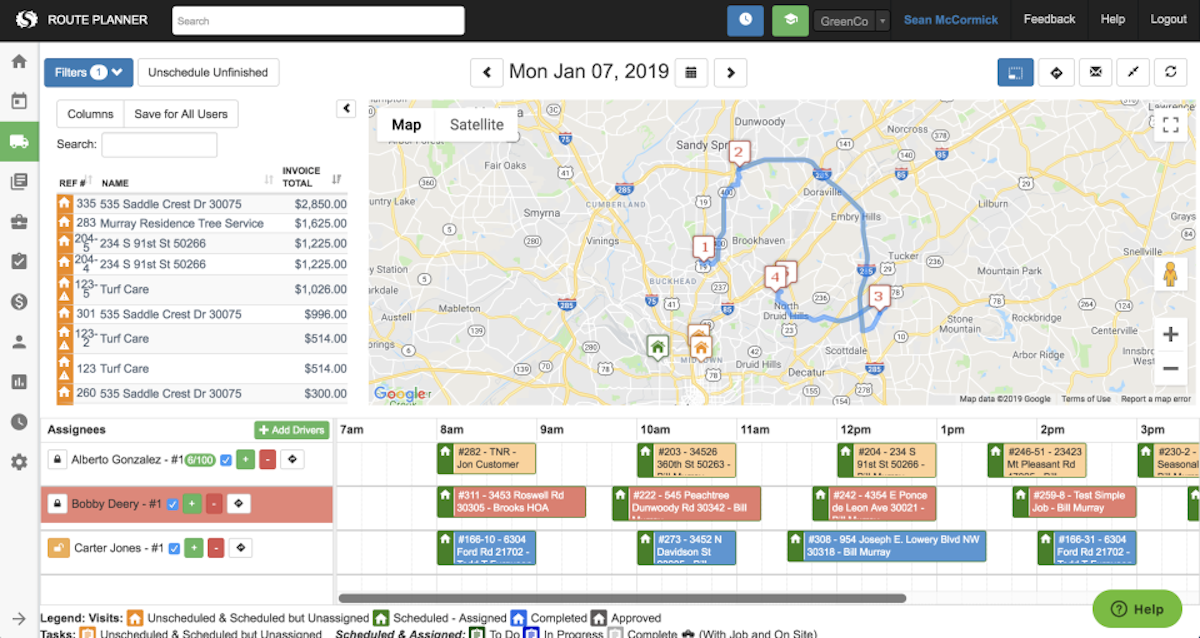
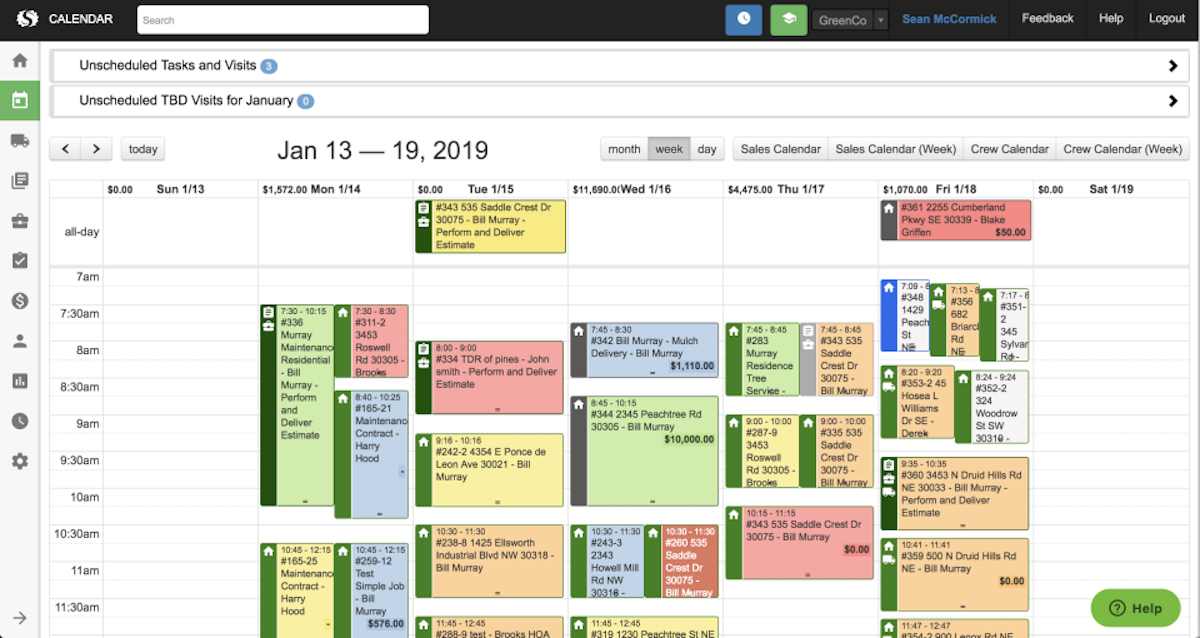
A calendar and dispatch board with genuine map-based route optimization for route-based lawn care and tree service work.
CRM & customer database
A full customer and property history keeps every job, note and past proposal in one place for repeat and seasonal work.
Job costing
Track labor, materials and equipment against each job so owners see which work and which crews actually make money.
Invoicing & online payments
Turn approved work into invoices, take online and on-site payment, and close the loop from lead to paid.
QuickBooks integration
Two-way QuickBooks sync flows estimates, invoices and payments to the books without double entry.
Mobile app
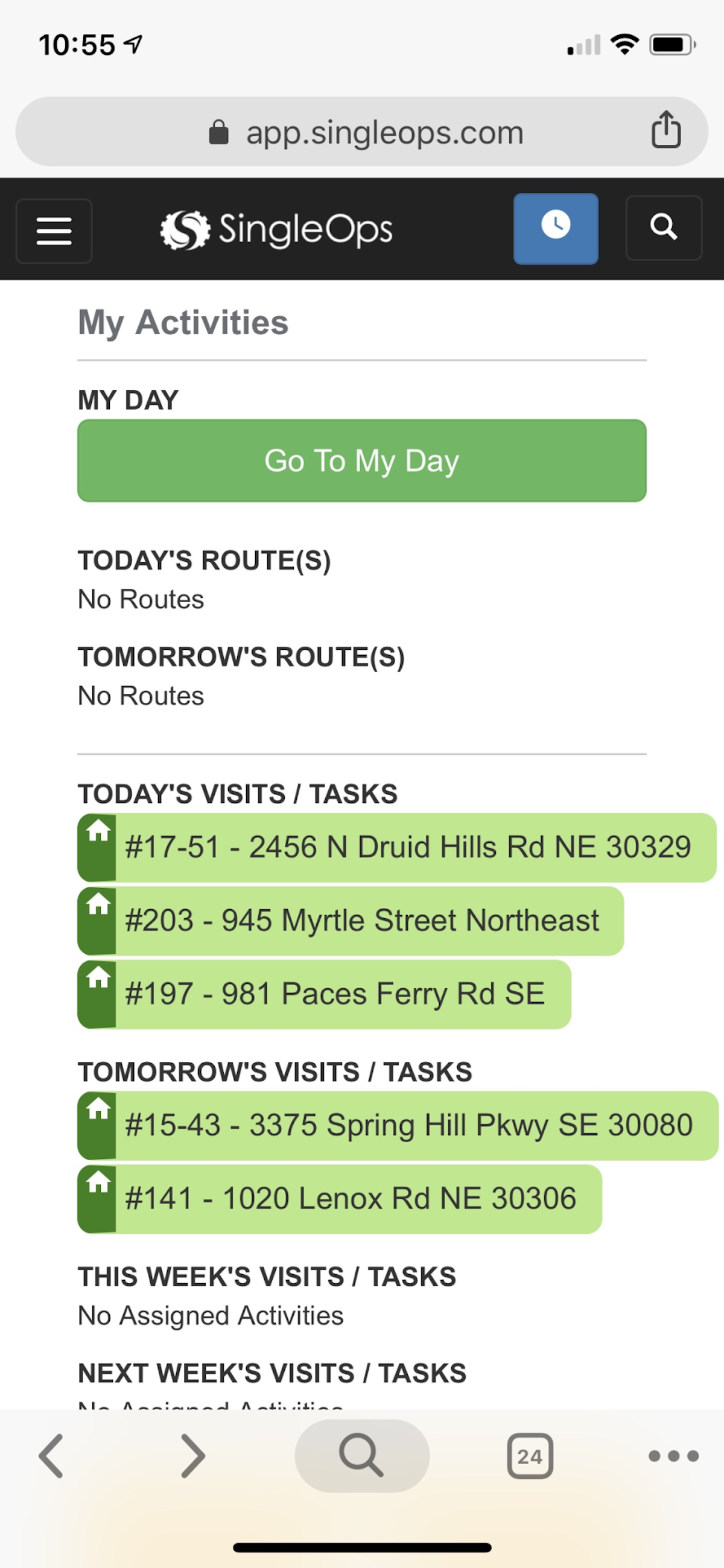
Crews clock in, view job details, capture photos, take payment and send the invoice from the field without returning to the office.
Reporting
Reports on jobs, revenue and crews give green-industry owners the numbers to run and grow the business.
How SingleOps works day to day
SingleOps is an all-in-one business platform built for the green industry, and it is one of the strongest names in tree care and landscaping software. Founded in 2015 and headquartered in Atlanta, now part of Granum, SingleOps serves more than a thousand landscaping, tree care, lawn care, plant healthcare and snow companies, running the whole business from lead and estimate through scheduling, job costing, invoicing and payment on one system.
What sets SingleOps apart, and what its reviews return to again and again, is estimating. Reviewers rate the estimating and proposal tools the best part of the platform, and for a tree care or landscape business that is the make-or-break workflow. Estimators build detailed, line-item proposals, map individual work items onto an aerial photo of the property, add photos and options, and send a professional proposal the customer can approve and sign online. Tie that to job costing and the business finally sees which jobs and which crews actually make money.
The rest of the platform is deep for the trade. Scheduling and dispatch come with genuine route optimization on a map, which for a route-based lawn care or tree service operation is real time and fuel saved. A CRM holds the full customer and property history, invoicing and online payments close the loop, and QuickBooks sync keeps the books clean. The SingleOps mobile app lets a crew run the whole day from a phone, clocking in, viewing the job, capturing photos, taking payment and sending the invoice without a trip back to the office.
The honest trade-offs are consistent across SingleOps reviews. The platform is powerful, and that power brings a steep learning curve: onboarding and configuration take real time, and a small crew can feel the depth before they feel the payoff. Reviewers also note that the mobile app is less polished than some competitors and that customer support can be slow at busy times. This is software for a company ready to invest in setup, not a solo operator looking for something to run in an afternoon.
Pricing sits at the higher end of the green-industry market. SingleOps uses per-user pricing that starts around 200 dollars a month, with public plans, unlimited customers, properties and jobs on every tier, month-to-month terms with no long contract, and a discount for annual billing. For a small crew that is a real commitment, but for a growing tree care or landscape business the estimating and job-costing depth usually earns it back.
Across SingleOps reviews the verdict is clear: for a serious tree care, landscaping or lawn care company with a handful to a hundred technicians, SingleOps software is one of the best-built tools in the green industry, especially if estimating accuracy and job costing matter more than a dead-simple app. Its Capterra rating of 4.4 from more than a hundred reviews, with a standout 4.5 for customer service scores, reflects a platform that green-industry owners trust to run the whole operation. It is written as one word, SingleOps, though many owners search for single ops software reviews, and either way it points to the same green-industry platform.
SingleOps pros and cons
Pros
- Best-in-class estimating and proposals for tree care and landscaping (rated 5/5 by reviewers)
- Aerial line-item mapping ties work items to a photo of the property
- Strong route optimization for route-based lawn and tree work
- Real job costing so owners see which jobs and crews make money
- Unlimited customers, properties and jobs on every plan, month-to-month
- QuickBooks sync, online payments and a full mobile app
Cons
- Steep learning curve and real setup time
- Mobile app less polished than some competitors
- Customer support can be slow at busy times
- Per-user pricing starts around $200/mo, higher end of the market
- Depth can feel like overkill for a very small crew
Who should use SingleOps, and who should skip it
A great fit if you
- You run a tree care, landscaping or lawn care business with 5 to 100 techs
- Accurate estimating and job costing matter more than a simple app
- You want aerial line-item proposals and route optimization
- You handle complex or seasonal contracts
- You are ready to invest time in setup to get the depth
Look elsewhere if you
- You are a solo operator wanting something simple to run today
- You need the most polished mobile app in the category
- You run a non-green-industry trade like HVAC or plumbing
- You want the lowest possible monthly price
Is SingleOps right for your trade?
SingleOps is used across the main home-service trades. Here is how it fits each one, and what its reviews tend to say in that niche.
SingleOps for Tree care
Arborists and tree service companies use aerial line-item mapping, proposals and job costing built for the trade; SingleOps sits near the top of most tree care software reviews.
SingleOps for Landscaping
Landscaping and design-build firms use detailed estimating, scheduling and job costing, a fit its landscaping software reviews consistently highlight.
SingleOps for Lawn care
Lawn care crews run recurring, route-based service with route optimization and seasonal-contract billing, a strength noted across its lawn care software reviews.
SingleOps for Plant healthcare
Plant healthcare providers track treatments, properties and recurring visits with the CRM and scheduling tools.
SingleOps for Snow & ice
Green-industry companies that add snow and ice work use SingleOps to schedule, dispatch and bill seasonal winter routes alongside their landscaping work.
SingleOps scorecard
How SingleOps scored across our rubric. Every tool is measured on the same areas.
SingleOps pricing and plans
Real starting prices, dated and re-checked each pass. SingleOps uses per-user pricing that starts around $200 a month, with public plans and a 14-day free trial. Every tier includes unlimited customers, properties and jobs, and only user seats move you between plans. Terms are month-to-month with no long contract, and annual billing gives roughly two months free.
SingleOps integrations
Tools SingleOps connects with out of the box, so it fits the stack you already run.
 QuickBooks Online
QuickBooks Desktop
QuickBooks Online
QuickBooks Desktop
 Stripe
CardConnect
Google Maps
Stripe
CardConnect
Google Maps
 Zapier
Support, training and deployment
How you can reach the SingleOps team, how they onboard you, and where it runs.
Support
- Email / Help Desk
- Phone Support
- Chat
- Knowledge Base
Training
- Live Online
- Webinars
- Documentation
- Videos
Deployment
- Cloud, SaaS, Web-Based
- Mobile - Android
- Mobile - iPhone / iPad
Typical customers
- Small businesses
- Mid-size businesses
SingleOps alternatives
If SingleOps is not the fit, these are the closest tools we rank, in order.



 SingleOps
How to test SingleOps before you commit
Every tool demos well. These are the checks that actually tell you whether SingleOps fits your shop, while the free trial is still running.
Run a real job end to end
- Book it, schedule it, dispatch a tech, then invoice and take payment
- Do it on the phone your techs actually carry, not a demo laptop
- Try it with weak signal in the field, not just on office wifi
- Add a second user and watch how the per-seat price moves
Watch for the catch
- Payment-processing fees taken on every card and ACH run
- Features quietly locked to a higher tier than the one you tried
- Onboarding or data import sold as a paid add-on
- How hard it is to export your data if you decide to leave
SingleOps FAQ
How much does SingleOps cost?
SingleOps uses per-user pricing that starts around $200 a month, with public plans and a 14-day free trial. Every tier includes unlimited customers, properties and jobs, and only user seats move you between plans. It is month-to-month with no long contract, and annual billing gives roughly two months free, which puts it at the higher end of green-industry software.
What do SingleOps reviews say?
SingleOps holds a 4.4 out of 5 on Capterra from more than 100 reviews, with a standout 4.5 for customer service. Owners single out the estimating and job costing as the best in tree care and landscaping software. The most common criticisms are a steep learning curve, a mobile app that is less polished than some rivals, and support that can be slow at busy times.
Is SingleOps good for tree care?
Yes, tree care is one of its core markets. SingleOps offers aerial line-item mapping, detailed proposals, route optimization and job costing built for arborists and tree service companies, which is why it appears at the top of most tree care software shortlists alongside Arborgold.
Is SingleOps good for landscaping and lawn care?
Yes. SingleOps is built for the whole green industry, and landscaping, lawn care and plant healthcare companies use its estimating, route optimization and seasonal-contract tools daily. It is especially strong for businesses that live on accurate estimates and job costing.
Does SingleOps have a mobile app?
Yes. The SingleOps mobile app lets a crew run the whole day from a phone, clocking in, viewing job details, capturing photos, taking payment and sending the invoice from the field. Some reviewers note it is less polished than the best apps in the category.
Does SingleOps integrate with QuickBooks?
Yes. SingleOps syncs with QuickBooks Online and Desktop, so estimates, invoices and payments flow to your accounting without double entry. It also connects to payment processors and other green-industry tools.
Is SingleOps worth it?
For a serious tree care, landscaping or lawn care company with a handful to a hundred technicians, yes. The estimating and job-costing depth is the best in the green industry and usually earns back the higher price. It is less worth it for a solo operator who wants something simple and cheap to run today.
SingleOps vs Arborgold: which is better for tree care?
Both are top green-industry tools. SingleOps is prized for its estimating, aerial mapping and modern interface, while Arborgold is a long-established specialist with deep plant and inventory management. Choose SingleOps for estimating depth and a modern feel, and Arborgold for legacy tree-management depth.
Is SingleOps hard to learn?
It has a steeper learning curve than lighter tools, because its depth in estimating, job costing and routing takes time to configure. Plan for real onboarding. The payoff is a system that runs the whole business once it is set up, which is why reviewers who invest the time rate it highly.
Is SingleOps the same as single ops software?
Yes. The product is written as one word, SingleOps, but many owners search for single ops software reviews or single ops software. Either spelling refers to the same green-industry platform, now part of Granum.
What are SingleOps's main downsides?
The most common are the steep learning curve and setup time, a mobile app that is less polished than some competitors, customer support that can be slow at busy periods, and per-user pricing that starts around $200 a month, at the higher end of the market.
SingleOps reviews from real users
Verified reviews from people running SingleOps in the field. Every review is read by our team before it goes live, so this is honest signal, not spam.
No user reviews yet. If you use SingleOps, be the first to tell other shops how it works in the real world.
You need a free account to post a review. Create one in under a minute and you will come right back here to write it.
Why our ranking is worth trusting
“We run a real week of jobs through every tool and score it against the same 40 points. If it wins, it earned it, and no vendor can change that.”
The Duhari review teamProud of your score? Show it.
Add your independent Duhari rating to your site. It is free, it updates on its own, and it links back to this review.
Get your badge →
Not sure which tool fits?
Start from the full ranking, filtered by your trade and crew size, and pick the right tool with honest scores and real starting prices.