
Dubsado Review
Dubsado is a customization-first client-management platform for photographers and creatives, built by a former photographer around brand-controlled forms, contracts and powerful automation. It is a service-business CRM, not a photography-native tool.
On this page
The verdict
Dubsado reviews rate it the customization-first client-management CRM, and it is the tool photographers choose when HoneyBook feels too rigid. Built in 2015 by a founder who ran a photography business, it holds a 4.2 out of 5, with brand-controlled, template-driven forms, contracts and proposals as its standout, wired into powerful automated workflows. It covers a project pipeline, invoicing with payment plans, a client portal, scheduling and QuickBooks sync, and it has a genuinely free tier up to three clients. The honest trade-off is complexity: a steeper learning curve than HoneyBook, real setup time, lighter calendar and multi-team features, and it can get disorganized with many workflows. Like HoneyBook it is a service-business CRM, not photography-native, so it has no built-in galleries; photographers pair it with Pixieset or ShootProof.
Dubsado at a glance
| Vendor | Dubsado | Category | Client management CRM for photographers |
|---|---|---|---|
| Best for | photographers who want deep customization and powerful automation | Starting price | Free to $40/mo |
| Free trial | Yes | Free plan | Yes |
| User rating | 4.2/5 (61 reviews) | Our score | 8.3/10 |
| Deployment | Cloud, iOS, Android | Founded | 2015 |
| Headquarters | Burbank, CA | Users | Photographers & creatives |
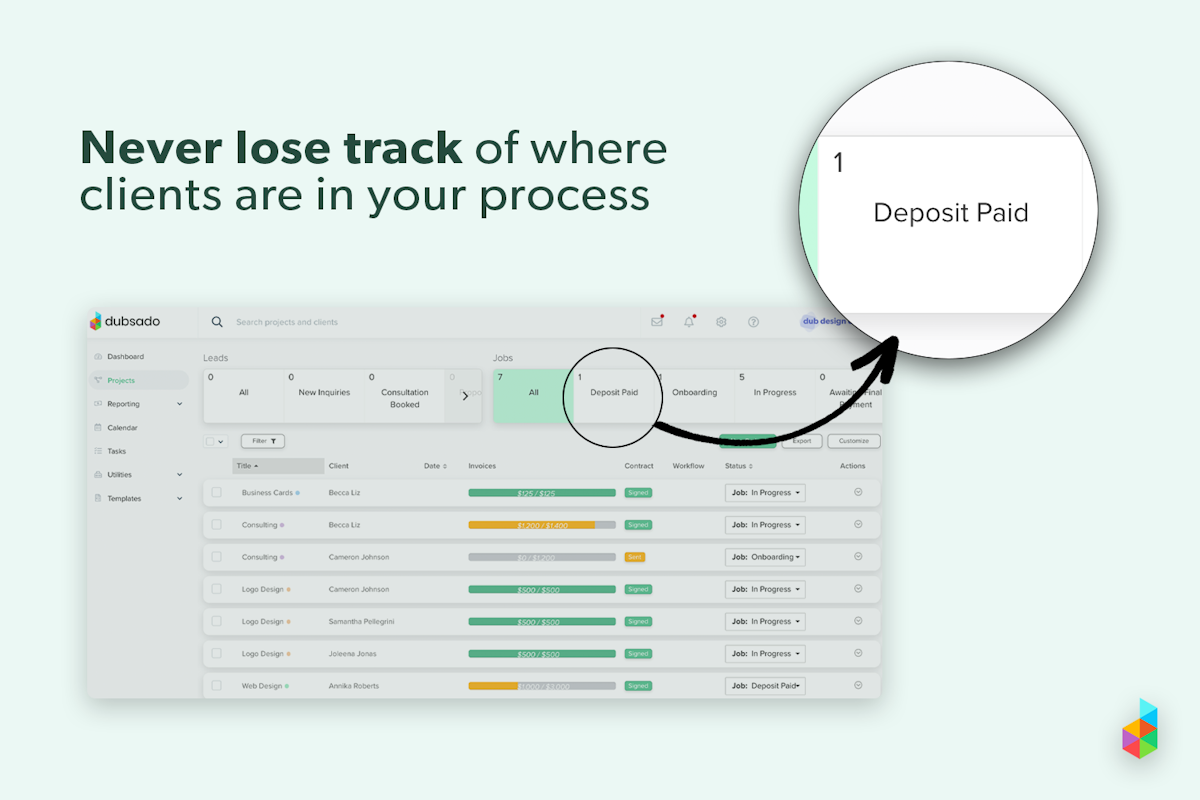
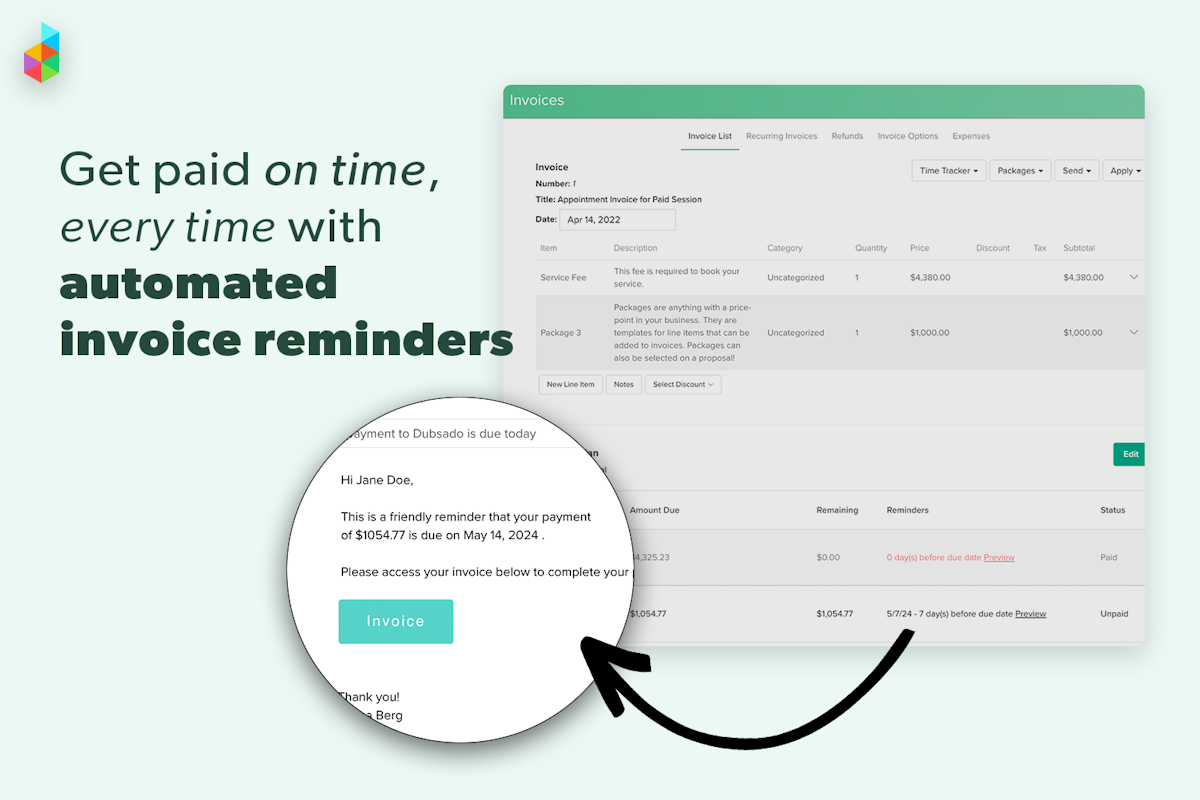
See Dubsado in action
A quick look at the interface, so you know what you are getting before the trial.

What Dubsado does
The areas we lean on most in daily use, and how Dubsado handles each.
Customizable forms & contracts
Template-driven proposals, contracts, questionnaires and lead-capture forms, brand-controlled to match your look at every touchpoint.
Automated workflows
Chain emails, forms, invoices and tasks that fire automatically when a client books, pays or signs, running each project hands-free.
Project pipeline
A lead-to-booked pipeline with stages (new inquiry, consultation, deposit paid, in progress) keeps every client visible.
Invoicing & payment plans
Invoice with packages, payment plans, recurring payments and automated reminders, collected through Stripe.
Client portal
A branded portal gives clients one place to view proposals, sign contracts, complete forms and pay.
Scheduling & time tracking
Built-in scheduling books consultations and shoots, and time tracking ties hours to projects and invoices.
Contracts & e-signature
Send legally binding contracts for e-signature as part of the same branded client flow.
QuickBooks & Xero sync
Integrations with QuickBooks Online and Xero keep invoices and payments aligned with your accounting.
How Dubsado works day to day
Dubsado is the customization-first client-management platform, and it is the tool photographers reach for when HoneyBook feels too rigid. It was founded in 2015 by Jake and Becca Berg, and that origin matters: Becca ran a photography business and built Dubsado to fix the client chaos she lived every day. Based in Burbank, California, and bootstrapped rather than venture-funded, Dubsado has become the power-user favorite among photographers and creatives. Across Dubsado reviews the platform earns a solid 4.2 out of 5, with reviewers praising how far they can bend it to their exact workflow.
What sets Dubsado apart is depth of customization. Its forms, contracts, proposals and questionnaires are template-driven and brand-controlled down to fine detail, and its highest-rated feature is exactly that: customizable templates score near the top of every Dubsado review. A photographer can design a proposal, contract and payment flow that matches their brand at every touchpoint, then wire it into an automated workflow that fires the next email, form or task the moment a client books, pays or signs. For someone who wants their system to work exactly their way, that flexibility is the whole appeal.
The day-to-day toolkit is complete. Dubsado handles a lead-to-booked project pipeline, invoicing with payment plans, recurring payments and automated reminders, a branded client portal, task boards, time tracking and scheduling. Clients get a professional, on-brand experience from inquiry to final payment, and the automation engine quietly moves each project along without the photographer touching it. Payments run through Stripe and it syncs with QuickBooks Online and Xero.
The honest trade-offs are the flip side of that power. Dubsado has a steeper learning curve than HoneyBook and takes real setup time before it pays off, its calendar and scheduling are lighter than dedicated tools, multi-team features are thin, and once you have many workflows it can get hard to keep organized. It is affordable, but the flexibility comes at the cost of simplicity, which is exactly the HoneyBook-versus-Dubsado trade-off photographers weigh most.
Like HoneyBook, Dubsado is a service-business CRM, not a photography-native tool. Its biggest industries span design, consulting and other creative services as well as photography, and it does not include image galleries, proofing or shoot-day scheduling views. Photographers run their whole business side in Dubsado and deliver photos through a separate gallery tool such as Pixieset or ShootProof.
Across Dubsado reviews the verdict is clear: for a photographer who wants a deeply customizable system, brand control at every touchpoint and powerful automation, Dubsado is one of the best CRMs available, and its affordable pricing (with a genuinely free tier up to three clients) makes it low-risk to try. Just budget the setup time and accept the learning curve. If you would rather be up and running in an afternoon with a more polished but more fixed flow, compare it head to head with HoneyBook first.
At its core Dubsado is a client management and workflow management system. It handles contract management, proposal management, project management, invoicing management and email management from one customizable workflow, so a photographer replaces several apps with a single platform. Everything runs through a branded client portal with online booking, online invoicing and online payments, and the automation engine tracks each project and payment through its stages. The Dubsado reviews that rate it highest single out this depth of customization and control; the most common complaint is a lighter calendar and thin multi-team management.
On price, Dubsado pricing is among the most affordable in the category: a genuinely free plan up to three clients, then Starter around $20 a month and Premier around $40 a month for full automation, which is why value-for-money scores so well. If it is not the right fit, the strongest Dubsado alternatives are HoneyBook for a faster, more polished setup, Studio Ninja for a photography-native workflow, and Sprout Studio if you want galleries built in; the best Dubsado alternatives are compared below. Dubsado for photographers remains a top pick for anyone who wants to bend every form, contract and workflow to their exact process.
Dubsado pros and cons
Pros
- Deepest customization: forms, contracts and proposals brand-controlled in detail
- Powerful automated workflows triggered by booking, payment or signature
- Complete toolkit: pipeline, invoicing, payment plans, portal, scheduling
- Genuinely free tier up to three clients, then affordable pricing
- Built by a former photographer, tuned to creative client workflows
- QuickBooks Online, Xero and Stripe integrations
Cons
- Steeper learning curve than HoneyBook; real setup time before it pays off
- Calendar and scheduling are lighter than dedicated tools
- Multi-team features are thin
- Can get disorganized once you have many workflows
- No built-in image galleries or proofing (not photography-native)
Who should use Dubsado, and who should skip it
A great fit if you
- You are a photographer who wants a system built exactly your way
- You value brand control across proposals, contracts and forms
- You want powerful automation and will invest the setup time
- You want to start free (up to three clients) and keep costs low
- You are happy to deliver galleries through a separate tool
Look elsewhere if you
- You want to be up and running in an afternoon (choose HoneyBook)
- You need strong calendar, scheduling or multi-team features
- You want client galleries in the same platform
- You dislike a learning curve and prefer a fixed, guided flow
Is Dubsado right for your studio?
Here is how Dubsado fits each type of studio, and what to check for yours.
Dubsado for Wedding photography
Wedding photographers build brand-controlled proposals and automated workflows for long booking timelines; a common pick in wedding photography software reviews.
Dubsado for Portrait & family
Portrait studios reuse customized session forms, contracts and payment plans across recurring clients.
Dubsado for Real estate photography
Real estate photographers automate recurring invoicing and intake for high-volume agent clients.
Dubsado for Boudoir & branding
Boudoir and branding photographers use detailed questionnaires and on-brand forms to guide the client experience.
Dubsado for Creative freelancers
Designers, consultants and other creatives use the same customizable workflows, since Dubsado is cross-industry by design.
Dubsado scorecard
How Dubsado scored across our rubric. Every tool is measured on the same areas.
Dubsado pricing and plans
Real starting prices, dated and re-checked each pass. Dubsado is unusually affordable: a genuinely free tier with full features up to three clients (no time limit), then Starter at around $20/mo and Premier at around $40/mo, with annual billing cheaper. Automated workflows and scheduling require the Premier plan. Payments run through Stripe with standard processing fees.
Dubsado integrations
Tools Dubsado connects with out of the box, so it fits the stack you already run.
 QuickBooks Online
 Xero
Xero
 Stripe
 Gmail
Gmail
 Google Calendar
 Zapier
Support, training and deployment
How you can reach the Dubsado team, how they onboard you, and where it runs.
Support
- Email / Help Desk
- Chat
- Phone
- Knowledge Base
- FAQs / Forum
Training
- Live Online
- Webinars
- Documentation
- Videos
Deployment
- Cloud, SaaS, Web-Based
- Mobile - iPhone / iPad
- Mobile - Android
Typical customers
- Freelancers
- Small businesses
Dubsado alternatives
If Dubsado is not the fit, these are the closest tools we rank, in order.



 Dubsado
How to test Dubsado before you commit
Every tool demos well. These are the checks that actually tell you whether Dubsado fits your studio, while the free trial is still running.
Run a real client workflow end to end
- Use your own templates and one of your busiest appointment or session types
- Test it on the devices your team actually use, not a demo laptop
- Move the result into the system you already use and time every step
- Add a second user and watch how the per-seat price moves
Watch for the catch
- Usage caps, credits or add-on fees that only show up on the invoice
- Features quietly locked to a higher tier than the one you tried
- Onboarding or data import sold as a paid add-on
- How hard it is to export your data if you decide to leave
Dubsado FAQ
How much does Dubsado cost?
Dubsado is unusually affordable. It has a genuinely free tier with full features up to three clients and no time limit, then Starter at around $20/mo and Premier at around $40/mo, with annual billing cheaper. Automated workflows and scheduling require the Premier plan. Payments run through Stripe with standard processing fees.
What do Dubsado reviews say?
Dubsado holds a 4.2 out of 5. Photographers and creatives praise how deeply customizable it is, the brand control over forms and contracts, and the powerful automation, along with its low price. The most common complaints are a steeper learning curve, real setup time, lighter calendar and multi-team features, and disorganization once you have many workflows.
HoneyBook vs Dubsado: which should a photographer choose?
HoneyBook is easier and faster to set up with a more polished, more fixed client flow, ideal if you want to be running quickly. Dubsado is more customizable and automation-deep but takes more time to configure. Choose HoneyBook for speed and polish, and Dubsado if you want to bend the system to your exact workflow and will invest the setup time.
Is Dubsado hard to learn?
It is the main trade-off. Dubsado's power comes from deep customization, which means a steeper learning curve and real setup time before it pays off, especially building out automated workflows. Many photographers hire a Dubsado specialist for setup. Once configured, it largely runs itself, but budget time to get there.
Does Dubsado have client galleries?
No. Dubsado is a service-business CRM focused on forms, contracts, invoicing, payments and automation, not a photography-native platform, so it has no image galleries, proofing or print sales. Photographers run their business side in Dubsado and deliver photos through a separate gallery tool like Pixieset or ShootProof.
Is Dubsado good for photographers?
Yes, photographers are a core audience, and Dubsado was built by a founder who ran a photography business. It excels at brand-controlled proposals and contracts, automated client workflows and flexible invoicing. The gap is that it is not photography-native, so pair it with a gallery tool for photo delivery.
Does Dubsado have a free plan?
Yes. Dubsado offers a genuinely free tier with full features for up to three clients and no time limit, which is unusual and makes it very low-risk to try. Once you exceed three clients you move to the Starter or Premier plan.
Is Dubsado worth it?
For a photographer who wants a deeply customizable system with brand control and powerful automation, yes, and the free tier and low pricing make it easy to test. Just budget the setup time and accept the learning curve. If you prefer to be running in an afternoon with a more polished but fixed flow, compare it against HoneyBook first.
Dubsado reviews from real users
Verified reviews from people running Dubsado in the field. Every review is read by our team before it goes live, so this is honest signal, not spam.
No user reviews yet. If you use Dubsado, be the first to tell other studios how it works in the real world.
You need a free account to post a review. Create one in under a minute and you will come right back here to write it.
Why our ranking is worth trusting
“We score every tool against the same 40 points, from the same sources. If it wins, it earned it, and no vendor can change that.”
The Duhari review teamProud of your score? Show it.
Add your independent Duhari rating to your site. It is free, it updates on its own, and it links back to this review.
Get your badge →
Not sure which tool fits?
Start from the full ranking, compare honest scores and real starting prices, and pick the right tool for your studio.