
Session Review
Session is a design-forward, booking-first platform for photographers that automates self-serve booking, payments, contracts and questionnaires in one flow, and is the standout tool for mini sessions.
On this page
The verdict
Session reviews make it the best-in-class booking-first platform for photographers, holding a near-perfect rating on Capterra. It focuses on the booking flow and nails it: clients see available times and book themselves, and Session collects payment or a deposit, gets the contract signed and captures the questionnaire in one clean flow, with an automatic waitlist that fills cancellations. It adds automated confirmation and reminder emails, custom email workflows and built-in galleries with sneak-peek delivery, all in a cleaner, more modern interface than most rivals. It is a booking and payments specialist rather than a full CRM, so pair it with a fuller tool for deep client management. For mini sessions and effortless booking, it is the pick.
Session at a glance
| Vendor | Session (usesession.com) | Category | Photography booking & scheduling |
|---|---|---|---|
| Best for | photographers who want effortless booking, especially mini sessions | Starting price | From ~$29/mo |
| Free trial | Yes | Free plan | No |
| User rating | 5.0/5 (40 reviews) | Our score | 8.4/10 |
| Deployment | Cloud, iOS, Android | Founded | 2019 |
| Headquarters | United States | Users | Thousands of photographers |
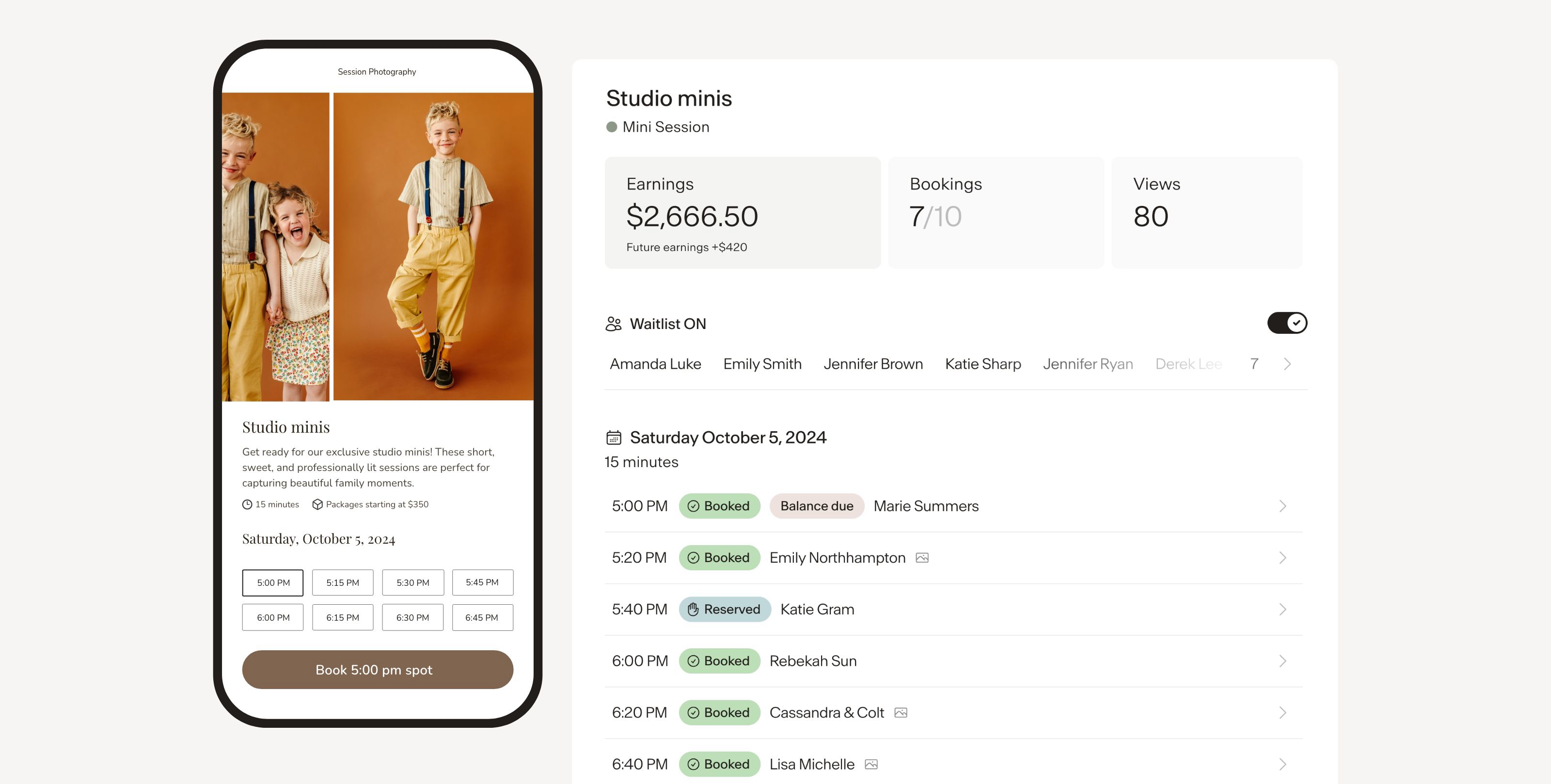
See Session in action
A quick look at the interface, so you know what you are getting before the trial.

What Session does
The areas we lean on most in daily use, and how Session handles each.
Smart booking
Clients see available times and book a session themselves, with no back-and-forth emails.
Mini sessions
Set up and sell out short mini-session slots in bulk, the feature Session is best known for.
Payments at booking
Collect payment or a deposit the moment a client books, so every slot is paid up front.
Contracts & questionnaires
Get the contract signed and the questionnaire completed as part of the booking flow.
Automatic waitlist
A built-in waitlist fills cancellations automatically so no slot goes to waste.
Automated emails
Send booking confirmations, reminders and custom email workflows without lifting a finger.
Built-in galleries
Deliver images through built-in galleries, including a sneak-peek preview before the full set.
Modern interface
A cleaner, more design-forward interface than most competitors, which clients notice.
How Session works day to day
Session is the beautiful, booking-first platform built for one job and built to do it better than anyone: getting photography sessions booked and paid. Where the big CRMs try to run your whole business, Session focuses on the booking flow, and it is the standout tool for mini sessions in particular. Design-forward and genuinely easy, it has grown fast among photographers who care about how their booking looks to clients, and across Session reviews it holds a remarkable near-perfect rating on Capterra.
The core is smart, self-serve booking. A photographer sets up a mini session or a full session, and Session shows clients the available times so they pick a slot and book themselves, with no back-and-forth emailing. At the moment of booking it handles everything: it collects payment or a deposit, gets the contract signed, and captures the questionnaire, so a client is fully booked and paid in one clean flow. For mini sessions, where a photographer might sell out dozens of short slots in a day, that automation is transformational, and a built-in waitlist fills cancellations automatically.
Where Session goes beyond a bare scheduler is the client experience and delivery. Automated emails send booking confirmations, session reminders and custom email workflows without you touching them, and Session even includes built-in galleries with a sneak-peek feature to deliver a preview before the full set. The whole thing is wrapped in an interface that is cleaner and more modern than most competitors, which is exactly why aesthetics-minded photographers choose it.
The honest trade-off is scope. Session is a booking and payments specialist, not a full client-management CRM, so it is lighter on long-term lead pipelines, project management and deep bookkeeping than HoneyBook, Dubsado or 17hats. Many photographers happily use Session for the booking side and pair it with a fuller CRM or a dedicated gallery tool for everything else. If your priority is a complete business system rather than the best booking experience, a full CRM will fit better.
On price, Session pricing starts around 29 dollars a month, with a free trial to test it, and higher tiers add unlimited sessions and bookings plus gallery storage. That makes Session for photographers a focused, fairly priced tool for anyone whose bottleneck is booking, especially mini-session events. If it is not the fit, the closest Session alternatives are HoneyBook and Studio Ninja for a fuller CRM with booking built in, and Pixieset Studio Manager or Bloom for booking plus galleries; the best Session alternatives are compared below, and you can see them all on our best CRM for photographers guide.
Across Session reviews the verdict is clear: for a photographer whose priority is a beautiful, effortless booking experience, above all for mini sessions, Session is the best-in-class pick, with a near-perfect rating and automation that books, signs and charges clients in one flow. Just treat it as a booking specialist rather than a full CRM, and pair it accordingly.
Session pros and cons
Pros
- Best-in-class booking, especially for mini sessions
- Books, signs the contract and charges the client in one self-serve flow
- Automatic waitlist fills cancelled slots without manual work
- Automated confirmation and reminder emails plus custom email workflows
- Built-in galleries with a sneak-peek preview feature
- Beautiful, modern interface and a near-perfect Capterra rating
Cons
- A booking specialist, not a full client-management CRM
- Lighter on long-term lead pipelines, project management and bookkeeping
- Galleries are lighter than a dedicated tool like Pixieset or Pic-Time
- No permanent free plan, only a trial
- Best paired with a fuller CRM for the whole business
Who should use Session, and who should skip it
A great fit if you
- Your bottleneck is booking, especially mini sessions
- You want clients to book, sign and pay themselves in one flow
- You run mini-session events and want an automatic waitlist
- You care about a beautiful client-facing booking experience
- You already have a CRM and want the best booking layer
Look elsewhere if you
- You want a complete client-management CRM (choose HoneyBook or Dubsado)
- You need deep bookkeeping and project management (choose 17hats)
- You need heavy print-sales galleries (add Pixieset or Pic-Time)
- You want a permanent free plan (choose Dubsado)
Is Session right for your studio?
Here is how Session fits each type of studio, and what to check for yours.
Session for Mini sessions
Session is the standout tool for selling out mini-session events with self-serve booking and a waitlist.
Session for Portrait & family
Portrait and family photographers book, sign and charge clients for sessions in one clean flow.
Session for Seasonal & holiday
Holiday and seasonal photographers fill packed booking days with automated slots and reminders.
Session for Newborn & maternity
Newborn and maternity photographers take deposits and questionnaires at the moment of booking.
Session for Any photographer who books
Photographers who want the best client-facing booking experience layer Session onto their business.
Session scorecard
How Session scored across our rubric. Every tool is measured on the same areas.
Session pricing and plans
Real starting prices, dated and re-checked each pass. Session pricing starts around $29/mo, with a free trial to test it, and higher tiers add unlimited sessions and bookings plus gallery storage. Annual billing is cheaper than monthly. For a photographer whose bottleneck is booking, especially mini sessions, it is a focused, fair value.
Session integrations
Tools Session connects with out of the box, so it fits the stack you already run.
 Stripe
 Google Calendar
Apple Calendar
Google Calendar
Apple Calendar
 Zapier
Instagram
Email
Zapier
Instagram
Email
Support, training and deployment
How you can reach the Session team, how they onboard you, and where it runs.
Support
- Email / Help Desk
- Chat
- Knowledge Base
- FAQs / Forum
Training
- Documentation
- Videos
- Webinars
Deployment
- Cloud, SaaS, Web-Based
- Mobile - iPhone / iPad
- Mobile - Android
Typical customers
- Freelancers
- Small businesses
Session alternatives
If Session is not the fit, these are the closest tools we rank, in order.



 Session
How to test Session before you commit
Every tool demos well. These are the checks that actually tell you whether Session fits your studio, while the free trial is still running.
Run a real client workflow end to end
- Use your own templates and one of your busiest appointment or session types
- Test it on the devices your team actually use, not a demo laptop
- Move the result into the system you already use and time every step
- Add a second user and watch how the per-seat price moves
Watch for the catch
- Usage caps, credits or add-on fees that only show up on the invoice
- Features quietly locked to a higher tier than the one you tried
- Onboarding or data import sold as a paid add-on
- How hard it is to export your data if you decide to leave
Session FAQ
How much does Session cost?
Session pricing starts around $29/mo, with a free trial to test it, and higher tiers add unlimited sessions and bookings plus gallery storage. Annual billing is cheaper than monthly. For a photographer whose main need is booking, especially mini sessions, it is a focused, fair value.
What do Session reviews say?
Session reviews are outstanding, with a near-perfect rating on Capterra. Photographers love how easy and beautiful the booking experience is, especially for mini sessions, and that it books, signs and charges clients automatically. The main caveat reviewers note is that it is a booking specialist rather than a full client-management CRM.
Is Session good for mini sessions?
Yes, mini sessions are exactly what Session is best at. You set up short session slots, clients book themselves and pay at booking, and a built-in waitlist fills cancellations automatically, so you can sell out a day of mini sessions with almost no admin. It is the standout tool for mini-session booking.
Is Session a full CRM?
No. Session is a booking and payments specialist, not a full client-management CRM. It handles booking, contracts, questionnaires, payments, automated emails and light galleries brilliantly, but it is lighter on long-term lead pipelines, project management and bookkeeping. Many photographers pair Session for booking with a fuller CRM for the rest.
Does Session include galleries?
Yes, Session includes built-in galleries, with a sneak-peek feature to deliver a preview before the full set. They are convenient for delivery, but lighter than a dedicated gallery tool, so photographers who sell a lot of prints often pair Session with Pixieset or Pic-Time.
Session vs HoneyBook: which should I choose?
They solve different problems. Session is the best booking experience, especially for mini sessions, with clients booking, signing and paying themselves in one beautiful flow. HoneyBook is a full all-in-one CRM covering the whole client lifecycle. Choose Session if booking is your bottleneck, HoneyBook if you want one system for everything, or use Session for booking alongside a CRM.
What are the best Session alternatives?
The closest Session alternatives are HoneyBook and Studio Ninja for a fuller CRM with booking built in, and Pixieset Studio Manager or Bloom for booking plus galleries at a low price. Compare all of them on our best CRM for photographers guide.
Is Session worth it?
For a photographer whose priority is a beautiful, effortless booking experience, especially for mini sessions, Session is easily worth it and best-in-class, with a near-perfect rating. If you want a complete business system with deep client management and bookkeeping, pair it with a fuller CRM or choose an all-in-one like HoneyBook.
Session reviews from real users
Verified reviews from people running Session in the field. Every review is read by our team before it goes live, so this is honest signal, not spam.
No user reviews yet. If you use Session, be the first to tell other studios how it works in the real world.
You need a free account to post a review. Create one in under a minute and you will come right back here to write it.
Why our ranking is worth trusting
“We score every tool against the same 40 points, from the same sources. If it wins, it earned it, and no vendor can change that.”
The Duhari review teamProud of your score? Show it.
Add your independent Duhari rating to your site. It is free, it updates on its own, and it links back to this review.
Get your badge →
Not sure which tool fits?
Start from the full ranking, compare honest scores and real starting prices, and pick the right tool for your studio.