
Studio Ninja Review
Studio Ninja is a photography-native CRM built by a wedding photographer, with a wedding-first workflow, an excellent mobile app and gallery integrations. Unlike cross-industry CRMs, every screen is shaped around running a photography business.
On this page
The verdict
Studio Ninja reviews make it the photographer's CRM, built by a wedding photographer specifically to run a photography business, with a 4.4 out of 5 and a reputation as the most user-friendly option in the category. Its pipeline speaks photography: enquiries tagged wedding, newborn or portrait; jobs with main and extra shoots; quotes, contracts with e-signature, invoicing with payment plans, workflow automation and a genuinely good mobile app. It integrates with Xero, QuickBooks and gallery tools like ShootProof for delivery. The honest catches are post-acquisition support reports and price increases since ImageQuix bought it, and it is simpler and less customizable than Dubsado by design. It is a CRM, not a gallery platform, so it connects to a delivery tool rather than hosting photos itself.
Studio Ninja at a glance
| Vendor | Studio Ninja (by ImageQuix) | Category | Photography CRM & studio management |
|---|---|---|---|
| Best for | wedding & portrait photographers who want an easy, photography-native CRM | Starting price | $24.90 to $36.50/mo |
| Free trial | Yes | Free plan | No |
| User rating | 4.4/5 (68 reviews) | Our score | 8.3/10 |
| Deployment | Cloud, iOS, Android | Founded | 2015 |
| Headquarters | Melbourne, Australia | Users | Photographers |
See Studio Ninja in action
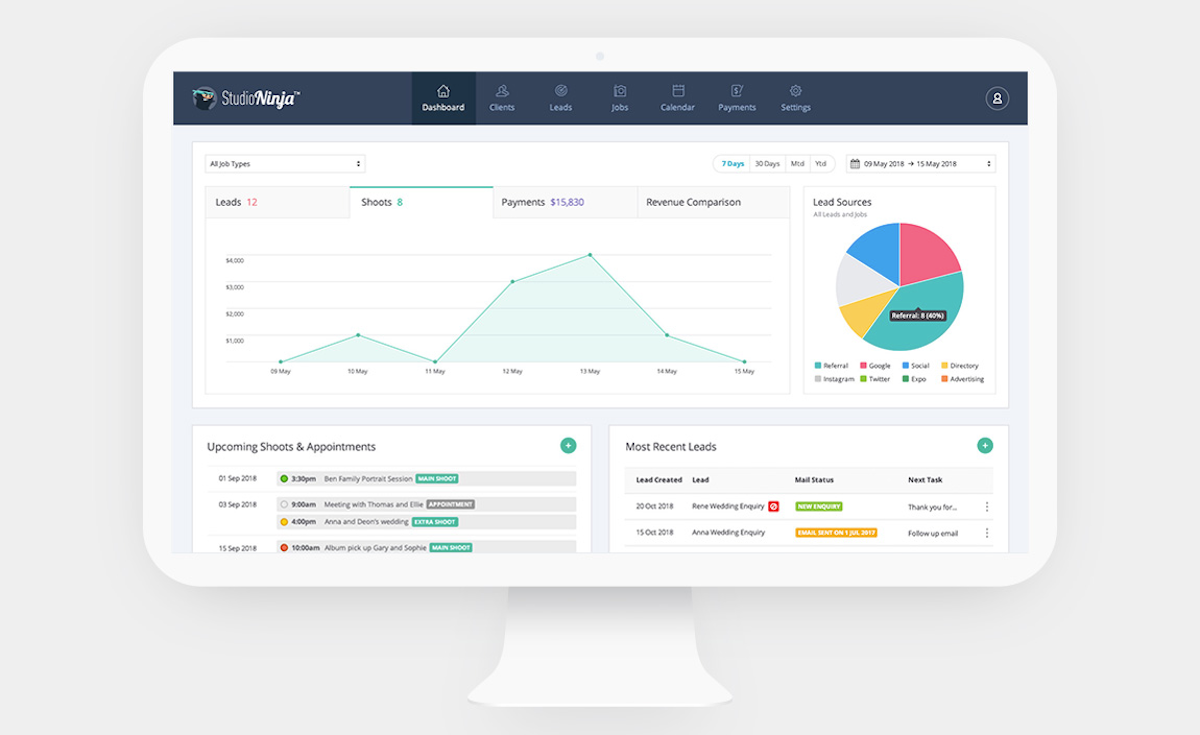
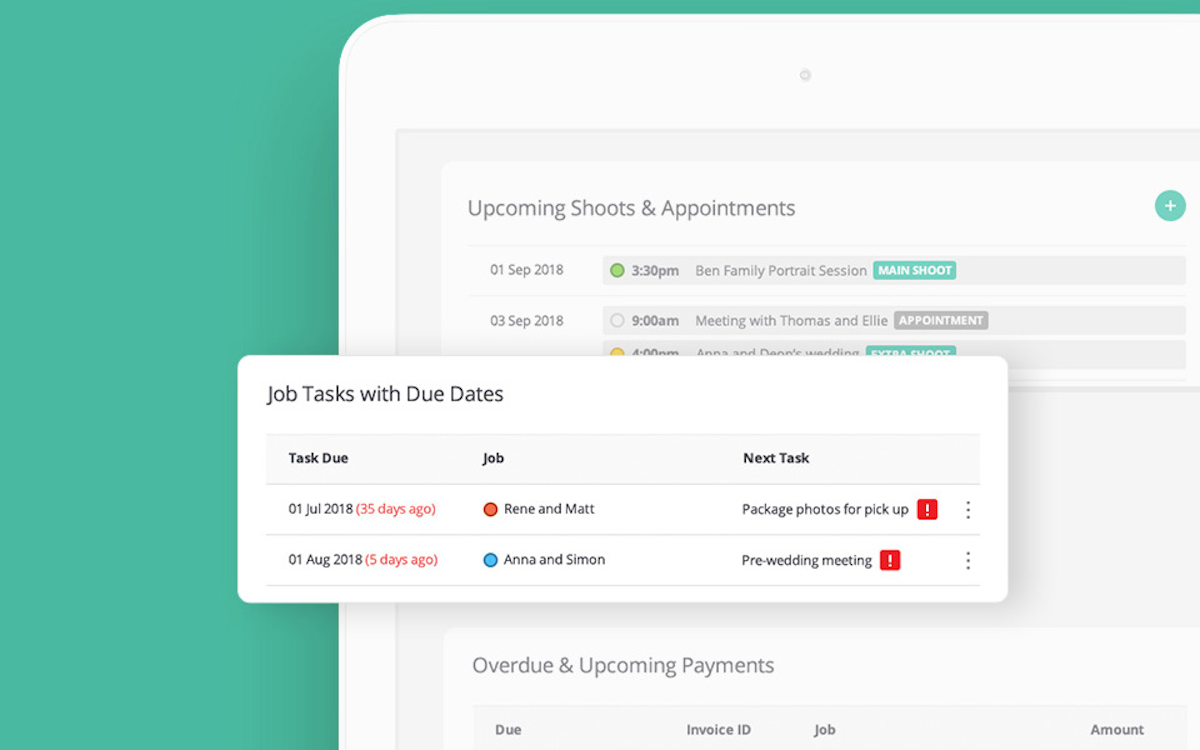
A quick look at the interface, so you know what you are getting before the trial.

What Studio Ninja does
The areas we lean on most in daily use, and how Studio Ninja handles each.
Photography-native pipeline
Leads come in as enquiries tagged wedding, newborn or portrait, and jobs carry main shoots, extra shoots and album pickups.
Quotes & packages
Build customizable quotes and photography packages and send them for the client to accept and book.
Contracts & e-signature
Send contracts with built-in e-signature so clients sign online as part of the booking flow.
Invoicing & payment plans
Online invoicing with payment plans, card payments and automated reminders keeps deposits and balances on track.
Workflow automation
Automated emails and tasks fire at each stage, so follow-ups and reminders happen without the photographer chasing them.
Jobs, tasks & calendar
Job and task tracking with due dates plus a shoot-and-meeting calendar keep every booking organized.
Mobile app
A genuinely good mobile app runs leads, jobs, payments and settings from a phone, ideal for photographers on the go.
Gallery & accounting integrations
Connects to ShootProof and PhotoShelter for photo delivery and to Xero and QuickBooks for accounting.
How Studio Ninja works day to day
Studio Ninja is the photographer's CRM, built by a photographer, and that focus is its whole identity. Where HoneyBook and Dubsado are cross-industry tools that photographers happen to use, Studio Ninja was created in 2015 by Melbourne wedding photographer Chris Garbacz and UX designer Yuan Wang specifically to run a photography business, and it shows in every screen. It bills itself as the world's most user-friendly photography business app, and across Studio Ninja reviews that ease is the recurring praise, alongside a 4.4 out of 5 rating and a wedding-first workflow that photographers recognize instantly.
Because it is photographer-native, the language and the pipeline fit the job. Leads come in as enquiries tagged wedding, newborn or portrait; jobs carry main shoots, extra shoots and album pickups; and the dashboard tracks leads, shoots and payments with a lead-source breakdown so a photographer sees where bookings come from. A photographer moves an enquiry to a quote, contract and booking with automated emails firing along the way, and the whole thing runs from a genuinely good mobile app, which matters for people who work from a camera bag rather than a desk.
The toolkit covers the business end cleanly. Studio Ninja handles quotes and customizable packages, online invoicing with payment plans and automated reminders, contracts with built-in e-signature, workflow automation, job and task tracking with due dates, and a calendar for shoots and meetings. It integrates with Xero and QuickBooks for accounting and, importantly for a photographer, with gallery and delivery tools like ShootProof and PhotoShelter, so the business side and the photo-delivery side connect.
The honest concerns are worth flagging. Studio Ninja was acquired by ImageQuix, and some reviewers describe post-acquisition support as less responsive and note price increases without matching improvements, while a few report account and security frustrations. Client management is capable but less deep than a heavily customizable tool, and being Australian-built, some workflows suit that market first. It is simpler than Dubsado by design, which is a plus for most and a limit for power users.
Unlike a full studio suite, Studio Ninja is a CRM and business-management app, not a gallery platform. It does not host or proof images itself; instead it connects to ShootProof or PhotoShelter for delivery. That keeps it lean and focused on bookings, jobs and payments, which is exactly what most photographers want from a CRM.
Across Studio Ninja reviews the verdict is clear: for a photographer, especially a wedding or portrait shooter, who wants a CRM that speaks their language and is easy to run from a phone, Studio Ninja is one of the best-fitting options, backed by a 4.4 out of 5 and an affordable price. Just weigh the post-acquisition support reports and confirm current pricing, and if you want maximum customization over simplicity, compare it against Dubsado, or against HoneyBook for the most polished all-round clientflow.
Behind the photographer-friendly surface, Studio Ninja is a solid client management and project management system. It covers billing and invoicing, order management, CRM, workflow management and lead management, with automated emails moving each job through its stages, so a photographer runs the whole client management workflow from one place. Reviewers give its CRM and invoicing top marks; the client-management depth is lighter than a heavily customizable tool, which is the main trade-off in most Studio Ninja reviews alongside the post-acquisition support concerns.
On value, Studio Ninja pricing is simple and affordable: Pro around $24.90 a month and Master around $36.50 a month, both with unlimited clients, jobs and invoices, which keeps its value-for-money rating high. If it is not the fit, the closest Studio Ninja alternatives are HoneyBook for a more polished cross-industry clientflow, Dubsado for deeper customization, and Sprout Studio for built-in galleries; we rank the best Studio Ninja alternatives below. As a photography-native tool, Studio Ninja for photographers is one of the easiest CRMs to run from a phone, especially for wedding and portrait shooters.
Studio Ninja pros and cons
Pros
- Photography-native: pipeline, language and jobs built for photographers
- Consistently praised as the most user-friendly CRM in the category
- Excellent mobile app for running the business from a camera bag
- Wedding-first workflow with shoot types, tasks and lead sources
- Contracts with e-signature, invoicing with payment plans and automation
- Integrates with ShootProof, PhotoShelter, Xero and QuickBooks
Cons
- Post-acquisition (ImageQuix) support reports are mixed; some price increases
- A few reviewers report account or security frustrations
- Client management is less deep than heavily customizable tools
- Not a gallery platform: connects to ShootProof or PhotoShelter for delivery
- Australian-built, so some workflows suit that market first
Who should use Studio Ninja, and who should skip it
A great fit if you
- You are a wedding, portrait or family photographer
- You want a CRM that speaks photography, not a generic one
- You run your business largely from your phone
- You want simple and easy over deeply customizable
- You already use ShootProof or PhotoShelter for galleries
Look elsewhere if you
- You want maximum workflow customization (choose Dubsado)
- You want galleries and proofing in the same platform
- You need deep multi-team or agency features
- Post-acquisition support consistency is a dealbreaker for you
Is Studio Ninja right for your studio?
Here is how Studio Ninja fits each type of studio, and what to check for yours.
Studio Ninja for Wedding photography
Studio Ninja is wedding-first: enquiries, shoots, timelines and album pickups are built in; it leads wedding photography software reviews for ease of use.
Studio Ninja for Portrait & family
Portrait and family photographers manage sessions, packages and payment plans with a simple, photography-native pipeline.
Studio Ninja for Newborn photography
Newborn shooters tag enquiries and jobs by type and automate the reminders around time-sensitive session windows.
Studio Ninja for Event photography
Event photographers track multiple shoots, tasks and payments per job from the dashboard and mobile app.
Studio Ninja for Real estate photography
High-volume real estate photographers use quick booking, invoicing and automation to serve recurring agent clients.
Studio Ninja scorecard
How Studio Ninja scored across our rubric. Every tool is measured on the same areas.
Studio Ninja pricing and plans
Real starting prices, dated and re-checked each pass. Studio Ninja keeps pricing simple: Pro at around $24.90/mo and Master at around $36.50/mo, both with unlimited clients, jobs, invoices and workflows, and annual billing cheaper. There is a free trial but no permanent free plan. Some reviewers note price increases since the ImageQuix acquisition, so confirm current rates.
Studio Ninja integrations
Tools Studio Ninja connects with out of the box, so it fits the stack you already run.
 Xero
Xero
 QuickBooks Online
ShootProof
PhotoShelter
QuickBooks Online
ShootProof
PhotoShelter
 Gmail
Gmail
 Stripe
Support, training and deployment
How you can reach the Studio Ninja team, how they onboard you, and where it runs.
Support
- 24/7 Live Rep
- Chat
- Email / Help Desk
- Phone
- Knowledge Base
Training
- Live Online
- Webinars
- Documentation
- Videos
Deployment
- Cloud, SaaS, Web-Based
- Mobile - iPhone / iPad
- Mobile - Android
Typical customers
- Freelancers
- Small businesses
Studio Ninja alternatives
If Studio Ninja is not the fit, these are the closest tools we rank, in order.



 Studio Ninja
How to test Studio Ninja before you commit
Every tool demos well. These are the checks that actually tell you whether Studio Ninja fits your studio, while the free trial is still running.
Run a real client workflow end to end
- Use your own templates and one of your busiest appointment or session types
- Test it on the devices your team actually use, not a demo laptop
- Move the result into the system you already use and time every step
- Add a second user and watch how the per-seat price moves
Watch for the catch
- Usage caps, credits or add-on fees that only show up on the invoice
- Features quietly locked to a higher tier than the one you tried
- Onboarding or data import sold as a paid add-on
- How hard it is to export your data if you decide to leave
Studio Ninja FAQ
How much does Studio Ninja cost?
Studio Ninja keeps pricing simple: Pro at around $24.90/mo and Master at around $36.50/mo, both with unlimited clients, jobs, invoices and workflows, and annual billing is cheaper. There is a free trial but no permanent free plan. Some reviewers note price increases since the ImageQuix acquisition, so confirm current rates before signing up.
What do Studio Ninja reviews say?
Studio Ninja holds a 4.4 out of 5, and the most consistent praise is that it is the most user-friendly CRM in photography, with a great mobile app and a workflow that fits how photographers actually work. The main concerns are mixed post-acquisition support since ImageQuix bought it, some price increases, and a few account or security frustrations.
Is Studio Ninja only for photographers?
Effectively yes, and that is the point. Studio Ninja was built by a wedding photographer specifically for photographers, so its pipeline, language and features are photography-native, from shoot types to album pickups. That focus makes it easier and more relevant for a photographer than a cross-industry CRM like HoneyBook or Dubsado.
Studio Ninja vs HoneyBook: which is better for photographers?
Studio Ninja is photography-native and simpler, with a workflow built specifically for shooters and a strong mobile app, at a lower price. HoneyBook is a cross-industry clientflow CRM with a more polished all-round client experience and more integrations. Choose Studio Ninja if you want a photographer-first tool that is easy to run from your phone, and HoneyBook for the most polished client flow.
Does Studio Ninja have client galleries?
No. Studio Ninja is a CRM and business-management app, not a gallery platform, so it does not host or proof images. Instead it integrates with dedicated gallery tools like ShootProof and PhotoShelter for photo delivery, keeping the CRM focused on bookings, jobs and payments.
Who owns Studio Ninja?
Studio Ninja was founded in 2015 in Melbourne, Australia, by wedding photographer Chris Garbacz and UX designer Yuan Wang, and was later acquired by ImageQuix, a photography technology company. Some reviewers have noted changes in support and pricing since that acquisition.
Does Studio Ninja have a good mobile app?
Yes, its mobile app is one of its biggest strengths and a frequent reason photographers choose it. The app runs leads, jobs, payments and settings from a phone, which suits photographers who work on location rather than at a desk. It is a genuine full-featured app, not an afterthought.
Is Studio Ninja worth it?
For a wedding or portrait photographer who wants an easy, photography-native CRM they can run from a phone, yes, and its affordable price makes it low-risk to trial. Just weigh the mixed post-acquisition support reports and confirm pricing. If you want maximum customization, compare it with Dubsado, or with HoneyBook for the most polished all-round experience.
Studio Ninja reviews from real users
Verified reviews from people running Studio Ninja in the field. Every review is read by our team before it goes live, so this is honest signal, not spam.
No user reviews yet. If you use Studio Ninja, be the first to tell other studios how it works in the real world.
You need a free account to post a review. Create one in under a minute and you will come right back here to write it.
Why our ranking is worth trusting
“We score every tool against the same 40 points, from the same sources. If it wins, it earned it, and no vendor can change that.”
The Duhari review teamProud of your score? Show it.
Add your independent Duhari rating to your site. It is free, it updates on its own, and it links back to this review.
Get your badge →
Not sure which tool fits?
Start from the full ranking, compare honest scores and real starting prices, and pick the right tool for your studio.