
Táve Review
Táve is a deeply capable, photography-native studio management CRM built for established, high-volume studios, with sessions mapped to products, album and print tracking and detailed reporting. It is powerful but has a steep learning curve, and is now becoming VSCO Workspace.
On this page
The verdict
Táve reviews make it the power user's photography studio manager, the tool established studios choose when they outgrow simpler CRMs, with a 4.3 out of 5. Bootstrapped in 2008, it has one of the deepest feature sets in the category: leads with star ratings, jobs tied to sessions and products, album proofing, print orders, detailed reporting and a fully configurable dashboard. The honest catch is ease of use, which scores a low 3.4, the lowest of the major photography CRMs; Táve is powerful but dense and dated, with a real learning curve. The big recent change is that VSCO acquired it in 2025 and is relaunching it as VSCO Workspace, so it is mid-transition. For a high-volume studio wanting maximum control it is superb; for simplicity, look at Studio Ninja or HoneyBook.
Táve at a glance
| Vendor | Táve (VSCO Workspace) | Category | Photography studio management CRM |
|---|---|---|---|
| Best for | established, high-volume photography studios wanting maximum control | Starting price | $24.99 to ~$44.99/mo |
| Free trial | Yes | Free plan | No |
| User rating | 4.3/5 (37 reviews) | Our score | 8/10 |
| Deployment | Cloud, iOS, Android | Founded | 2008 |
| Headquarters | United States | Users | Established photography studios |
See Táve in action
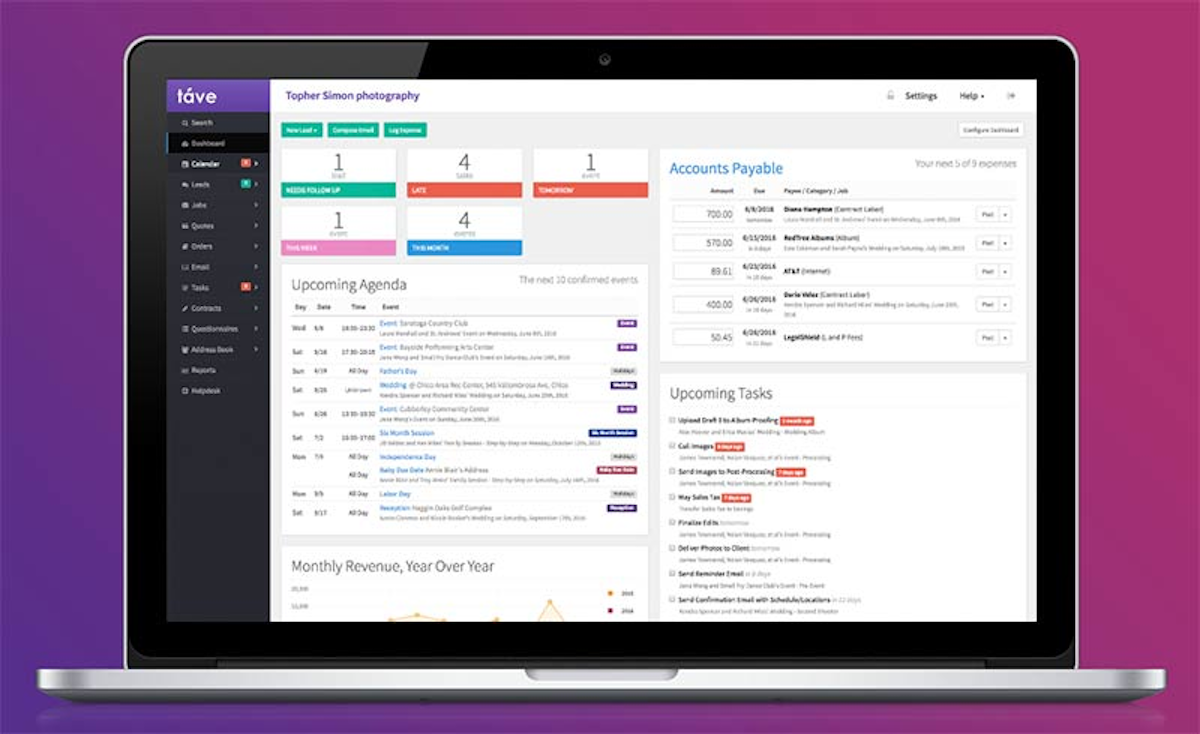
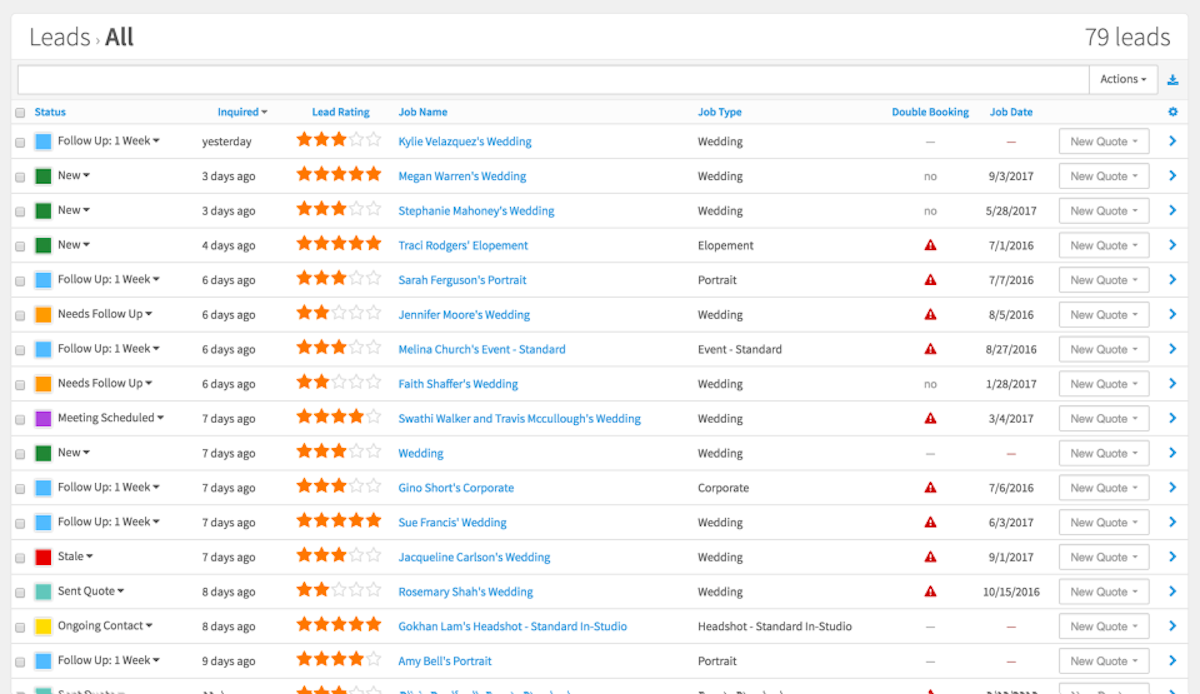
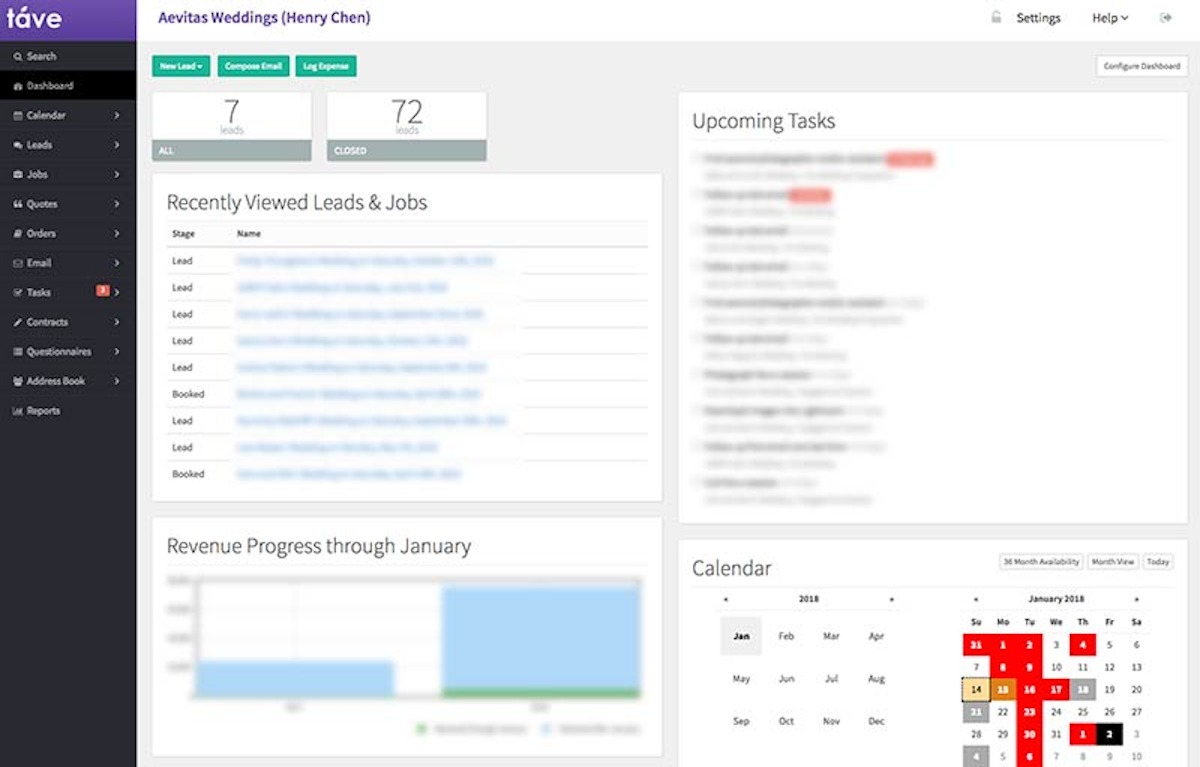
A quick look at the interface, so you know what you are getting before the trial.
What Táve does
The areas we lean on most in daily use, and how Táve handles each.
Sessions mapped to products
Jobs tie shoots to specific products, albums, prints and packages, so a wedding carries everything in one place.
Leads & pipeline
Leads with star ratings, statuses and double-booking detection give a busy studio real control over its funnel.
Configurable dashboard
A fully configurable dashboard surfaces follow-ups, agenda, tasks, accounts payable and revenue at a glance.
Automated workflows
Extensive automated workflows and email templates handle onboarding, reminders and post-production steps.
Contracts & questionnaires
Contracts, questionnaires, forms and a client portal cover the full client journey from lead to delivery.
Invoicing & finances
Invoicing with payment schedules plus expense and accounts-payable tracking give a full financial picture.
Album proofing & orders
Built-in album proofing and print-order tracking connect the sales side to delivery, unusual among CRMs.
Detailed reporting
Deep reports on revenue, leads, conversion and finances support data-driven decisions for larger studios.
How Táve works day to day
Tave is the power user's photography studio manager, the tool established shooters reach for when they have outgrown simpler CRMs. Bootstrapped in 2008 by photographer-developer John Bracamontes, Tave has one of the deepest feature sets in the category, built around how a real photography studio actually runs: leads with star ratings, jobs tied to sessions and products, album proofing, print orders and accounts payable all in one place. Across Tave reviews the platform earns a 4.3 out of 5, with high marks for what it can do and a clear, honest knock on how hard it is to learn.
What Tave does better than almost anyone is depth. Sessions map directly to products, so a wedding job can carry the shoot, the album, the prints and the payment schedule together, and lead ratings, double-booking detection and a fully configurable dashboard give a busy studio serious control. Its automated workflows and email templates are extensive, its reporting is genuinely detailed, and its contracts, questionnaires and client portal cover the full client journey. For a high-volume or multi-photographer studio, that depth is the whole reason to choose it.
The honest weakness is right there in the ratings: ease of use scores a low 3.4, the lowest of the major photography CRMs. Tave is powerful but its interface is dense and dated, and there is a real learning curve before it clicks. It rewards photographers who will invest the setup time and want maximum control, and frustrates those who want something they can run in an afternoon. Value for money and support both rate well, but simplicity is not what you are buying.
The big recent news is ownership. Tave was acquired by VSCO in 2025 and is being relaunched as VSCO Workspace, folding the studio manager into VSCO's creative ecosystem. That promises fresh investment and a modernized experience over time, but it also means the product is in transition, so anyone evaluating Tave today should confirm the current plan, name and roadmap before committing.
Like the other business-side CRMs, Tave centers on running the studio, though it leans more photography-native than HoneyBook, with built-in gallery delivery and product tracking that clientflow tools lack. Even so, most photographers treat it as the operations and sales engine and rely on it for the deep studio management that simpler tools cannot match.
Across Tave reviews the verdict is clear: for an established, high-volume photography studio that wants the deepest control over jobs, products, albums and finances, Tave is one of the most capable platforms available, backed by a 4.3 out of 5 and now VSCO's backing. Just go in expecting a steep learning curve and a product mid-transition to VSCO Workspace. If you want something simpler and more modern out of the box, compare it against Studio Ninja or HoneyBook first.
Under the hood Tave is one of the deepest studio management and client management systems in photography. It combines project management, order management, contract management, invoicing management, lead management and workflow management in one configurable platform, so a busy studio runs the whole client management workflow, from lead to album delivery, in one place. The Tave reviews that praise it most point to this depth and its reporting; the recurring criticism, and its low ease-of-use score, is that all that management power makes the interface dense.
On price, Tave pricing is a flat fee starting around $24.99 a month up to roughly $44.99, with a free trial and no free plan, which most studios find fair for the depth. If it is not the fit, the closest Tave alternatives are Studio Ninja for a simpler photography-native workflow, HoneyBook for polish and Sprout Studio for built-in galleries; the best Tave alternatives are ranked below. Tave for photographers suits established, high-volume studios that want maximum control, and it is now transitioning to VSCO Workspace.
Táve pros and cons
Pros
- One of the deepest feature sets in photography studio management
- Sessions map to products, with album, print and payment tracking
- Lead star ratings, double-booking detection, configurable dashboard
- Extensive automated workflows and email templates
- Genuinely detailed reporting and finances (accounts payable, revenue)
- Now backed by VSCO, promising fresh investment over time
Cons
- Low ease-of-use score (3.4): dense, dated interface with a steep learning curve
- Overkill and frustrating for photographers who want simplicity
- Product is mid-transition to VSCO Workspace; confirm current plan and roadmap
- Smaller review base than HoneyBook
- Not the tool to run in an afternoon
Who should use Táve, and who should skip it
A great fit if you
- You are an established or high-volume photography studio
- You want the deepest control over jobs, products, albums and finances
- You will invest the setup time to configure it fully
- You want product, album and print tracking in your CRM
- You run a multi-photographer or studio operation
Look elsewhere if you
- You want something simple you can run in an afternoon
- You dislike a dense, dated interface and a learning curve
- You are a brand-new or very small solo photographer
- You need certainty over the roadmap during the VSCO transition
Is Táve right for your studio?
Here is how Táve fits each type of studio, and what to check for yours.
Táve for Wedding photography
High-volume wedding studios tie shoots, albums and payment schedules to each job; Táve is a power pick in wedding photography software reviews.
Táve for Portrait studios
Portrait studios that sell prints and packages use session-to-product mapping and album proofing built in.
Táve for Multi-photographer studios
Studios with several shooters use lead ratings, configurable dashboards and detailed reporting to run at scale.
Táve for Event photography
Event photographers manage many jobs, products and financials with deep workflows and double-booking detection.
Táve for School & volume photography
Volume-heavy operations rely on Táve's reporting, order tracking and automation to keep large job counts organized.
Táve scorecard
How Táve scored across our rubric. Every tool is measured on the same areas.
Táve pricing and plans
Real starting prices, dated and re-checked each pass. Táve is a flat monthly price, starting around $24.99/mo and rising to roughly $44.99/mo for larger studios and teams, with annual billing cheaper. There is a free trial but no free version. Because Táve is transitioning to VSCO Workspace under VSCO ownership, confirm the current plan names and pricing before signing up.
Táve integrations
Tools Táve connects with out of the box, so it fits the stack you already run.
 QuickBooks Online
 Stripe
ShootProof
Stripe
ShootProof
 Google Calendar
 Zapier
 PayPal
Support, training and deployment
How you can reach the Táve team, how they onboard you, and where it runs.
Support
- Email / Help Desk
- Chat
- Knowledge Base
- FAQs / Forum
Training
- Live Online
- Webinars
- Documentation
- Videos
Deployment
- Cloud, SaaS, Web-Based
- Mobile - iPhone / iPad
- Mobile - Android
Typical customers
- Freelancers
- Small businesses
Táve alternatives
If Táve is not the fit, these are the closest tools we rank, in order.



 Táve
TáveHow to test Táve before you commit
Every tool demos well. These are the checks that actually tell you whether Táve fits your studio, while the free trial is still running.
Run a real client workflow end to end
- Use your own templates and one of your busiest appointment or session types
- Test it on the devices your team actually use, not a demo laptop
- Move the result into the system you already use and time every step
- Add a second user and watch how the per-seat price moves
Watch for the catch
- Usage caps, credits or add-on fees that only show up on the invoice
- Features quietly locked to a higher tier than the one you tried
- Onboarding or data import sold as a paid add-on
- How hard it is to export your data if you decide to leave
Táve FAQ
How much does Táve cost?
Táve is a flat monthly price, starting around $24.99/mo and rising to roughly $44.99/mo for larger studios and teams, with annual billing cheaper. There is a free trial but no free version. Because Táve is transitioning to VSCO Workspace under VSCO ownership, confirm the current plan names and pricing before signing up.
What do Táve reviews say?
Táve holds a 4.3 out of 5. Reviewers praise its depth, control and reporting, and its value, but the standout theme is difficulty: ease of use scores a low 3.4, the lowest of the major photography CRMs, because the interface is dense and dated with a steep learning curve. It rewards studios that invest the setup time.
Is Táve becoming VSCO Workspace?
Yes. VSCO acquired Táve in 2025 and is relaunching it as VSCO Workspace, folding the studio manager into VSCO's creative ecosystem. That should bring fresh investment and a more modern experience over time, but it also means the product is in transition, so evaluate the current plan, name and roadmap before committing.
Is Táve hard to learn?
Yes, and it is the main trade-off. Táve's power comes from an enormous, configurable feature set, which makes the interface dense and the learning curve steep, reflected in its low 3.4 ease-of-use rating. Photographers who want maximum control accept this; those who want simplicity usually prefer Studio Ninja or HoneyBook.
Who is Táve best for?
Táve is best for established, high-volume or multi-photographer studios that want the deepest possible control over jobs, sessions, products, albums and finances, and are willing to invest time configuring it. It is overkill for a brand-new or very small solo photographer, who will be better served by a simpler CRM.
Táve vs HoneyBook: which should I choose?
HoneyBook is far easier and more polished, ideal for photographers who want a smooth client experience quickly. Táve is much deeper, with product, album and financial tracking a clientflow CRM lacks, but with a steep learning curve. Choose HoneyBook for ease and polish, and Táve if you run a serious studio and want maximum control.
Does Táve handle albums and print orders?
Yes, and it is a differentiator. Táve ties sessions to products, tracks album proofing and print orders, and connects the sales side to delivery, which most business-side CRMs do not do. For studios that sell albums, prints and packages, that built-in product tracking is a major reason to choose it.
Is Táve worth it?
For an established, high-volume studio that wants the deepest control and detailed reporting, yes, and its value rating is solid. Just expect a steep learning curve and a product mid-transition to VSCO Workspace. If you want something simpler and more modern out of the box, compare it against Studio Ninja or HoneyBook first.
Táve reviews from real users
Verified reviews from people running Táve in the field. Every review is read by our team before it goes live, so this is honest signal, not spam.
No user reviews yet. If you use Táve, be the first to tell other studios how it works in the real world.
You need a free account to post a review. Create one in under a minute and you will come right back here to write it.
Why our ranking is worth trusting
“We score every tool against the same 40 points, from the same sources. If it wins, it earned it, and no vendor can change that.”
The Duhari review teamProud of your score? Show it.
Add your independent Duhari rating to your site. It is free, it updates on its own, and it links back to this review.
Get your badge →
Not sure which tool fits?
Start from the full ranking, compare honest scores and real starting prices, and pick the right tool for your studio.