
Bloom Review
Bloom (formerly PICR) is a modern, low-cost all-in-one photography CRM covering lead capture, scheduling, contracts, invoicing and automation, plus a portfolio website and light client galleries, with a strong iOS app.
On this page
The verdict
Bloom reviews make it the standout value all-in-one for photographers: formerly PICR, now Bloom.io, it covers lead capture, online scheduling, contracts with e-signature, invoicing and workflow automation, and folds in a portfolio website builder and light client galleries that most booking CRMs charge separately for. A strong iOS app runs it all from a phone, and it holds 4.3 out of 5 on Capterra. The catches are a newer, lighter feel than HoneyBook or Studio Ninja, occasional Google Calendar sync quirks, and galleries lighter than a dedicated tool. Pricing is the headline: a Starter plan near $7/mo annually and a Standard near $17/mo, undercutting the big names. For a complete workflow at the lowest price, Bloom is hard to beat.
Bloom at a glance
| Vendor | Bloom.io | Category | Photography business management (CRM) |
|---|---|---|---|
| Best for | photographers who want a complete workflow at the lowest price | Starting price | ~$7 to $17/mo |
| Free trial | Yes | Free plan | No |
| User rating | 4.3/5 (40 reviews) | Our score | 8/10 |
| Deployment | Cloud, iOS, Android | Founded | 2019 |
| Headquarters | United States | Users | Thousands of photographers |
See Bloom in action
A quick look at the interface, so you know what you are getting before the trial.
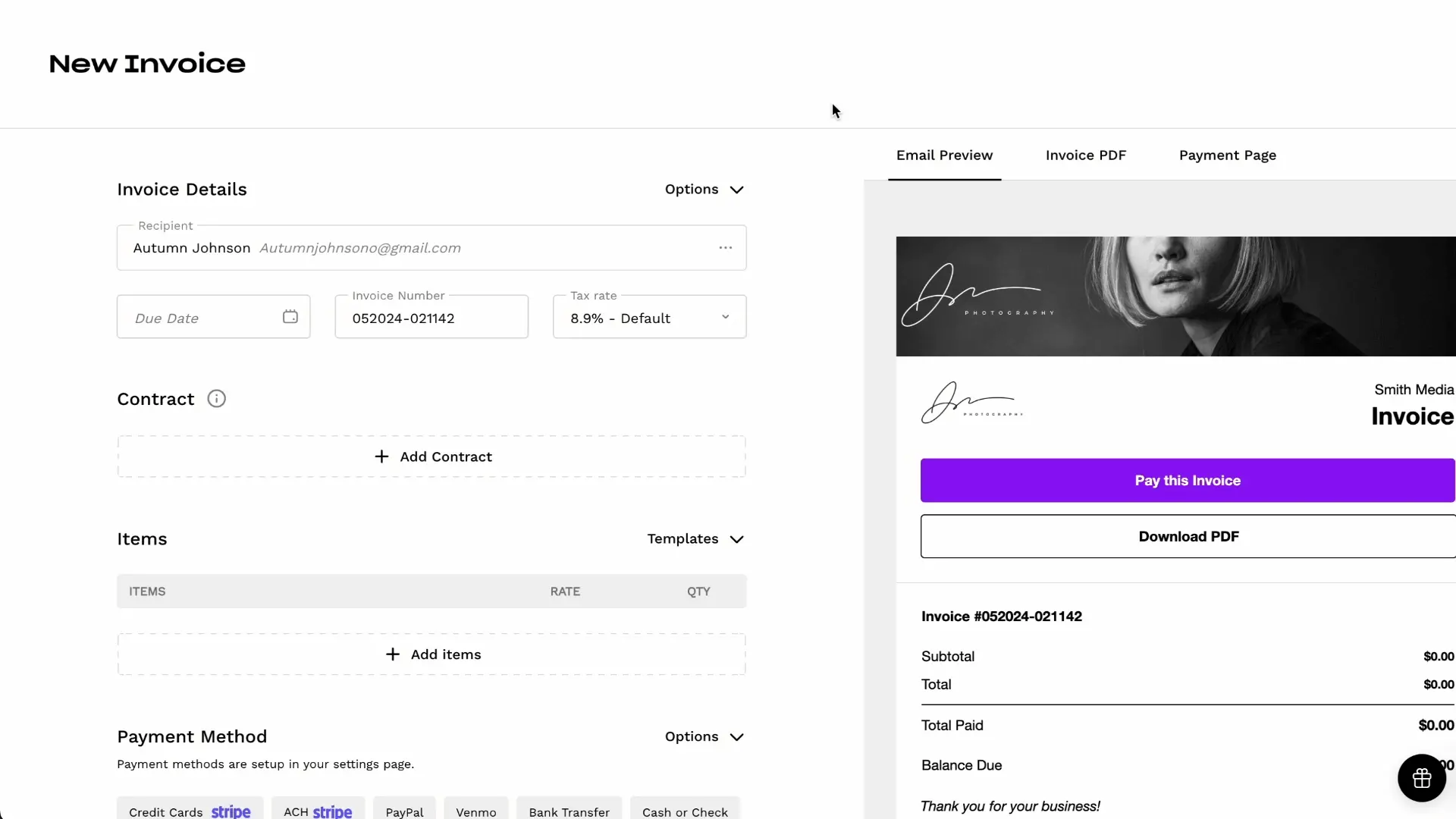
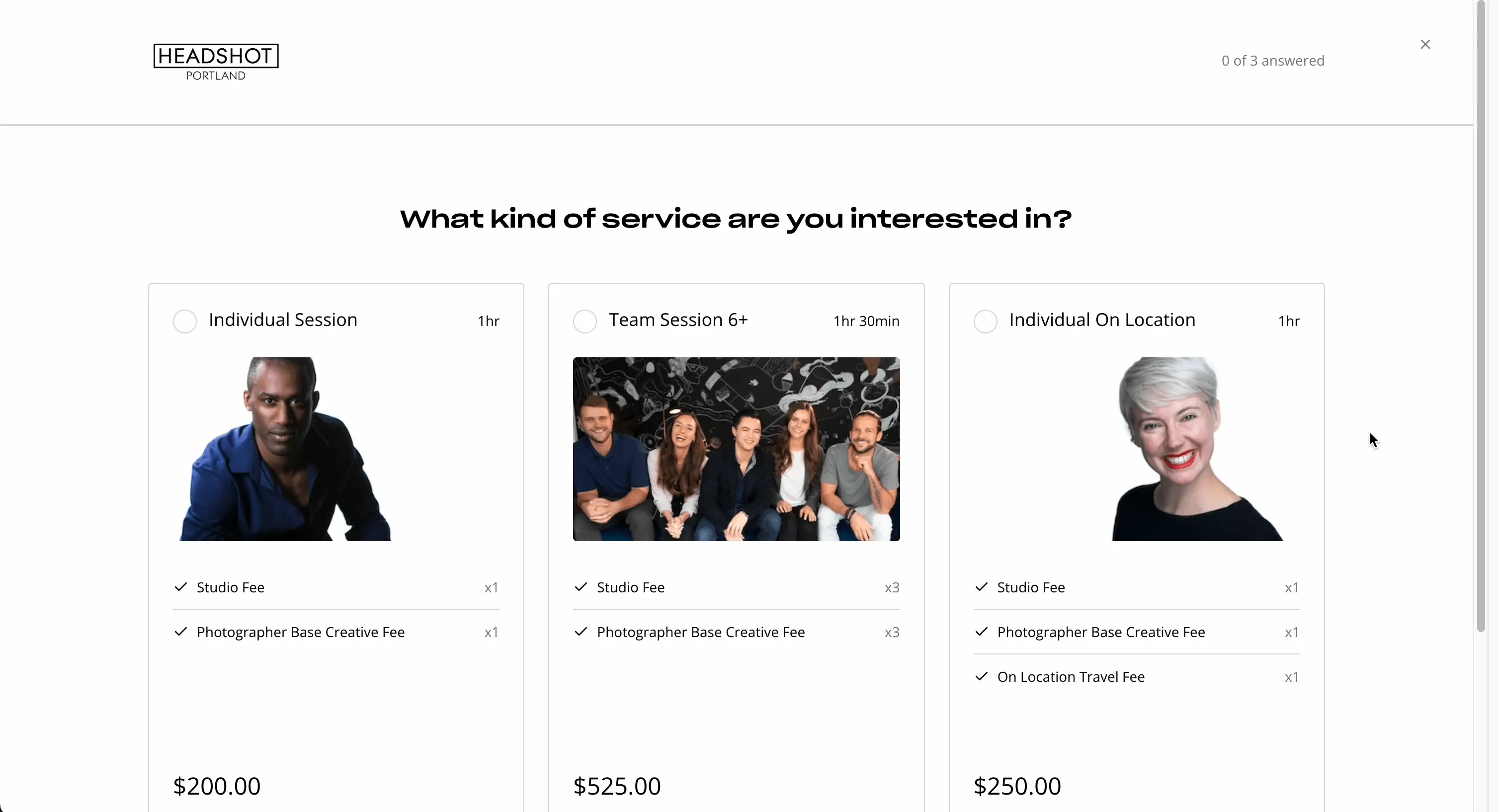
What Bloom does
The areas we lean on most in daily use, and how Bloom handles each.
Lead capture & scheduling
Embeddable contact forms capture leads and online scheduling books sessions straight from your site.
Contracts & e-signature
Send branded contracts for online e-signature as part of the booking flow.
Invoicing & payments
Invoice clients and collect card payments online, with a small fee on the cheapest plan removed on Standard.
Workflow automation
Automate follow-ups, reminders and the steps between inquiry and delivery.
Website builder
Build a portfolio website in the same platform, so your site and your CRM live together.
Client galleries
Deliver light client galleries for viewing and download without a separate gallery subscription.
Client portal
A branded client portal keeps every client, their documents, contracts and payments in one place.
iOS app
A well-regarded mobile app runs bookings, invoicing and client management from a phone.
How Bloom works day to day
Bloom is the modern, budget-friendly all-in-one for photographers who want the whole client workflow, and even a website, without the price of the big incumbents. Formerly known as PICR and now Bloom.io, it has spent years building a genuinely complete platform for session-based service businesses, and photographers are its core audience. Across Bloom reviews the recurring theme is value: it does almost everything HoneyBook does, plus a portfolio website and light galleries, for a fraction of the cost. It holds a 4.3 out of 5 on Capterra.
The workflow is exactly what a session photographer needs. Bloom captures a lead through an embeddable contact form, books the session with online scheduling, sends a branded contract for e-signature, invoices and collects payment, and runs the follow-ups through workflow automation, so a shoot moves from inquiry to paid without leaving the app. A client portal keeps every client, their documents and their payments in one place, and the whole thing works from a well-regarded iOS app, which matters for photographers who run their business from a phone.
Where Bloom stands out against other photography CRMs is breadth for the money. On top of client management, scheduling, contracts and invoicing, Bloom includes a portfolio website builder and light client galleries, so a photographer just starting out can run bookings, a website and basic delivery from a single low subscription. That is a genuine differentiator: most booking CRMs make you pay separately for a site and a gallery tool, while Bloom folds simple versions of both into the plan.
The honest trade-offs are maturity and depth. Bloom is newer and smaller than HoneyBook, Dubsado or Studio Ninja, so a few areas feel less polished, and reviewers occasionally flag calendar sync quirks where Google Calendar events do not always import cleanly. The built-in galleries are lighter than a dedicated tool like Pixieset or Pic-Time, so a photographer who sells a lot of prints will still want a specialist gallery. It is best understood as the value all-rounder, not the deepest tool in any single area.
On price, Bloom pricing is its headline: a Starter plan around 7 dollars a month billed annually, which carries a small payment-processing fee, and a Standard plan around 17 dollars a month that removes the fee, with a free trial to test it. That makes Bloom for photographers one of the most affordable ways to run a complete client workflow, and the reason it wins on value. If it is not the fit, the closest Bloom alternatives are HoneyBook for a more polished all-in-one, Studio Ninja for a photography-native workflow, and Dubsado for deeper customization; the best Bloom alternatives are compared below.
Across Bloom reviews the verdict is clear: for a photographer who wants client management, scheduling, contracts, invoicing, a website and light galleries in one low-cost platform, Bloom is the standout value pick, with a 4.3 out of 5 and pricing that undercuts the big names. Just weigh its newer, lighter feel against the incumbents, and pair it with a dedicated gallery tool if print sales are central to your business.
Bloom pros and cons
Pros
- Exceptional value: complete client workflow from around $7/mo
- Includes a portfolio website builder and light galleries, unlike most CRMs
- Full session workflow: lead capture, scheduling, contracts, invoicing, automation
- Well-regarded iOS app for running the business from a phone
- Client portal keeps clients, documents and payments in one place
- Integrates Google/Apple Calendar, Zoom, Gmail and Zapier (QuickBooks, Xero)
Cons
- Newer and smaller than HoneyBook, Dubsado or Studio Ninja
- Occasional Google Calendar sync quirks reported
- Built-in galleries are lighter than Pixieset or Pic-Time
- Less depth in any single area than the specialists
- No permanent free plan, only a trial
Who should use Bloom, and who should skip it
A great fit if you
- You want a complete client workflow at the lowest price
- You want a website and galleries bundled with your CRM
- You are starting out and want one low subscription
- You run your business from a phone and value a good app
- You want scheduling, contracts and invoicing in one place
Look elsewhere if you
- You want the most polished, mature platform (choose HoneyBook)
- You want the deepest customization (choose Dubsado)
- You sell a lot of prints and need dedicated galleries (add Pixieset or Pic-Time)
- You need rock-solid calendar sync above all
Is Bloom right for your studio?
Here is how Bloom fits each type of studio, and what to check for yours.
Bloom for Portrait & family
Portrait and family photographers run bookings, contracts and invoicing plus a website from one low-cost plan.
Bloom for Wedding photography
Wedding photographers manage the booking timeline with contracts, payment plans and automation affordably.
Bloom for Session & mini-sessions
Session photographers capture leads and book mini-sessions with embeddable scheduling.
Bloom for New & part-time photographers
Photographers starting out get a complete workflow, website and galleries without a big subscription.
Bloom for Mobile-first photographers
Photographers who run their business from a phone rely on Bloom well-regarded iOS app.
Bloom scorecard
How Bloom scored across our rubric. Every tool is measured on the same areas.
Bloom pricing and plans
Real starting prices, dated and re-checked each pass. Bloom pricing is its headline: a Starter plan around $7/mo billed annually, which carries a small payment-processing fee, and a Standard plan around $17/mo that removes the fee. A free trial lets you test it first, and annual billing is cheaper than monthly. That undercuts most all-in-one photography CRMs on price.
Bloom integrations
Tools Bloom connects with out of the box, so it fits the stack you already run.
 Google Calendar
Apple Calendar
Zoom
Google Calendar
Apple Calendar
Zoom
 Gmail
Gmail
 Zapier
 QuickBooks
 Xero
Xero
 Stripe
Support, training and deployment
How you can reach the Bloom team, how they onboard you, and where it runs.
Support
- Email / Help Desk
- Chat
- Knowledge Base
- FAQs / Forum
Training
- Documentation
- Videos
- Webinars
Deployment
- Cloud, SaaS, Web-Based
- Mobile - iPhone / iPad
- Mobile - Android
Typical customers
- Freelancers
- Small businesses
Bloom alternatives
If Bloom is not the fit, these are the closest tools we rank, in order.


 Bloom
BloomHow to test Bloom before you commit
Every tool demos well. These are the checks that actually tell you whether Bloom fits your studio, while the free trial is still running.
Run a real client workflow end to end
- Use your own templates and one of your busiest appointment or session types
- Test it on the devices your team actually use, not a demo laptop
- Move the result into the system you already use and time every step
- Add a second user and watch how the per-seat price moves
Watch for the catch
- Usage caps, credits or add-on fees that only show up on the invoice
- Features quietly locked to a higher tier than the one you tried
- Onboarding or data import sold as a paid add-on
- How hard it is to export your data if you decide to leave
Bloom FAQ
How much does Bloom cost?
Bloom pricing is its headline: a Starter plan around $7/mo billed annually, which carries a small payment-processing fee, and a Standard plan around $17/mo that removes the fee. A free trial lets you test it first, and annual billing is cheaper than monthly. That undercuts most all-in-one photography CRMs.
What do Bloom reviews say?
Bloom reviews center on value, with a 4.3 out of 5 on Capterra. Photographers love that it covers the whole workflow, plus a website and light galleries, for a low price, and praise the iOS app. The most common criticisms are that it is newer and less polished than HoneyBook, occasional Google Calendar sync quirks, and galleries lighter than a dedicated tool.
Is Bloom the same as PICR?
Yes. Bloom is the evolution of PICR, rebranded and expanded into Bloom.io. It kept the session-photography focus and grew into a complete client-management platform with scheduling, contracts, invoicing, a website builder and galleries.
Bloom vs HoneyBook: which should I choose?
Both are all-in-one client-management platforms. Bloom is the value pick, covering the full workflow plus a website and light galleries from around $7/mo, and it suits photographers starting out or watching costs. HoneyBook is more polished and mature, with a smoother client experience, at a higher price. Choose Bloom for value and bundled website/galleries, HoneyBook for polish.
Does Bloom include a website and galleries?
Yes, and that is a key differentiator. Alongside client management, scheduling, contracts and invoicing, Bloom includes a portfolio website builder and light client galleries, so a photographer can run bookings, a site and basic delivery from one low subscription. For heavy print sales, pair it with a dedicated gallery tool like Pixieset or Pic-Time.
What are the best Bloom alternatives?
The closest Bloom alternatives are HoneyBook for a more polished all-in-one, Studio Ninja for a photography-native workflow, and Dubsado for deeper customization and a free tier. Compare all of them on our best CRM for photographers guide.
Does Bloom have an app?
Yes. Bloom has a well-regarded iOS app, so photographers can manage leads, scheduling, contracts, invoicing and client communication from a phone. Mobile-first operation is one of the reasons photographers pick Bloom.
Is Bloom worth it?
For a photographer who wants a complete client workflow plus a website and light galleries at the lowest price, Bloom is excellent value and easy to recommend, especially early in a business. If you want the most polished, mature platform or the deepest customization, HoneyBook or Dubsado may suit you better, and heavy print sellers should add a dedicated gallery tool.
Bloom reviews from real users
Verified reviews from people running Bloom in the field. Every review is read by our team before it goes live, so this is honest signal, not spam.
No user reviews yet. If you use Bloom, be the first to tell other studios how it works in the real world.
You need a free account to post a review. Create one in under a minute and you will come right back here to write it.
Why our ranking is worth trusting
“We score every tool against the same 40 points, from the same sources. If it wins, it earned it, and no vendor can change that.”
The Duhari review teamProud of your score? Show it.
Add your independent Duhari rating to your site. It is free, it updates on its own, and it links back to this review.
Get your badge →
Not sure which tool fits?
Start from the full ranking, compare honest scores and real starting prices, and pick the right tool for your studio.